AI & Technology

What the Odoo ESG App Does: Carbon Footprint, Scope 1, 2 and 3, Emission Factors and Workforce Data in Odoo 19.4 and 20

The Odoo ESG app calculates a carbon footprint from accounting entries, employee commuting and manual inputs, splits it into Scope 1, 2 and 3 under the GHG Protocol, shows sex parity and the pay gap, and tracks reduction initiatives. This guide walks through the features in the Odoo 19.4 and 20 documentation, compares them with 19.0, and points out what Thai companies still have to design themselves.

12 Oct 20269 minOdoo S.A.
OdooOdoo ESGCarbon FootprintScope 1 2 3ESG SoftwareESG

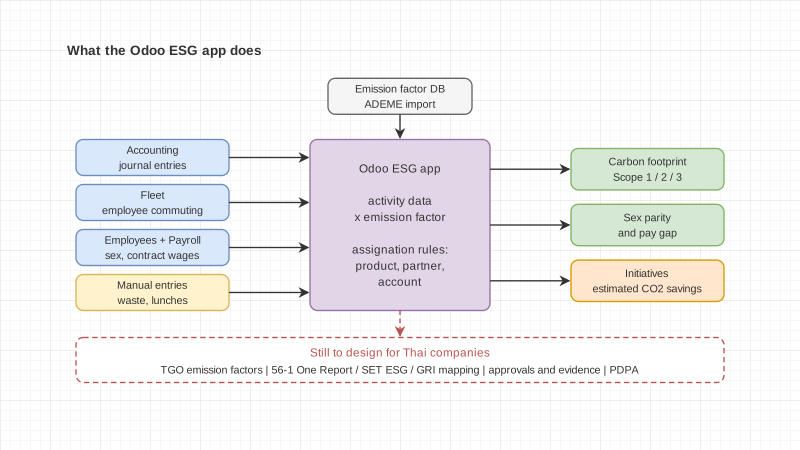
The Odoo ESG app is an Enterprise app that pulls data from Accounting, Fleet, Employees and Payroll to calculate a company's carbon footprint. It splits emissions into Scope 1, 2 and 3 by multiplying activity data by emission factors, shows sex parity and the pay gap, and tracks reduction initiatives. The Odoo 19.0, 19.4 and 20 documentation describes the same feature set.

This guide is for executives, sustainability teams and accountants deciding whether to use the app for ESG data. We read the official Odoo ESG documentation for saas-19.4, 20.0 and 19.0 and compared them line by line, then checked Odoo's app page, its edition comparison, and the emission factor page of Thailand's Greenhouse Gas Management Organization (TGO), all on 12 October 2026.

If you want the bigger picture of how Thai listed companies should organise ESG data first, read ESG with Odoo data for Thai listed companies. This article goes deeper into the app itself.

How does the Odoo ESG app calculate a carbon footprint?

The app calculates emissions in kgCO₂e by multiplying activity data by the emission factor assigned to it. The Odoo docs say the figures update in real time, so a team can see the effect of reduction actions right away instead of waiting for year end.

Activity data comes from three places.

  • Accounting. Odoo collects data from journal entries posted to expense and asset accounts. The docs list four account types: Fixed assets, Expenses, Other expenses and Cost of revenue, and say only these are used, in line with the Bilan Carbone methodology.
  • Fleet. Odoo calculates commuting emissions from data in the Fleet and Employees apps.
  • Manual inputs. For activities the system does not track automatically. The docs give employee lunches and waste as examples.

Employee commuting

The calculation uses the number of days, the home-to-work distance for the round trip, the share of the week spent in the office, and the CO₂ emissions of the vehicle model. Three settings need to be filled in.

  1. Average office days per week, under ESG > Configuration > Settings in the Weekly Office Attendance field
  2. Emissions for each vehicle model, under Fleet > Configuration > Models in the CO₂ Emissions field
  3. Each employee's home-to-work distance, in the Employees app in the Home-Work Distance field

The start date and end date of an employee's vehicle are also used. The pivot table is under ESG > Collect > Employee Commuting, where Add Emissions and an emissions period move the figures into total emitted emissions.

Manual entries

Go to ESG > Collect > Emitted Emissions, click New, name the activity, pick a date, select an emission factor and enter a quantity. Once saved, the entry is included in the carbon footprint report.

How are Scope 1, 2 and 3 handled?

Every emission factor in the app is assigned to a scope under the GHG Protocol, so the results split by scope according to the factor matched to each entry.

  • Scope 1, direct emissions, such as fuel burned on site or in company vehicles
  • Scope 2, indirect emissions from purchased energy, such as electricity or heat
  • Scope 3, all other indirect emissions across the value chain, such as purchased goods, travel and waste

Scopes can be nested. The docs give the example of Scope 3 broken down into Purchased Goods and then Electronics. If you have to report Scope 3 subcategories, this is where you set up that structure.

Where do emission factors come from, and how are they matched?

Emission factors can be imported from an external database and are matched to accounting entries by rules you set on product, partner or account.

The factor database

The docs tell you to import from a certified emission factors database under ESG > Configuration > Source Databases, by clicking Download on the ADEME database. Each emission factor carries:

  • The scope it belongs to
  • Uncertainty, the possible margin of error, which helps you judge how much confidence to place in reported figures
  • A compute method, either physical quantities such as kg, litres or units, or monetary amounts spent
  • Gas lines. The app includes the six main Kyoto Protocol gases, CO₂, CH₄, N₂O, HFCs, PFCs and SF₆, each with a predefined Global Warming Potential to convert it to CO₂ equivalent. More gases can be added under ESG > Configuration > Gases

Assignation rules

Assignation rules let the system pick the emission factor for an accounting entry on its own. You set them under ESG > Configuration > Emission Factors by opening a factor and adding lines in the Assignations tab with a product, partner, account or a combination. Every attribute on a line has to match for the rule to apply.

When several rules match, Odoo picks the most specific one: product first, then partner, then account. If that is still a tie, the rule with more attributes wins. The docs give the example of a factor tied to one computer model; when a vendor bill arrives for 150 units, the system multiplies the factor by 150 automatically.

Watch the units. The docs warn that the unit of measure next to the product's cost must match the emission factor's unit. If the field is hidden, enable Units of Measure & Packagings under Accounting > Configuration > Settings. Journal entries still missing a factor show up under Emissions to define on the Collect Emissions card of the dashboard.

Rules can also be applied to past data. Click Assign on a factor, choose an Application Period, and decide whether to replace existing assignations. For several factors at once, select them in list view and use Actions, then Assign Emission Factors.

What social metrics does the app cover?

The app shows sex parity and the pay gap from employee data. These are the only social metrics the docs describe.

Sex parity can be compared across technical and administrative roles, permanent and temporary contracts, office locations, or management and non-management positions. You first need to set each employee's gender in the Private Information tab of the Employees app.

The pay gap uses the wages on Payroll contracts for people in the same jobs. It takes the average male salary minus the average female salary, divides by the average male salary, and shows the result as a percentage. The measures are under ESG > Measure > Sex Parity / Pay Gap and can be grouped by leadership level, department, job position, contract type or country.

The docs say this data supports CSRD reporting under ESRS S1, which is a European Union framework. A Thai company reporting in the 56-1 One Report has to check for itself how well these metrics match what it must disclose.

Can it track reduction initiatives?

Yes, under ESG > Act > Initiatives, which uses all the features of the Project app. You can estimate CO₂ savings per task, track progress and assign people with deadlines.

The docs are clear that estimated reductions do not lower the carbon footprint right away. The real effect shows only once the reduction appears in operations, so plans do not replace measured figures.

Do the 19.0, 19.4 and 20 docs differ?

No. We converted the ESG page of all three versions to plain text and compared them. The content is identical line for line.

Topic 19.0 saas-19.4 20.0
Accounting, Fleet and manual data sources Yes Yes Yes
Hierarchical Scope 1, 2, 3 Yes Yes Yes
ADEME database, six gases, uncertainty Yes Yes Yes
Assignation rules and retroactive assignment Yes Yes Yes
Sex parity and pay gap Yes Yes Yes
Initiatives Yes Yes Yes

One more thing worth knowing. The ESG page on Odoo's website mentions features that are not in any of these three documentation versions, such as AI-assisted emission assignment, more than 15,000 emission factors, the IPCC database, double materiality assessment, stakeholder surveys, and CSRD and VSME reports. If any of these matter to your decision, ask for a demo on the version you will actually run.

What do Thai companies still need to add?

The app gives you a workable calculation engine, but the parts tied to the Thai context still need design work. Here is what we see from the documentation.

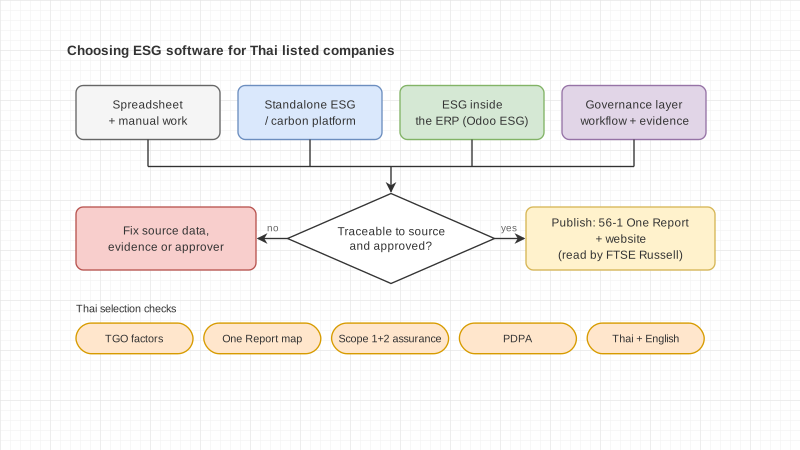
  • Thai emission factors. The docs only mention importing ADEME. TGO, Thailand Greenhouse Gas Management Organization (Public Organization), publishes Emission Factor (CFO) values for corporate carbon footprints on its own site, with a January 2026 (มกราคม 2569) edition covering fuels and grid mix electricity. You need to decide which factor set to use, how it gets into the app, and who maintains it when TGO releases a new set.
  • Mapping to Thai reporting. The app does not map metrics to the 56-1 One Report, FTSE Russell ESG Scores or GRI. You need your own mapping of which figure goes under which disclosure. From 2026, SET uses FTSE Russell ESG Scores, built from public disclosures, in place of the questionnaire-based SET ESG Ratings (how to prepare the data). See seven building blocks of sustainability data for one way to lay this out.
  • Governance. The app docs have no governance section. Policies, board oversight and risk management evidence still come from elsewhere.
  • PDPA. Employee gender and wages are personal data. Report them in aggregate, limit who can see individual records, and record the legal basis for processing.
  • Evidence and approvals. The docs do not describe review, approval or period close for ESG data. If a verifier needs to trace figures back to source documents, that process has to be designed. Our approach is in making ESG a monthly process with PrivacyHub.

If the difference between ESG and sustainability is still unclear, start with sustainability vs ESG.

Who is the app a good fit for?

It fits companies that already keep their accounting and employee records in Odoo and want to start measuring carbon from data already in the system.

A good fit if you

  • Run Odoo Enterprise and record expenses and assets every month
  • Want an overall carbon footprint before investing in a larger system
  • Have company cars, or employees who commute in vehicles recorded in Fleet
  • Want reduction initiatives tracked alongside other projects

Wait or plan more if you

  • Run Odoo Community, which does not include the ESG app
  • Must hand figures to a verifier and need an approval trail
  • Keep most energy or waste data outside Odoo, for example in metering systems or plant spreadsheets
  • Need TGO factors throughout and nobody owns that factor set yet

How to start

Start with a single indicator and follow it end to end before expanding. This matches the pilot approach described on our ESG page.

  1. Pick one indicator you actually have to report, such as electricity emissions across all sites
  2. Agree on scope, units, calculation method, data owner, reviewer and approver
  3. Check whether the source data is already in Odoo accounting; if it lives elsewhere, decide whether to connect it or enter it manually
  4. Choose the factor set, ADEME or TGO, and set assignation rules with matching units
  5. Close one period, then have a reviewer trace the figure back to its source documents
  6. List what the app does not cover, then decide what to add

Frequently asked questions

Is the Odoo ESG app available in Odoo Community?

No. Odoo's edition comparison lists ESG under Enterprise only. The pricing page says the Standard and Custom plans include all apps, and there is a One App Free plan for one app with unlimited users.

Does it cover all of Scope 1, 2 and 3?

The app splits emissions into all three scopes based on the scope assigned to each emission factor. How complete the result is depends on how much of your activity data is in Odoo or entered manually.

Can I use TGO emission factors?

The Odoo docs do not mention TGO factors, only importing ADEME. If you need Thai factors, plan how to bring them into the app and who keeps them current.

Does the app produce the 56-1 One Report?

No. The docs do not mention the 56-1 One Report or SET's ESG assessment. You map metrics to report sections yourself.

We run Odoo 19.0. Do we need to upgrade to use the ESG app?

According to the docs, no. The ESG pages for 19.0, saas-19.4 and 20.0 read the same. For features the app page adds, such as AI factor matching or CSRD reports, ask for a demo on your version.

What Enersys does

Enersys is a Bangkok software company that has built business software since 2012 and is an Official Odoo Silver Partner. This is our second year working with Odoo. We won the Odoo Awards 2026 Best Starter APAC and are among the Top 3 Odoo partners in Thailand on the Odoo Partner Leaderboard for Q2 2026.

For ESG, we build a custom ESG module on Odoo for Thai listed companies, scoped to each company's indicators, source systems, approvals and report format. We run monthly ESG data cycles on PrivacyHub's governance base, meaning role-based access, workflow status, evidence and audit history, and build ESG-specific functions on top for each project. KPI dashboards map indicators to the 56-1 One Report, FTSE Russell ESG Scores or GRI, and Genesis AI helps draft the report with a person reviewing every step.

See our ESG page and our Odoo ERP page. If you want to take one of your indicators and check together how far the standard app goes, contact the Enersys team.

Sources

"Empowering Innovation,
Transforming Futures."

Contact us to make your project a reality.