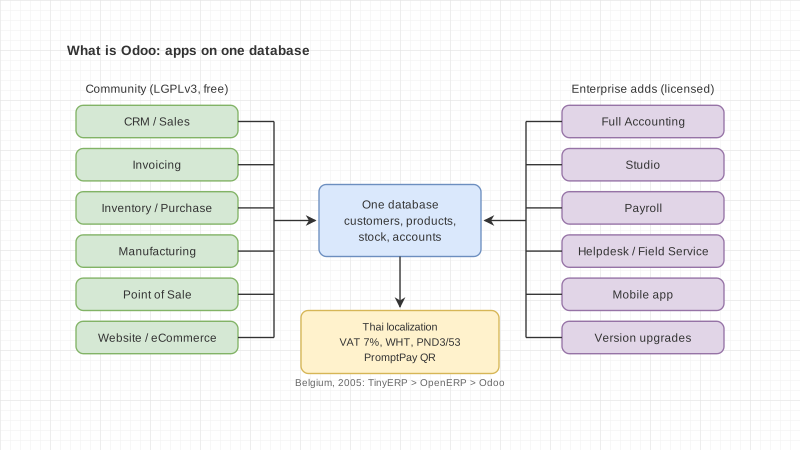
Odoo is an open-source suite of business software from Belgium. It puts apps for accounting, sales, purchasing, inventory, manufacturing, HR, websites and marketing on a single database. You can start with one app and add others as the business grows. Odoo comes in two editions: Community, free under the LGPLv3 licence, and Enterprise, which you pay for per user.
We are an Odoo Silver Partner in Bangkok, so we should say up front that this guide is written by people who sell Odoo services. We have tried to cite only facts we could check on Odoo's and Zoho's own pages, and we list Odoo's limits too, so you can decide on facts rather than marketing.
Which country is Odoo from?
Odoo is a Belgian company, founded in 2005 by Fabien Pinckaers, who is still its CEO.
Odoo's press release, issued from Brussels on 15 May 2014, says the company was founded in 2005 and is headquartered in Belgium. Odoo's About page today lists its office in Grand Rosière, Belgium, as HQ.
Odoo was not the first name. The project started as TinyERP while Fabien was studying computer science at Louvain-la-Neuve, then became OpenERP, and was renamed Odoo in 2014. The reason Odoo gave was that the product had outgrown the ERP label, since by then it also covered websites, eCommerce and point of sale.
When we wrote this, Odoo's About page claimed 28 million users, more than 8,000 employees and more than 21,000 partners. These are Odoo's own figures, not an independent survey.
How do you pronounce Odoo?
Odoo is pronounced "oh-doo", written โอดู in Thai. The clearest evidence is the name of Odoo's Thai legal entity, registered as บริษัท โอดู (ประเทศไทย) จำกัด, or ODOO (THAILAND) COMPANY LIMITED.
The company registry data we checked shows registration number 0105557072429, registered on 26 May 2014, and still operating. If you need to write the name in Thai on a document or quotation, use โอดู, as in the registered company name.
What can Odoo do?
Odoo covers almost every department in a company, and every app shares the same customer, product and accounting data.
Odoo's All Apps page groups the apps like this:
- Website: Website, eCommerce, Blog, Forum, eLearning, Live Chat
- Sales: CRM, Sales, Point of Sale, Subscriptions, Rental
- Finance: Accounting, Invoicing, Expenses, Documents, Spreadsheet, Sign, ESG
- Inventory and manufacturing: Inventory, Manufacturing, PLM, Purchase, Maintenance, Quality
- Human resources: Employees, Recruitment, Time Off, Appraisals, Payroll, Referral, Fleet
- Marketing: Marketing Automation, Email Marketing, SMS Marketing, Social Marketing, Events, Survey
- Services: Project, Timesheet, Field Service, Helpdesk, Planning, Appointments
- Productivity: Discuss, Approvals, IoT, VoIP, Knowledge, AI
- Customisation: Studio
Odoo says it builds 50 main apps itself and that its community has contributed more than 50,000 more. What sets it apart from buying several separate programs is that a quotation in Sales can reserve stock in Inventory and post to Accounting without anyone retyping the data.
How do Odoo Community and Enterprise differ?
Community is the open-source edition, free under LGPLv3. Enterprise uses Odoo's own licence and can only be used with an Enterprise subscription for the right number of users.
Odoo describes Community as the core that Enterprise is built on, and you can move from Community to Enterprise. The comparison table on Odoo's Editions page shows these main differences:
| Item | Community | Enterprise |
|---|---|---|
| Licence | LGPLv3, free | Odoo Enterprise Edition License, subscription required |
| Functional support, version upgrades, hosting | No | Yes |
| Android and iOS mobile app | No | Yes |
| Full Accounting | No (Invoicing only) | Yes |
| CRM, Sales, POS, Inventory, Purchase, Manufacturing | Yes | Yes |
| Barcode, Quality, PLM, shop floor planning | No | Yes |
| Payroll, Appraisals | No | Yes |
| Helpdesk, Field Service, Planning | No | Yes |
| Documents, Sign, Knowledge, Approvals | No | Yes |
| Studio (no-code customisation) | No | Yes |
A common mistake is assuming Community has full accounting. According to Odoo's table, Community has Invoicing and Payments only. The Accounting app, with the general ledger and bank reconciliation, is in Enterprise.
On upgrades, Odoo's documentation says each major version is supported for three years, and "With Odoo Enterprise, upgrading a database to the most recent version of Odoo is free". On Community you plan the upgrade yourself or hire someone to do it.
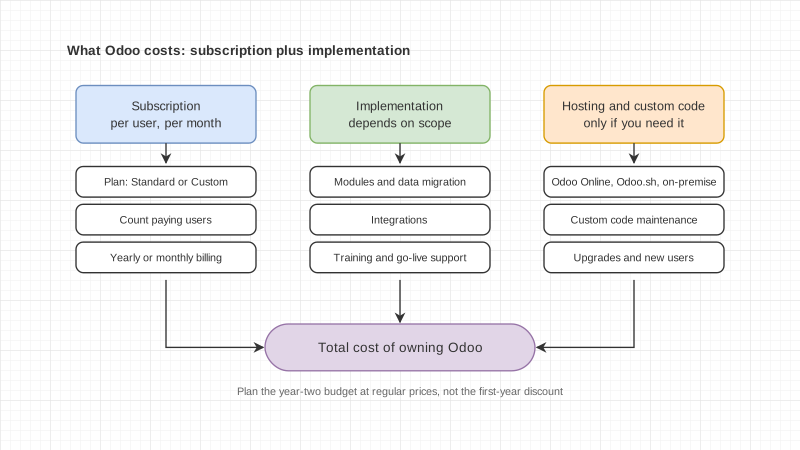
On pricing, Odoo's Pricing page lists One App Free (one app, unlimited users), Standard (all apps on Odoo Online) and Custom, which adds Studio, multi-company, the External API, and the choice of hosting on Odoo.sh or your own servers. Implementation, SMS credits and maintenance of custom code are not included in the subscription. Prices change with time and promotions, so check the Pricing page before you decide.
Can Odoo handle Thai accounting?
Yes. Odoo ships its own Thai tax package with VAT 7%, withholding tax, purchase and sales VAT reports, and PromptPay QR, but the features differ by version and filing still goes through the Revenue Department's own program.
The Odoo 19.4 Thailand fiscal localization documentation (the same content as Odoo 20) lists:
- The Thailand - Accounting module (l10n_th) as the default package, plus Thailand - Accounting Reports (l10n_th_reports) for Thai reports
- Preconfigured taxes: VAT 7% for goods, VAT 7% S for services, VAT 0% for exports, VAT-exempted and withholding tax
- The P.P.30 VAT return exported as CSV for the Revenue Department's RD Prep program, with sales and purchase tax reports exported to Excel
- PND3 and PND53 exported as CSV for RD Prep
- Withholding tax certificates (50 Tawi) printed as PDF from the vendor payment
- Tax invoices printed from the invoice, with the head office or branch code taken from the contact record
- PromptPay QR on invoices, linked to one of an Ewallet ID, a merchant tax ID or a mobile number
If your company runs Odoo 19.0, you get less: the 19.0 documentation has no 50 Tawi print and no P.P.30 export. Check which version you will run before you choose. Our Odoo Thai accounting guide has the details.
On the chart of accounts, the 19.4 page says the Thai package comes with a predefined chart of accounts tailored to Thai standards, but it does not describe the account structure in detail. If your company already uses a chart of accounts from its accounting firm, plan the mapping of old account codes into Odoo during design.
On e-Tax Invoice, the Odoo localization page we checked does not mention it at all. If your company has to issue e-Tax Invoices, ask your implementer how they will do it and ask to see a working example.