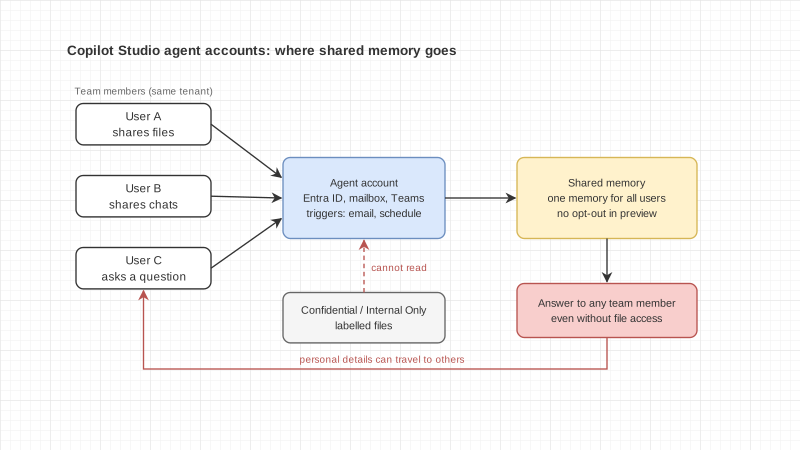
Say your purchasing team builds an AI agent to collect supplier quotes. The agent has its own email address and sits in the team's Teams channel. People send it files, explain the terms they agreed with each supplier, and a few mention personal things, like being out often this month to care for a sick parent and asking that urgent work go through a colleague.
A week later another team member asks the agent why one job is running late. Everything above sits in the same memory. How much will the agent say?
Microsoft's announcement on 15 October 2026 brings this situation much closer for any organization running Microsoft 365.
What Microsoft announced
On 15 October 2026 Jason Moore, Vice President of Product for Microsoft Copilot Studio, published a blog post introducing three capabilities for agents that belong to the organization rather than to one employee: agent accounts, business process memory and triggers. They are rolling out through the Frontier program, Microsoft's early access channel for new features.
The Microsoft Learn page updated the same day gives the details:
- An agent with an account gets its own Microsoft Entra ID, a mailbox, and a presence in Teams and the company directory. People reach it through email, Teams chat and @mentions in Word, Excel and PowerPoint comments.
- Triggers let the agent start work without anyone prompting it, for example when an email arrives or on a set schedule.
- Admins turn it on in two steps: activate the Copilot Studio template in the Microsoft 365 admin center and choose which users or groups may create agents with accounts, then switch on Agent accounts in the Power Platform admin center.
- The maker needs a Microsoft 365 E5 license with the Microsoft Agent 365 add-on, or Microsoft 365 E7. Each published agent consumes one Microsoft 365 Frontier for AI Teammates license, and usage is billed separately in Copilot Credits.
The memory section deserves a careful read
The part worth slowing down for is the Memory section of the Microsoft Learn page.
An agent with an account uses shared memory. One memory serves everyone who works with it, even in one-to-one chats. It can hold facts about the work, such as team processes and terminology, and details about individual people, such as how someone likes to receive updates.
Microsoft states plainly that the agent is guided not to bring up one person's details with someone else, but that shared memory has "no privacy boundary between users". During this preview users cannot opt out of shared memory, and using the agent counts as consent.
The agent's People card carries a warning that files or chats shared with it can be summarized and used in answers to any user, including people without permission to the original file, whatever its sensitivity label.
On the other side, the documentation says agents with accounts cannot read documents with protective labels such as Confidential or Internal Only, and Microsoft warns against relabeling documents to get around this.
Other preview limits: the agent does not respond to anyone outside the tenant, it only answers email threads with up to 250 people, and it can create new documents but cannot yet co-author or edit existing ones.