Imagine that next month your accounts payable team gets a new member called "AP Assistant". It has a company email address, a calendar, a Drive folder and an entry in the staff directory. It is also an AI agent.
It can receive supplier emails, open invoice files, book meetings and keep working after everyone has gone home. The first question is not how capable it is. It is who approved what it can see, and how you will trace its steps if it gets something wrong.
That picture is closer than it sounds, because Google has just announced something that works this way.
Google introduces Gemini agent
At Gemini at Work 2026, Google Cloud introduced Gemini agent, which the company describes as a single agent for all kinds of work. Google Cloud's official post, adapted from Thomas Kurian's keynote, is dated 9 October 2026. VentureBeat and Constellation Research reported the news on 8 October.
The idea is that people hand it a goal rather than step-by-step instructions. The agent plans the work, uses tools, connects to company systems and returns finished output. It runs in the cloud, so work continues after the user closes the laptop, and it can spin up sub-agents that work in parallel for hours or days.
Google lists connectors including Microsoft Office, Teams, Slack, Jira, Salesforce, ServiceNow, BigQuery, Snowflake and Postgres, plus any MCP server. On models, Google says it can use both the Gemini family and Anthropic's Claude models.
The part businesses should look at: the agent has its own identity
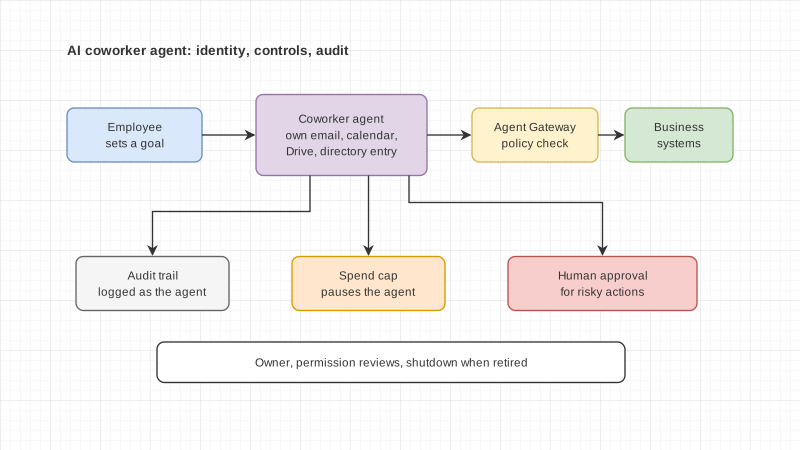
Inside Google Workspace there is a mode Google calls the coworker agent. A user describes the role they need and Gemini creates an agent for it. That agent receives its own Workspace account, with an email address, calendar, Drive and a place in the company directory.
Google says the agent acts under its own identity rather than the user's, and sees only what people share with it. When it edits a document, version history shows the agent's name.
Google frames governance around four areas:
- Identity: each agent has its own identity, managed like an employee, with least-privilege permissions.
- Permissions: role-based access approved by the organisation's security administrators, with access to outside systems through standards such as OAuth.
- Audit: every action goes into an audit trail and is attributed to the agent, not to a person.
- Policy: agents run in a sandbox with its own network boundary, and traffic passes through Agent Gateway, which enforces rules such as not opening documents marked as restricted.
On cost, Google lets organisations set per-project spend caps in the Cloud Billing Console. When a cap is reached, that project's agent pauses and can be resumed with one click. Because spending is tracked per project, it can be charged back to departments.
As for status, VentureBeat reports that Gemini agent is in private preview for a select group of customers, with no confirmed date for wider release. Constellation Research reports that general availability is expected around the end of October or early November. Google's own post gives no date. The two outlets also describe pricing differently, so it is worth waiting for Google's own announcement.