Say your company hires a software team, or has its own IT team that has started using an AI coding agent to write and fix code. That agent can run commands on a developer's machine, read files and reach the internet.
The question is what it can see. Database passwords, cloud access keys, or another client's code sitting on the same machine?
In the first week of October 2026, two of the largest vendors made changes that bear directly on that question.
GitHub lets organisations limit what coding agents can reach
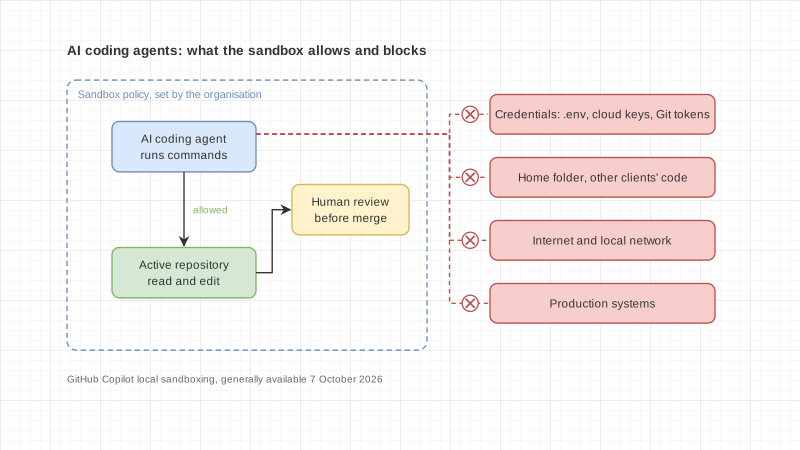
On 7 October 2026, GitHub made local sandboxing generally available in Copilot CLI, the GitHub Copilot app and VS Code sessions using Agent Host. It works on Windows, macOS and Linux and is included with Copilot at no additional cost.
The sandbox controls what commands run by the agent can do:
- which files and folders they can read or change
- whether they can reach the internet or local networks
- whether they can use Git and GitHub CLI credentials
- how far they can reach local services such as MCP servers, where supported
For organisations, the key point is that enterprise administrators can require sandboxing for everyone and set policies developers cannot weaken. Control no longer depends on each person being careful.
Organisations can now control AI code-review spending
The next day, 8 October, GitHub added an option for organisations to pay for Copilot code review instead of using each member's quota. It requires AI Credits paid usage, and a budget can be set.
A second setting blocks review requests made with a Copilot licence from outside the organisation, such as a developer's personal licence. That helps when outside contractors work on company code: the owner knows the code goes through accounts the organisation controls.
A local model is not automatically private
GitHub also let Copilot CLI, from version 1.0.94-0, discover models running locally through Ollama. GitHub is clear that choosing a local model does not turn on offline mode and does not disable telemetry. If a remote provider is still configured, prompts and code context can still go out over the network.
Organisations choosing local models to protect their code need to check the settings themselves, rather than assume "local" means safe.