Say your team runs a few small cloud servers for background jobs: a file drop for suppliers, a backup box, or a jump host the admins use to reach other systems. Machines like these often run Alpine Linux because it is light and quick to set up, and they keep SSH open so an admin can get in when something breaks.
If one of those machines has not had its openssh package updated this week, anyone who can reach its SSH port may be able to log in without knowing a password at all.
What happened
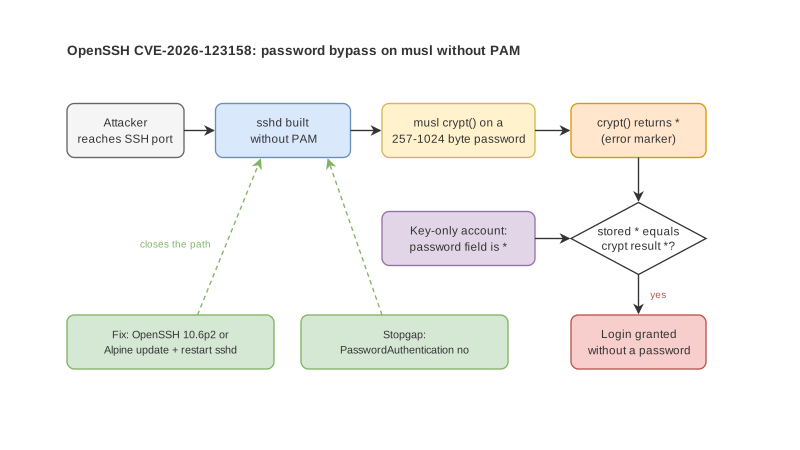
On 5 November 2026, the OpenSSH team released Portable OpenSSH 10.6p2. The release notes describe a critical security workaround for a password authentication bypass through sshd on some Linux systems built and run with PAM disabled. The OpenSSH team considers the root cause to sit outside sshd, but because sshd is the way in, they fixed it there. The bug was reported by Özgün Kültekin of Wakefield.
The same day, Alpine Linux published a security advisory. It says an attacker who can reach the SSH port can log in without knowing any password, using one connection, with no retries, and it works every time.
NIST's National Vulnerability Database records the issue as CVE-2026-123158. It affects sshd in OpenSSH before 10.6p2 on Linux when musl libc is used without PAM, and for some account configurations any password between 256 and 1024 characters succeeds. The CVSS 3.1 score on record is 8.1.
On 9 November 2026, the US Cybersecurity and Infrastructure Security Agency (CISA) added the flaw to its Known Exploited Vulnerabilities catalog, the list of flaws with evidence of real attacks, and gave US federal agencies until 12 November 2026 to fix it. That deadline does not bind Thai companies, but a three-day window says a lot about the urgency.
How the flaw works
Alpine explains the mechanism plainly. When sshd is built without PAM, it checks a password by running the attempt through the C library's crypt() function and comparing the result with the value stored in the shadow file.
musl's crypt() returns the string * to signal an error when the password is longer than 256 bytes. An account with no password set, such as a key-only account, also stores * in that field. The two values match, so sshd lets the attacker in.
According to Alpine, a machine is affected only when all of these are true:
- It runs Alpine's openssh-server package, which is built without PAM, or openssh-server-pam with UsePAM no.
- PasswordAuthentication is yes, which is the OpenSSH default unless someone changed it.
- It has an account whose password field is *, for example root in the base image since about Alpine 3.16, users created for key-only login, or users pulled from a directory service through musl-nscd.
- At least one local account has a password hash starting with $5$ or $6$.
The default PermitRootLogin prohibit-password setting protects root itself, but Alpine warns this does not help if another account that can log in is able to become root, for example through doas.
Alpine also notes that its official tiny-cloud images from 3.18.11 through 3.24.3 ship an alpine user with no password and passwordless doas. Those machines are safe on first boot, and become exploitable as soon as anyone sets a password hash for any account on them.
Who is not affected
Alpine lists these cases as not affected: containers that do not run sshd inside, systems with PasswordAuthentication no, openssh-server-pam with UsePAM yes, locked accounts marked with !, and systems where no account has a password hash at all. Cloud images configured through cloud-init are also safe, because cloud-init writes PasswordAuthentication no.
The OpenSSH notes limit the problem to Linux systems that use musl libc with PAM disabled, and NVD names Alpine as an example of such a platform. A machine that does not meet both conditions is outside the bug. Still, IT teams should confirm how the running sshd was built on each machine instead of guessing from the operating system name.