News

GitLab Patches a CVSS 10.0 Flaw: What Companies Running Their Own GitLab Should Check This Week

On 21 October 2026 GitLab shipped seven patch releases at once, fixing 12 vulnerabilities. The worst, CVE-2026-110264, scores CVSS 10.0 and could let an unauthenticated user run code on the server. GitLab.com is already fixed, but self-managed instances must be upgraded by their owners. Here is what to check and what to ask your development team.

GitLabCybersecurityPatch ManagementSoftware DevelopmentDevOps

Say your company has an in-house development team, or a contractor building systems for you, and all of the code lives in a GitLab instance on your own server. That server usually holds more than code: pipeline settings, deployment passwords, and access paths into production.

If an outsider could run commands on that machine without logging in, the damage would not stop at GitLab. This week's news is about exactly that kind of risk.

What happened

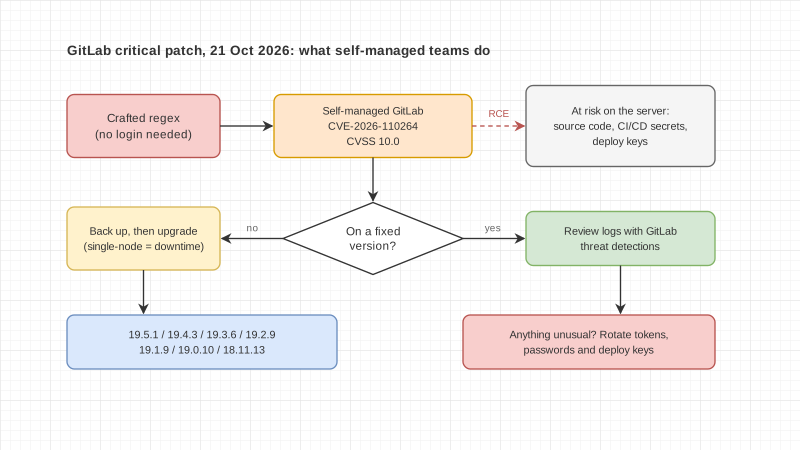
On 21 October 2026 GitLab released seven patch versions at once: 19.5.1, 19.4.3, 19.3.6, 19.2.9, 19.1.9, 19.0.10 and 18.11.13, for both Community Edition and Enterprise Edition. GitLab recommends that self-managed installations upgrade as soon as possible.

The release fixes 12 vulnerabilities. The most serious is CVE-2026-110264, rated CVSS 10.0, the top of the scale. The bug sits in the regular expression compiler. A specially crafted regex triggers an integer overflow, and under certain conditions an unauthenticated user could execute arbitrary code on the GitLab server.

The affected range is wide: every version from 7.0 up to the fixed release in each branch. That is why GitLab also backported the fix to older branches 18.11, 19.0, 19.1 and 19.2 on top of its normal patch cycle.

Two high-severity fixes are also worth knowing about:

  • CVE-2026-15723, rated 8.2, in OmniAuth-to-LDAP automatic account linking
  • CVE-2026-112212, rated 7.5, a cache poisoning issue in the OAuth and OIDC discovery endpoints

Who needs to act

GitLab says GitLab.com already runs the patched version. GitLab Dedicated tenants on 19.3.5-internal0 or 19.4.2-internal0 and later need no action.

The group that has to do something is every organization running self-managed GitLab, whether on its own servers or on cloud machines the team operates itself.

On exploitation, GitLab's release post does not report attacks in the wild. SecurityOnline reported on 21 October that no exploitation had been confirmed and no public proof of concept existed. That is not a reason to wait. Once a patch is public, people can compare it with the old code to find what changed, and GitLab publishes each issue's details 90 days after the fix. The longer a server stays on an old version, the higher the risk.
Before you upgrade

This release includes database migrations. GitLab notes that single-node instances will have downtime, because migrations must finish before GitLab starts. Multi-node setups can upgrade without downtime by following the zero-downtime procedure.

GitLab also published two threat detections for self-managed customers to review past activity: Onigmo native worker crash and Org mode render error burst. Teams that keep logs should run them to see whether anything unusual happened before the patch.

Checklist for this week

  1. Ask your IT team or contractor how many self-managed GitLab instances you have, including test servers and ones a contractor set up for you.
  2. Get the current version of each and compare it with the fixed version for the same branch.
  3. Schedule the upgrade window, and warn pipeline users in advance if a single-node server will go down.
  4. Back up and test a restore before upgrading, since this release changes the database.
  5. After upgrading, review past logs using the threat detections GitLab provided.
  6. If anything looks wrong, rotate the tokens, passwords and deploy keys stored in GitLab. Upgrading alone does not close that gap.
  7. If you cannot upgrade right away, consider blocking internet access to the instance for now, and record who accepted the risk and when it will be reviewed.

What Enersys does

We have built and supported business software for 14 years. Patching the systems a development team uses every day usually stalls on two things: nobody owning the task, and no plan to avoid breaking work in progress. If you want a second look at whether your development systems, and the ones contractors run for you, have a patch plan you can actually verify, talk to the Enersys team.

Sources

"Empowering Innovation,
Transforming Futures."

Contact us to make your project a reality.