"Why Did Our Website Score Only 60?"
There is one question you should never ask your team right before the end of the day on a Friday: "Can you run Lighthouse on our website?"
Because when the results came back, the number on the screen meant we had to stay a little longer.
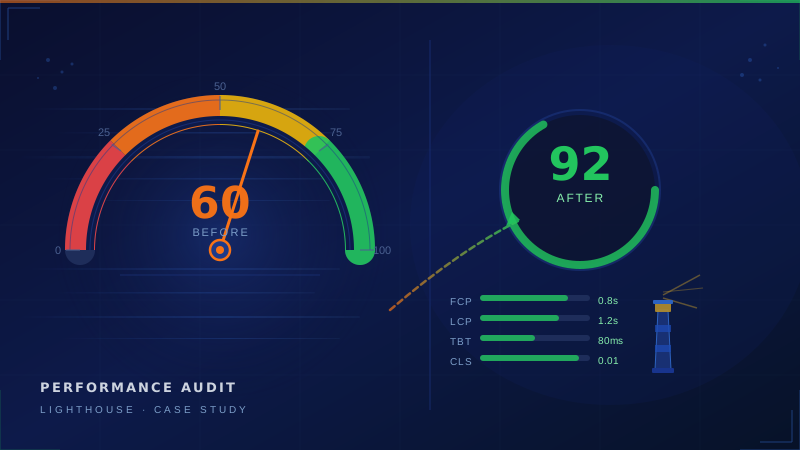
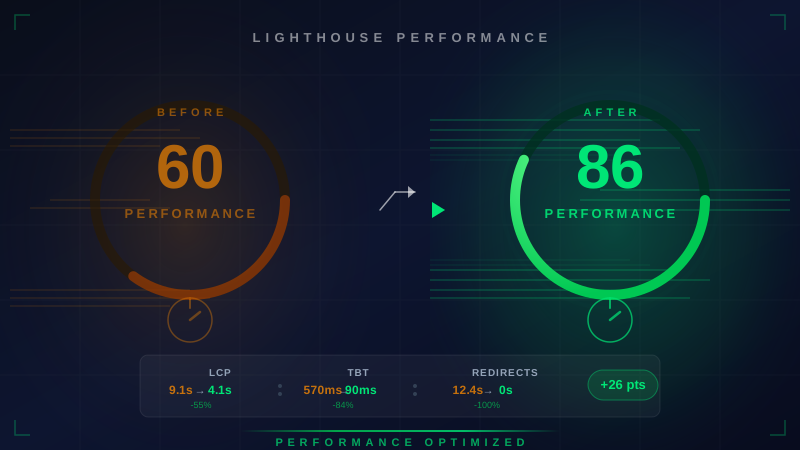
Performance Score: 60/100
Not a score to be proud of—especially for a website built with a leading framework, exported statically, deployed on a CDN, and already reasonably optimized. But that is exactly what made it interesting: if everything looks good on paper, yet Lighthouse says 60, then something is hidden beneath the surface that we still do not know.
This article documents the process of digging into the cause, analyzing the root issue, and planning the fix—written candidly, without hiding the uncomfortable numbers, because we believe sharing lessons is better than hiding problems.
Filmstrip: How Lighthouse Sees the Page Load
Before looking at the numbers, let’s first see what Lighthouse “saw” while the site was loading:



Notice that the filmstrip shows only 3 states—a white screen, the beginning of visible content, and then fully loaded. There is no intermediate state at all. That is because during the first 12 seconds lost to the redirect chain, the browser did not render even a single pixel. This is clear evidence that the issue was not in rendering, but at the network-level redirect stage.
Breakdown of Each Score
| Metric |
Measured Value |
Score |
Status |
| Performance Score |
— |
60 |
Needs improvement |
| First Contentful Paint (FCP) |
1.6s |
0.95 |
Very good |
| Largest Contentful Paint (LCP) |
9.1s |
0.01 |
Very poor |
| Total Blocking Time (TBT) |
570ms |
0.52 |
Needs improvement |
| Cumulative Layout Shift (CLS) |
0 |
1.0 |
Perfect |
| Speed Index |
2.8s |
0.96 |
Very good |
| Time to Interactive (TTI) |
9.6s |
0.29 |
Poor |
These numbers tell an interesting story: FCP and Speed Index are both very good, meaning content begins rendering quickly. But LCP is abnormally bad. The metric that destroyed the overall Performance score was LCP alone.
The contradiction between strong FCP and poor LCP is a classic signal of a problem happening before the browser starts rendering—and that was the path that led us to the root cause.
Root Cause #1: A 12.4-Second Redirect Chain — The Real Culprit
This was the main cause behind the performance breakdown:
Redirect Chain:
  enersys.co.th/             →  enersys.co.th/th
  Time lost: 12,400ms (12.4 seconds!)
Yes, not 1.2 seconds—twelve point four seconds.
Why Did It Happen?
The website supports multiple languages, with Thai set as the default. When a user visits /, the system automatically redirects them to /th.
Under normal conditions, a redirect should take only a few milliseconds. The issue is that Lighthouse measures LCP from the original URL and counts time from the start of navigation until the largest element is rendered—including all time lost in redirects.
The 12.4-second figure is highly abnormal. Redirects should not take that long, which suggests several possible causes:
- Cold start overhead — the server handling the redirect may have high startup latency
- DNS / connection overhead — the redirect may force the browser to establish a new connection
- Redirect not cached — causing every request to pass through the origin server
Impact on the Score
LCP carries the highest weight in the Performance Score (~25%), and a value of 9.1s received a score of just 0.01 out of 1.0. That single metric dragged the performance score from what could have been 95+ down to 60.
Root Cause #2: Unused JavaScript — 65KB Not Being Used
Lighthouse detected approximately 65KB of unused JavaScript in the shared bundle, representing potential savings of around 300ms.
Common issues often hidden in the main bundle without anyone noticing:
- Libraries imported as entire packages instead of importing only what is used
- Components loaded immediately even though users do not see them at first
- Code compiled to support older browsers that no longer need to be supported
Root Cause #3: Image Optimization — Still Serving PNG Files
Lighthouse identified multiple images still being served as PNG, even though they could be converted to lighter formats—representing total potential savings of ~76KB.
The site uses static export, which means there is no automatic image optimization, so all image formats must be managed manually.
Main Thread Work: 3.1 Seconds
Lighthouse reported a total of 3.1 seconds of main thread work, broken down as follows:
| Task |
Time |
| Style & Layout calculation |
1.1s |
| Other |
0.9s |
| Script Evaluation |
0.8s |
| Parse HTML & CSS |
0.3s |
A TBT of 570ms indicates that the main thread was blocked by JavaScript for a total of 570ms—above the “needs improvement” threshold (200ms), but not yet in the “poor” range (600ms).
What Went Well — It Was Not All Problems
To be fair, Lighthouse also gave the site full marks in several areas:
Server Response Time: Perfect (score 1.0) — the server responded quickly, so infrastructure was not the issue here
CLS: 0 — Perfect — no layout shift at all, meaning users did not experience buttons jumping out of place
FCP 1.6s — Very good — first content appeared quickly, with no render-blocking resources
Speed Index 2.8s — Very good — the page appeared to load quickly (when accessed directly)
In short: if users land on the page directly without going through the redirect, performance is actually very good. The biggest issue is hidden inside a single redirect chain.
Remediation Plan — Prioritized by Impact
| Priority |
Issue |
Approach |
Expected Impact |
| 1 |
Redirect chain 12.4s |
Handle redirects at the infrastructure layer |
Reduce LCP by 5+ seconds |
| 2 |
Unused JS 65KB |
Code splitting, lazy load below-the-fold |
Reduce TBT by 200–300ms |
| 3 |
PNG images |
Convert to modern formats |
Save 76KB+ |
| 4 |
Style/Layout cost 1.1s |
Audit CSS usage |
Reduce main thread work |
Post-fix targets:
| Metric |
Current |
Target |
| Performance Score |
60 |
85+ |
| LCP |
9.1s |
< 2.5s |
| TBT |
570ms |
< 200ms |
| TTI |
9.6s |
< 5s |
Lessons Learned: Why Performance Must Be Measured Regularly
This 12.4-second redirect chain issue had likely been there for some time—but we did not know, because we were not measuring it. If you do not measure, you do not know there is a problem.
The Core Web Vitals Google has used in Search ranking since 2021 are LCP, FID/INP, and CLS. If LCP is poor, it does not just affect how users feel—it can also impact search rankings.
What teams should do regularly:
- Run performance audits in CI/CD — every merge should include a performance report for comparison
- Set threshold alerts — define LCP to stay under 3 seconds, and fail the build if it exceeds that threshold
- Monitor Real User Data — lab testing alone is not enough; you also need metrics from real users
- Test the actual URLs users visit — including URLs with redirects, not just the final destination URLs
Conclusion
The Lighthouse score of 60 was not something to be embarrassed about—it was a valuable opportunity to learn:
- The biggest problem was not in the code, but in infrastructure configuration
- A single severely degraded metric can destroy more than half of the overall score
- CLS was a perfect 0 — the team’s work in that area clearly paid off
- If we had not measured it today, we still would not know about it
At Enersys, we believe that being transparent with ourselves matters more than maintaining appearances. Admitting that our own website scored 60 and openly sharing the root cause is the first step toward sustainable improvement.
What score does your organization’s website get? If you want to know but are not sure where to start — our team can help analyze it