“Open the supplier portal, find the invoices that are due, and prepare them for payment” sounds like one instruction. It contains at least three stages with different consequences: opening a website, reading information after sign-in, and clicking a control that changes data or moves money.
When an AI agent works through a browser interface, approval needs to be more specific than “allow this website.”
OpenAI’s changelog says that computer use was added to the Agents API on September 29, 2026. An agent can work in an OpenAI-hosted browser, while the developer’s application handles website access approvals and sign-in (OpenAI API changelog). This article was published on October 1, 2026. It explains a fresh platform update and the controls a business should consider; it is not evidence that browser agents are ready for broad, unsupervised work.
How a browser agent differs from an API integration
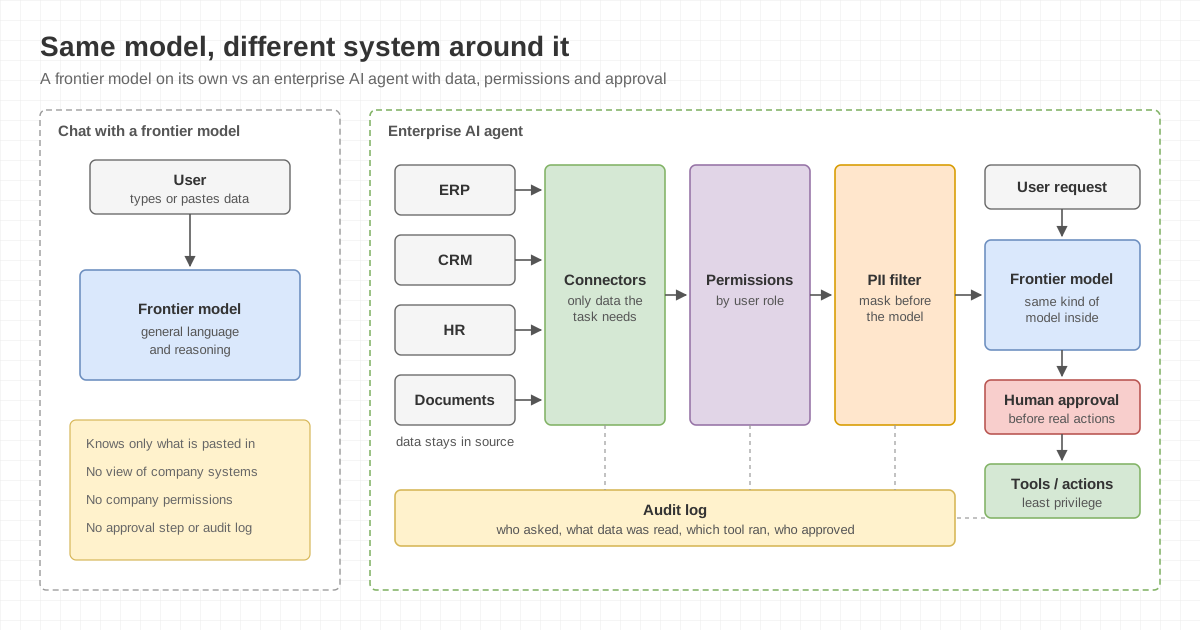
An API or MCP integration usually exposes structured actions, such as finding a customer, reading a balance, or creating a sales order. Its scope is tied to the available tools, data schema, and account permissions. The integration still needs careful permission design and result checks, but the development team can enumerate the actions it exposes.
A browser agent sees and operates elements in a user interface. That can help with websites that lack an API or spread a task across several screens. It can also make the effective scope as broad as the pages, controls, and data available to the signed-in account.
Neither approach is automatically safer. If a task fits a narrow, structured API action, that design is often easier to constrain and validate. Computer use is useful when the real workflow must pass through a browser, but it should begin with a small scope and an enforceable stopping point.
Approving a website does not approve every control on it
OpenAI’s computer use guide says that the browser requires user approval before accessing each new website origin, including a public website. Enabling network access does not approve those origin requests automatically (OpenAI, Handle origin access).
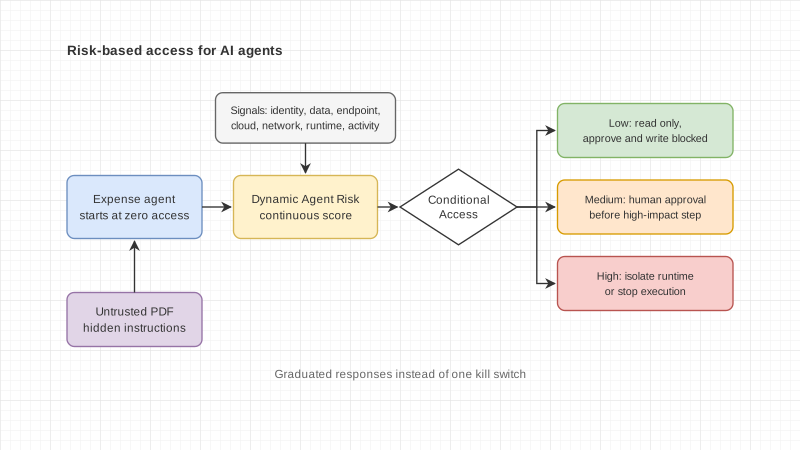
The next limitation matters more. Origin approval does not enforce confirmation before each action inside that website. Once an origin is approved, the agent may continue to other forms or controls as it works on the task. When an application must guarantee confirmation before a purchase, destructive change, or other consequential action, OpenAI advises constraining the hosted browser to resources that cannot perform those actions or using a browser runtime the organization controls. A confirmation requested through a function tool still depends on the agent calling that function as designed, so it should not be treated as the only enforcement layer (OpenAI, Computer use).
This changes the control question from “Which websites may the agent open?” to “After it opens one, which actions must always stop for a person?”
Five controls to set before leaving a test environment
Start with reading, searching, and testing. Let the agent open defined pages, find information, or assemble a list without submitting, editing, or deleting data. Learn how the site changes and what a failed result looks like before considering write access.
Limit outbound network destinations. OpenAI documents a network configuration that controls outbound access for the browser and code in the environment. Allow the destination and only the supporting domains needed for page resources or redirects. Avoid giving the task broader internet access than it requires (OpenAI, Control network access).
Keep sign-in in the application. The developer’s application renders the authentication request and collects the user’s input. Values submitted through the dedicated browser authentication channel stay outside the model input, while the application must still mask them, keep them out of logs, and clear the form after submission (OpenAI, Handle sign-in).
Base approvals on the consequence. Reading may continue under a low-privilege account. Drafting should stop before submission. Purchases, payments, deletion, permission changes, and external publication need approval that the application or controlled runtime can enforce. A prompt alone is not an enforcement mechanism.
Verify the destination state after completion. An agent saying “done” does not prove that the website stored the intended result. Check the destination record, activity history, approver, time, and before-and-after values. This is especially important when a retry could create duplicates.
A pilot that does not begin with a real payment
Consider an accounts-payable team that retrieves invoices from several supplier portals. This is a design example, not a claim that Enersys has deployed such a system.
In the first phase, the agent may access only allowlisted portal origins, sign in through an application-managed flow, and find documents that are due. It can download or summarize the list for a member of staff to review. The task ends there, without opening a payment screen.
A later phase might let the agent prepare a draft in an internal system but stop before submission. The accountable reviewer checks the supplier, invoice number, amount, and destination account before sending the record through an organization-controlled step. If the same portal can execute payment and the runtime cannot enforce confirmation for each transaction, separate payment from the browser environment used by the agent.
Tests should cover a redesigned page, a pop-up, an expired login, and a link that leaves the approved origin. They should also check that a cancellation or lost connection does not submit the same action again without first retrieving the current state.
Questions the process owner should be able to answer
- Does the task end with reading, drafting, or a real state change?
- Which data and controls can the agent’s account see?
- Which origins and supporting domains are required?
- Which steps must always stop for an authorized person?
- Which system enforces that stop, and how can the team prove it?
- Who verifies the destination result and handles duplicates?
- How will the team stop and retest the agent when a page or workflow changes?
Computer use expands the range of work an AI agent can assist with when the process still depends on a website. Origin approval is only the first gate. A business should place approvals according to the consequence of each action and enforce stopping points for changes that are difficult to reverse or affect money, data, or another person’s rights.