We Rebuilt the Entire Website in One Week
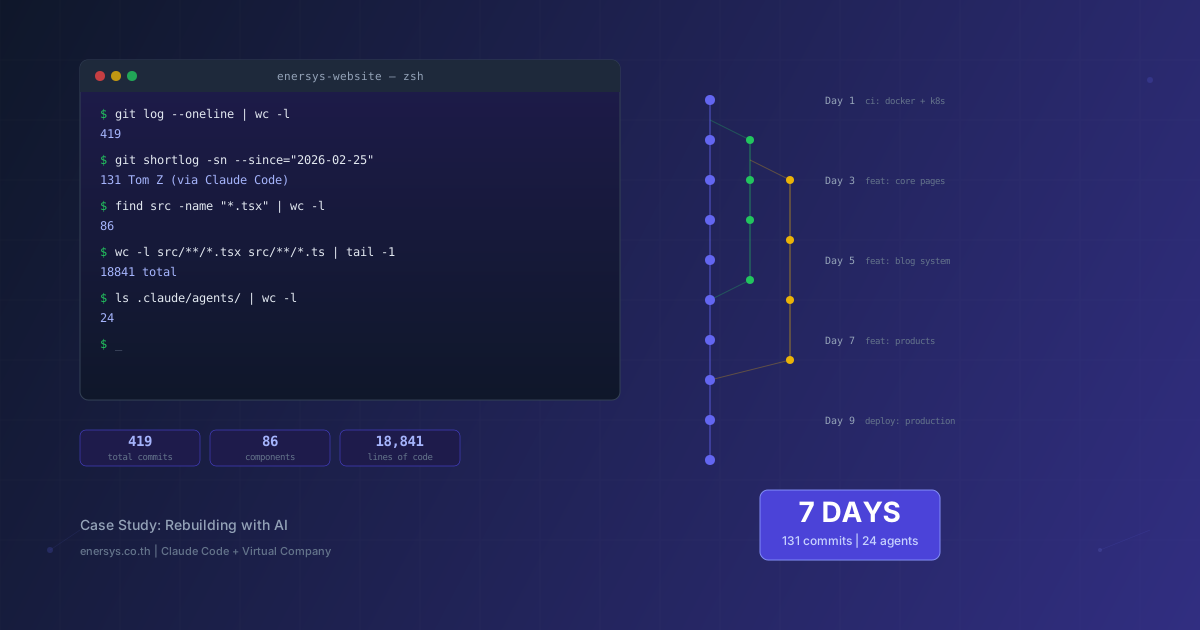
419 commits. 86 components. 18,841 lines of code. 27 pages. 26 articles. All of this was built in just one week — with 24 AI agents operating like a full development team.
This article is not fiction, not a demo, and not a proof of concept. Every number comes from the actual git log. Every component runs in production. The website you are reading right now is the result of this process.
Inspired by the article How we rebuilt Cloudflare's developer documentation with AI, we wanted to share our own story — honestly, including both what worked and what did not.
Before: The First Version of the Website, Built by a Human Team
The previous version of the Enersys website was built by a real team — 3 developers and 1 QA engineer working over 18 months, with a total of 288 commits.
$ git log --oneline --before="2026-02-25" | wc -l
288
The result was "good enough" — the site worked, the pages were complete, and it went live successfully. But to be candid, as CEO, I still was not comfortable with the outcome:
- Design was average — no dark mode, mobile responsiveness was not fully refined, and the typography lacked a clear system
- Functionality worked, but there was no content system — everything was hardcoded in HTML, so every update required code changes
- SEO was almost nonexistent — no meta tags, no sitemap, no structured data
- No bilingual support — only one language
What the team did very well was the CI/CD pipeline — the automated build, test, and deployment system established early on. That became the critical foundation for everything that followed.
The 4-person team did their best, but with limited resources, the outcome reflected those constraints — a website that was "usable," but still far from "impressive."
The Turning Point: When AI Agents Entered the Picture
Then one day, everything changed — Claude Code and Claude 4.6 (Opus) arrived.
And because we already had a CI/CD pipeline in place, the transition happened immediately. It was like a factory with an established production line: one day, the workers on the line were replaced by automation. The factory remained the same, the conveyor remained the same, but output increased by orders of magnitude — and the people who had previously worked on the line moved into more strategic roles.
The first commit after we started using AI agents:
$ git log --oneline | grep "initial Next.js"
a1b2c3d feat: ⚡ initial Next.js 14 setup with Turborepo
From that day on, everything changed — 131 commits in a single week, compared with 288 commits over the previous 18 months.
# commits per day
# Before AI: 288 commits / 540 days = 0.5/day
# After AI: 131 commits / 7 days    = 18.7/day (37x increase)
But commit counts do not tell the whole story. More important was the scope of what was built in that week. It felt as if we had created another company overnight — a complete AI team covering every role from frontend developer, designer, QA, and DevOps to content writer and SEO specialist.
The One-Week Sprint That Changed Everything
Day 1: Rebuilding the Entire Foundation
The first day was about tearing everything down and rebuilding the infrastructure from scratch:
- Turborepo + npm workspaces monorepo setup
- Next.js 14 with Pages Router, static export (
output: 'export')
- Tailwind CSS with a custom design system — 8 breakpoints, 18 typography variants
- Docker + Kubernetes manifests for production deployment
- CI/CD pipeline — automated build, lint, and deploy
- Dark/Light mode system with localStorage persistence
What had taken the 4-person team several weeks to set up was delivered by AI agents in a single day — including the monorepo, design system, CI/CD, and deployment pipeline.
Days 2–3: Building All 27 Core Pages
Next came the actual pages — all 27 were built in 2 days:
- Home page — hero section, services overview, strength highlights, testimonials
- About Us — company story, team section, values
- Our Service — service cards, detail pages for every service
- Strength — competitive advantages, visual diagrams
- Technology — tech stack showcase, Genesis AI, PrivacyHub, Odoo
- Contact — form with Google Forms integration
- Career — job listings, application form with file upload
Every page supported responsive design across all breakpoints from 375px to 1440px, and dark mode on every page — features the previous version never had.
Days 4–5: Content System + 26 Articles
This was the turning point that brought the website to life:
- Blog/Insights system — markdown-based content pipeline
- 26 articles covering AI, PDPA, case studies, and industry news
- SEO infrastructure — meta tags, Open Graph, sitemap generation
- Article registry — centralized article management in TypeScript
- Category + tag system — filterable article listings
- Reading time calculation — auto-computed from content length
// article registry pattern — manage all articles from a single place
export const articles: Article[] = [
  {
    slug: 'agentic-ai-enterprise-40-percent-2026',
    title: 'Agentic AI in the enterprise...',
    category: 'ai-tech',
    tags: ['Agentic AI', 'MCP', 'Enterprise AI'],
    readingTime: 7,
    gradient: 'from-[#1e1b4b] to-[#6366f1]',
  },
  // ... 25 more articles
];
Day 6: Products, Forms & i18n
- Genesis AI Platform pages — features, architecture, use cases
- PrivacyHub PDPA compliance platform — product showcase
- Odoo ERP integration pages
- Contact form — Google Forms backend integration
- Career application form — file upload via Google Drive Picker
- i18n framework — Thai/English language switching foundation
- Product comparison tables and pricing sections
Day 7: Polish & Production Deploy
- Performance optimization — image optimization, code splitting
- Accessibility review — semantic HTML, ARIA labels
- Final QA — cross-browser testing, mobile testing
- Production deployment — Docker build → K8s rollout
- DNS + SSL configuration
$ git log --oneline | head -5
092e6d7 chore: bump version to v1.1.48
09b3e6c style: format think-first command markdown
d75f8d1 style: apply prettier formatting to blog articles
f903ffe fix: fix duplicate opacity attribute in SVG
1e18550 chore: autopublish
Virtual Company: 24 AI Agents Working as a Team
This is what made the difference from simply “using AI to help write code” — we were not just copying and pasting from ChatGPT. We built a Virtual Company of 24 AI agents, each with clear roles, responsibilities, and a defined review pipeline.
It was like launching an entire software company overnight — with every role required.
$ ls .claude/agents/ | head -12
article-writer.md
blog-publisher.md
code-reviewer.md
content-strategist.md
deploy-manager.md
design-system-architect.md
devops-engineer.md
documentation-writer.md
frontend-developer.md
qa-engineer.md
security-auditor.md
seo-specialist.md
Team Structure
Leadership Layer:
- Tech Lead — architectural decisions, code review standards
- Content Strategist — editorial calendar, content quality
Development Layer:
- Frontend Developer — React components, pages, styling
- Design System Architect — Tailwind config, typography, color system
- DevOps Engineer — Docker, K8s, CI/CD pipeline
Content Layer:
- Article Writer — blog articles, case studies
- SEO Specialist — meta tags, structured data, sitemap
- Blog Publisher — content pipeline, article registry
Quality Layer:
- Code Reviewer — code quality, patterns, best practices
- QA Engineer — testing, cross-browser, responsive
- Security Auditor — vulnerability scanning, OWASP checks
Each agent had a system prompt defining its role, constraints, and review criteria. That made the output from each agent consistent and helped maintain quality.
Why Is This Different from a Human Team?
Our team of 3 developers and 1 QA engineer worked well, but human teams have inherent limitations:
- 8 working hours per day — AI can work continuously
- Slow context switching — moving from frontend to DevOps takes time, while each AI agent specializes in its own role
- Knowledge gaps — no one is an expert in everything, but AI agents can cover every domain from SEO to security
- Communication overhead — human teams need meetings and coordination; AI agents operate through clearly defined interfaces
Review Pipeline
Every change had to go through this pipeline:
- An agent generates code/content based on the prompt
- Code Reviewer checks patterns, quality, and consistency
- QA Engineer checks responsiveness, dark mode, and accessibility
- Human (us) approves the final merge
The key point: AI did not operate unsupervised. Every output was reviewed, and every major decision still depended on human judgment.
What Was Built: The Real Numbers
| Metric |
Count |
| Total pages |
27 |
| React components |
86 |
| Lines of code (TypeScript) |
18,841 |
| Blog articles |
26 |
| SVG illustrations |
31 |
| Custom breakpoints |
8 |
| Typography variants |
18 |
| AI agents |
24 |
| Total commits |
419 |
| Sprint commits (7 days) |
131 |
This was not just boilerplate — every component was designed to fit the design system, and every page fully supported dark mode and responsiveness across every breakpoint.
Abstraction Layer: The Most Important Insight
The most important lesson from this project was this: AI does not replace programmers — AI is a new abstraction layer above implementation
Just as:
- Assembly → C meant we no longer had to manage registers ourselves
- C → Python meant we no longer had to manage memory ourselves
- jQuery → React meant we no longer had to manage the DOM ourselves
React → AI means we can work at the level of intent rather than implementation.
Instead of writing:
"Build a responsive card component with hover effects,
dark mode support, gradient border, aria-labels..."

We instruct:
"Build a service card based on the design system
that supports 3 services: Genesis, PrivacyHub, Odoo"
The result is not meaningfully different — but the time required is dramatically different. We work at the level of “what we want” instead of “how to write it,” and AI handles the implementation details.
Cost Analysis: API Costs vs Traditional Development
Let’s talk openly about cost:
AI Approach (Claude Code — One Week)
| Item |
Cost |
| Claude API usage (Opus + Sonnet) |
~$150–200 |
| Infrastructure (Docker, K8s) |
existing |
| Domain + SSL |
existing |
| Total |
~$150–200 |
Traditional Development (Estimated)
| Item |
Cost |
| Frontend developer (2 months) |
฿120,000–200,000 |
| UI/UX designer (1 month) |
฿60,000–100,000 |
| Content writer (26 articles) |
฿52,000–130,000 |
| DevOps setup |
฿30,000–50,000 |
| Total |
฿262,000–480,000 |
| Time |
2–4 months |
The actual cost of the AI approach: ~฿6,000–7,000 in API costs, plus one week of our time.
These are not marketing numbers — they come directly from the real billing dashboard.
What AI Still Cannot Do: Honest Limitations
We are not going to pretend everything was perfect. Here is what AI still does not do well:
1. Business Decision-Making
AI does not know whether Enersys should prioritize selling Genesis AI first or PrivacyHub first. It does not know who the target audience is, and it does not understand what the Thai market needs — strategic decisions still have to come from humans
2. Original Design Direction
AI can implement beautiful design, but original creative direction — tone of voice, brand personality, visual identity — still needs to come from people. AI serves as an execution layer, not a creative director.
3. Cross-System Context
Once a project becomes sufficiently complex, AI starts to lose context from previous conversations. You need a systematic way to manage context — for example, a CLAUDE.md file that stores project conventions and important decisions.
4. Comprehensive Testing
AI can write code, but end-to-end testing that truly covers edge cases still requires human judgment. Humans still need to validate whether the full UX flow makes sense.
5. Production Debugging
When a production bug involves correlating multiple systems (DNS, K8s, Docker, Next.js, CDN), AI can help — but it is still slower than someone with hands-on experience in that stack.
By the Numbers: Human Team vs AI Team
| Metric |
Human Team (18 months) |
AI Team (1 week) |
| Team |
3 dev + 1 QA |
24 AI agents + 1 human |
| Commits/day |
0.5 |
18.7 |
| Total pages |
~5 (static HTML) |
27 (Next.js SSG) |
| Components |
0 (inline HTML) |
86 (React) |
| Lines of code |
~2,000 |
18,841 |
| Dark mode |
None |
Every page |
| Responsive |
Partial |
8 breakpoints |
| Blog articles |
0 |
26 |
| SEO |
None |
Full meta + sitemap |
| CI/CD |
Yes (foundation) |
Docker → K8s auto-deploy |
| Deploy time |
semi-auto (15 min) |
auto (~5 min) |
| Languages |
1 (Thai) |
2 (Thai + English foundation) |
A New Operating Model: The 5-Minute Update Cycle
What changed was not just the website — the entire way of working changed
Before
- Think through the content → write HTML by hand → test locally → copy files to the server → hope nothing breaks
- Total time: 30 minutes to 2 hours per update
After
- Write a markdown file →
git push → CI/CD builds automatically → deploy to K8s
- Total time: ~5 minutes per update
Or for a new article:
- Ask an AI agent to write the article → review + edit → commit → auto-deploy
- Total time: 15–30 minutes for a 1,500+ word article
Continuous deployment is no longer just a buzzword — it is a reality that allows 1 person to work at the level of a 4–5 person team.
What's Next: AI-First Development as the New Normal
Based on this week’s experience, we believe:
1. AI-Assisted Development Will Become the Default
The question is no longer “Should we use AI to help with coding?” but “How do we use AI for coding as effectively as possible?” Just like today, nobody asks whether they should use an IDE.
2. The Virtual Company Model Will Become Widespread
Having specialized AI agents working as a team will become normal. It is not unlike using microservices instead of a monolith — each agent specializes in a single responsibility and collaborates through defined interfaces.
3. People Will Shift from “How” to “What” and “Why”
The important skill will no longer be “Can you write React?” but “Do you know what should be built?” and “Can you design the right system?” Architectural thinking and product sense will matter more than syntax.
4. Speed-to-Market Will Be the Real Competitive Advantage
When everyone has equal access to AI, the advantage will come from speed of execution and quality of strategic decisions — not team size.
Conclusion
The website you are reading was built in one week by 1 person and 24 AI agents, with API costs under ฿7,000. The result is a website with 27 pages, 86 components, and 26 articles, supporting dark mode on every page, responsiveness across every breakpoint, and a CI/CD pipeline with automated deployment.
The old version, built by a 4-person team over 18 months, was “good enough.” The new version, built by AI agents in a single week, is at a level the CEO is fully comfortable showing to customers.
This is not the future — this is the present
If you are interested in how AI can help transform your organization — whether through website development, AI strategy, or implementing AI agents in business processes — talk to us.
Or if you want to assess your organization’s readiness, read 5 Signs Your Organization Is Ready for AI to get started.
This article was written by one of the AI agents in our Virtual Company system — reviewed and approved by a human. Every figure cited comes from the actual git history of this repository.