If your team needs to read an image of a quotation alongside an employee's spoken explanation, Gemma 4 12B Unified is a useful model to test first: it can accept both inputs. The choice still depends on whether your runtime exposes audio and how much memory remains for documents and concurrent requests.
This guide was updated on October 19, 2026, retaining its original publication date. Google added Gemma 4 12B Unified on June 3, 2026, after E2B, E4B, 26B A4B and 31B, which the release notes list under March 31, 2026. There are now five models to evaluate, so a launch-day comparison is incomplete. Google release history
The following sections describe ways to experiment and design a system. The enterprise example is hypothetical, not an Enersys project or measured result. Commands have been checked against developer documentation; this does not mean we ran every model on every hardware configuration.
Which Gemma 4 model should you try first?
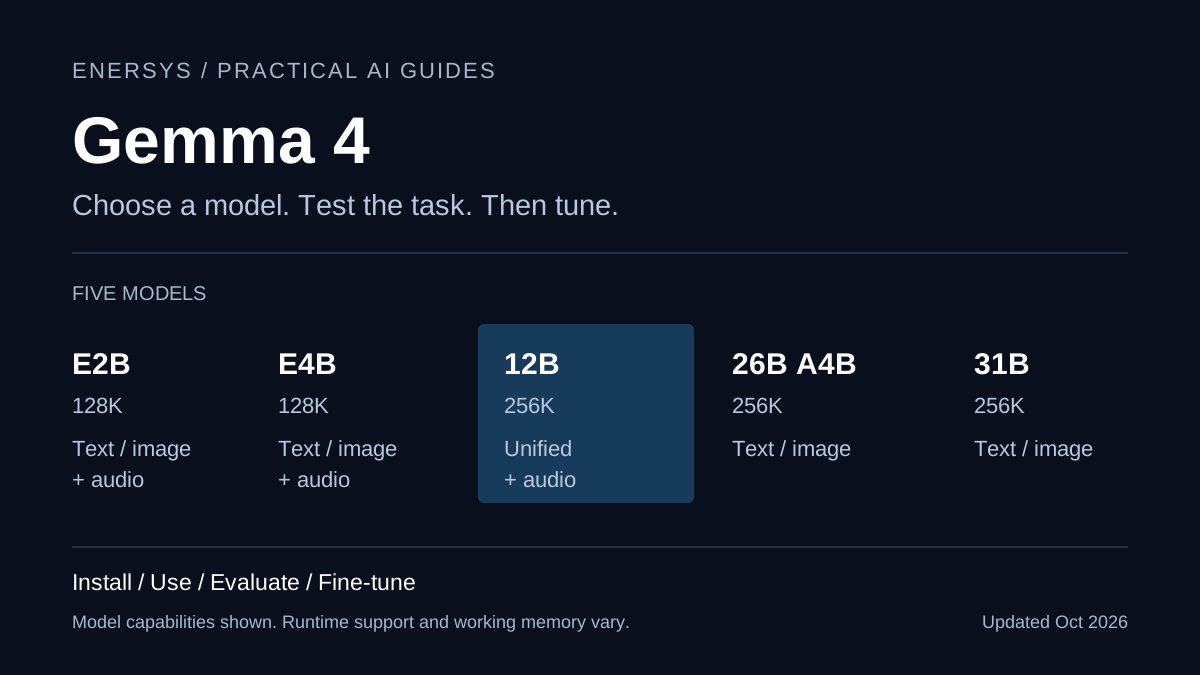
Gemma 4 is Google DeepMind's family of open-weight models. They accept multiple input types and generate text. This table describes model capabilities; the runtime and weight format determine which are available in a particular installation.
| Model |
Architecture and size in the model card |
Maximum context |
Inputs |
| E2B |
2.3B effective, 5.1B including embeddings |
128K tokens |
Text, images, audio |
| E4B |
4.5B effective, 8B including embeddings |
128K tokens |
Text, images, audio |
| 12B Unified |
Dense, 11.95B |
256K tokens |
Text, images, audio |
| 26B A4B |
MoE, 25.2B total, 3.8B active per token |
256K tokens |
Text, images |
| 31B |
Dense, 30.7B |
256K tokens |
Text, images |
Source: Google's Gemma 4 model card, updated July 30, 2026. Effective parameters in the E models and active parameters in the MoE model do not describe the total parameters that must be stored in memory.
On constrained hardware, start with E2B or E4B to establish whether simpler tasks already meet your acceptance criteria. For combined image and audio work on a GPU laptop or workstation, compare 12B against E4B on the same test set. Add 26B A4B when the task uses text and images and you can accommodate more memory. Test 31B when its measured quality gain might justify the additional time and resources.
Do not choose from a single aggregate score. Reading Thai document identifiers, finding exceptions in contracts and transcribing speech in a factory have different failure modes. A higher-ranked model can still misread the same tax number.
What changes with 12B Unified?
12B has an encoder-free architecture. Lightweight projection layers feed image and audio inputs into one transformer backbone, replacing the separate encoders used by other models. Google describes support for LoRA and full fine-tuning, and cites laptops with 16 GB of VRAM or unified memory as a local inference example. Architecture and getting started
That 16 GB figure is a developer reference, not a guarantee that every machine can run a 256K context or multiple simultaneous requests. Inference and training have different memory requirements.
Check hardware and budget before downloading
Separate weight download size from working RAM or VRAM. After loading weights, the runtime needs KV cache for conversation history, space for image or audio inputs, and its own working buffers. Other applications need memory too. Longer contexts and more simultaneous requests require fresh measurements.
Record the GPU and VRAM, RAM or unified memory, operating system, runtime version, model identifier and quantization. Begin with a short document and one user. For PyTorch, select a build that matches your CUDA and driver environment using the PyTorch installation selector. The GPU product name alone is insufficient.
Budget for the machine or GPU hours, electricity, storage, backups and operating staff. Weights available without a model purchase fee do not make a service cost-free. For hosted services, check the price of the specific model and provider when you use it, rather than relying on a fixed price or rate limit embedded in a tutorial.
Start locally with Ollama
This path suits text and image experiments. Install or update Ollama from the developer's download page, then check the version and choose an explicit model tag. Run these commands in a terminal after installing Ollama.
ollama --version
ollama pull gemma4:12b
ollama run gemma4:12b
If the machine cannot accommodate it, use gemma4:e4b or gemma4:e2b in a subsequent comparison. At this guide's update, Ollama lists approximately 7.7 to 8.0 GB downloads for 12B. That is not working RAM. Current tags, sizes and capabilities
The unqualified name gemma4 does not mean 12B. The current listing maps latest to E4B and labels these local variants Text, Image. This guide therefore does not use Ollama to demonstrate audio, even when the underlying model supports audio.
Call the local API
With Ollama running, try the following in another terminal. In a CLI installation without an app or service, start ollama serve first. Do not start a second server when the service is already running.
curl http://localhost:11434/api/chat \
  -H 'Content-Type: application/json' \
  -d '{
    "model": "gemma4:12b",
    "stream": false,
    "messages": [
      {"role": "system", "content": "Use only the supplied document. Say when a value is missing."},
      {"role": "user", "content": "Document: quotation Q-001, total THB 12500. Extract the quotation ID and total."}
    ]
  }'
Q-001 and THB 12,500 are fictional. Remove the amount from the prompt and check whether the model reports it missing or invents one. Save actual outputs against human-approved reference answers. One successful response is not a completed evaluation. Ollama chat API
A local API still needs access controls when connected to enterprise systems. Do not expose this example's port directly to the internet.
Use Python with Hugging Face Transformers
This path suits teams that need to control inputs, repeat evaluations or build in Python. Create a separate environment first. On Windows, use the activation command appropriate to your shell.
python3 -m venv .venv
source .venv/bin/activate
python -m pip install torch accelerate "transformers>=5.10.1"
Google's current text quickstart specifies Transformers 5.10.1 or later for its Gemma 4 examples. Select the correct PyTorch build as described above and record the versions that pass your checks. dtype="auto" does not automatically quantize a model to 4-bit, so this path has different weight and memory requirements from Ollama.
Save the following as try_gemma.py. It follows the quickstart's message format and selects the instruction-tuned (it) 12B model.
from transformers import GenerationConfig, pipeline

model_id = "google/gemma-4-12B-it"
pipe = pipeline(
    task="text-generation",
    model=model_id,
    device_map="auto",
    dtype="auto",
)
config = GenerationConfig.from_pretrained(model_id)
config.max_new_tokens = 256
messages = [
    {
        "role": "user",
        "content": [{"type": "text", "text": "Explain the difference between an invoice and a quotation."}],
    }
]
result = pipe(messages, return_full_text=False, generation_config=config)
print(result[0]["generated_text"])
python try_gemma.py
python -m pip freeze > requirements-tested.txt
If memory is insufficient, start with google/gemma-4-E2B-it to check the environment. This is a setup check, not a claim that its quality matches 12B. If a repository requires access approval, follow its model page and store tokens through your environment's secrets mechanism. Do not put tokens in scripts or Git. Google text quickstart and source notebook
Match images, audio and thinking to the runtime
Start image evaluation with documents that have reference answers, such as a fictional quotation with clearly printed numbers. Then add rotated pages, small text and multi-page tables. Score character reading separately from interpretation. Ask the model to identify unreadable fields instead of filling them, and validate JSON and data types in the application.
For audio, use a notebook or runtime that explicitly supports audio for the selected model. Google's audio understanding guide includes processor and audio preparation examples. Sending an audio file to a text-only endpoint does not add audio support.
Google's model card lists 30-second audio and 60-second video at one frame per second for the approach described there. Some 12B demonstrations use longer prepared inputs. Start with clips no longer than 30 seconds, then check the selected model and runtime's limits before expanding. A large context window does not establish that an hour-long meeting recording will work.
Thinking is another variable to compare against response time and quality. Use the current runtime's chat template and controls instead of copying tokens from an older Gemma generation. Follow the developer's guidance to retain final answers in conversation history. Visible reasoning is not evidence that an answer is correct. Gemma 4 prompt format
For function calling, the application must validate tool names, schemas and permissions before executing anything. A model proposing an ERP balance adjustment does not have authority to approve it. Begin with read-only tools and require human approval for business changes. Function calling guide
Try 12B with LiteRT-LM
Google publishes commands to import 12B and start a local server with an OpenAI-compatible API. Use a CLI version that supports these commands, and install uv first if it is absent.
uv tool install litert-lm
litert-lm --help
litert-lm import --from-huggingface-repo=litert-community/gemma-4-12B-it-litert-lm gemma-4-12B-it.litertlm gemma4-12b
litert-lm serve
Check the server address, port and model name in the CLI output and your installed version's documentation before connecting clients. Do not substitute Ollama's port by assumption. OpenAI-compatible describes the API format; it does not mean requests must be sent to OpenAI. Commands in Google's 12B developer guide
For Android or iOS applications, begin with the bundles and APIs Google AI Edge supports on that device. A successful desktop CLI run does not establish that a phone has sufficient RAM or the same backend capabilities. Read the LiteRT-LM platform guides and test on physical devices before committing to offline deployment.
Choose between retrieval and fine-tuning
When answers depend on current prices, the latest policy or a user's access rights, start by retrieving permitted documents as context (RAG) and show references. Training a model to memorize information that changes daily makes correction and access control harder.
Fine-tuning is worth testing when evaluation exposes a recurring behavioral problem: output format errors, failure to apply your organization's classification rules, or inconsistent terminology. LoRA trains small adapters on a base model; QLoRA uses quantized base weights during training to reduce memory use. Training does not guarantee an end to invented answers or replace access controls. Google's fine-tuning overview
A repeatable first training run
Use Unsloth's Gemma 4 fine-tuning guide, which lists E2B, E4B, 12B, 26B A4B and 31B support, and choose a notebook for your input type. For text, the E4B Text notebook is a starting point. For 12B, check the current guide's supported recipe and dependencies. Changing a model identifier in any old notebook is insufficient.
- Select examples you have permission to use, with expert-reviewed answers. Split train, validation and test sets by document, customer or time period so material from the same source cannot leak across sets.
- Select a GPU runtime and run the notebook's installation cells in order. Record its revision, GPU, package versions, model revision and seed. Save the notebook actually used in your internal project repository.
- Run a baseline on the locked test set before training. Include tasks that should succeed, requests that should be refused, and ambiguous cases requiring clarification.
- Convert data to the notebook's schema. For a text task, begin with text-only tuning. Start with a short context and small batch; measure peak VRAM before increasing either.
- Run a short training check to inspect loss, masking and response format. Training loss alone is insufficient. Compare the adapter with the baseline on the same test set.
- Save the adapter and processor or tokenizer using the notebook's instructions, retaining the base model revision. After merging or exporting to GGUF, evaluate the exported artifact again in its destination runtime.
The fictional record below illustrates an input and expected answer. Adapt it to your chosen notebook's schema before use.
{
  "messages": [
    {"role": "user", "content": "Classify: the delivered quantity is lower than the purchase order."},
    {"role": "assistant", "content": "quantity_mismatch"}
  ]
}
Unsloth provides separate text, image and audio notebooks because data preparation and collators differ. A text-only VRAM estimate is not an audio or vision training guarantee. For 12B's shared backbone, also test whether tuning one task degrades another.
For a direct Transformers, PEFT and TRL path, use Google's QLoRA guide as a framework reference, reading its notes on the example model and hardware. An example designed for a small model on a T4 does not establish that 12B can train with the same configuration.
Design a document and audio pilot
Suppose a purchasing team needs to check quotation images alongside employees' spoken explanations. The pilot aims to reduce review work while keeping source material available for inspection. This is a proposed experiment, not an Enersys announcement of a deployed system.
Begin with fictional quotations or documents with identifying personal information removed, and short recordings whose speakers have authorized this use. Limit outputs to the document number, amount, delivery terms and unanswered questions. Do not connect the first experiment to vendor creation or payment execution.
Compare E4B and 12B on the same machine and data. If adding 26B A4B, compare text and images only, or provide all models with transcripts from the same audio system so the conditions remain explicit.
| Measure |
Evidence to retain |
Decision owner |
| Document identifiers, amounts and currencies |
Field-level comparisons with reference answers, including missing values |
Purchasing owner |
| Behavior on unclear text or speech |
Unreadable inputs, background noise and requests for clarification |
Document and audio reviewers |
| Waiting time |
Time to first response, completion time, p50/p95 and concurrency |
Operations and users |
| Resources and human effort |
Peak RAM/VRAM, machine cost and correction time |
Budget owner |
| Data and tool permissions |
Cross-permission tests, logging and deletion checks |
Data owner and security team |
Set acceptance rules first: for example, a person must verify every monetary amount, and the model must not invent missing data. Set accuracy and waiting-time targets from the consequences your business can tolerate, rather than copying public benchmark targets.
Treat documents and recordings as untrusted data. Instructions embedded in them must not change permissions or execute tools. Retain only necessary logs, with defined access, retention and approval for external transfers. If training in a cloud notebook, review that data path separately from inference inside the organization.
License and checks before expansion
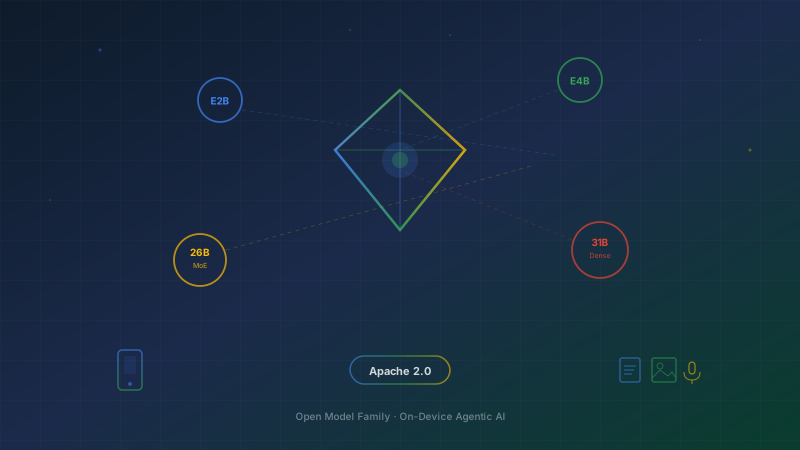
Gemma 4 specifies Apache 2.0, permitting commercial use and modification subject to its conditions. When distributing copies or derivative works, obligations include retaining the license, identifying modifications and preserving applicable notices. The license also contains warranty disclaimers. Apache 2.0 as published by Google for Gemma 4
The model license does not automatically grant rights to customer documents, employee recordings, trademarks or personal data. Before production use, have the responsible owners review data rights, contracts, provider terms and applicable law. Local execution lets you choose where processing occurs, but telemetry, logs, backups and outbound application calls still need inspection.
Before expanding the pilot, approve specific model and runtime versions, limit context and concurrency, and load-test the service. Add authentication and rate limits at the service layer, assign incident ownership and prepare rollback to the previous model. With vLLM or another serving stack, check support for the model and quantization before selecting a deployment image.
The next decision is to choose one task and two models, then compare them against the same acceptance criteria. If 12B improves overall answers but people still correct the amount on every quotation, investigate that failure before buying more hardware or starting fine-tuning.