TL;DR
Through 2026 we've watched teams across Thailand try to build "AI agents" and hit the same wall every time: they start with one ChatGPT API endpoint, sprinkle in tool calling, and assume everything else will fall into place.
It doesn't.
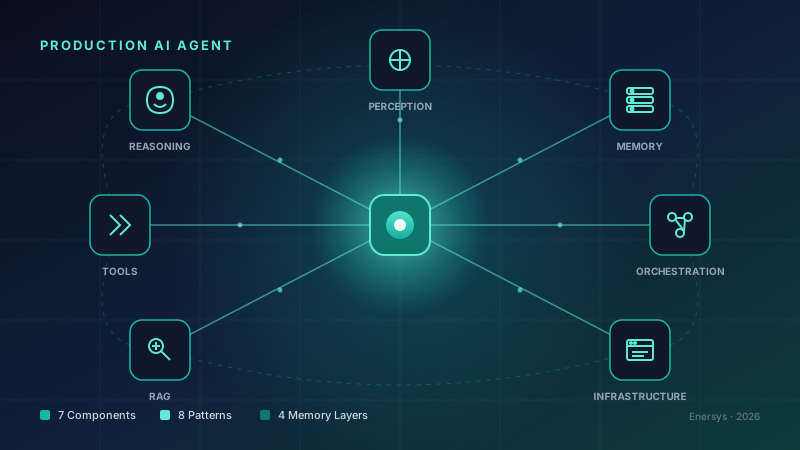
A production agent isn't "a smarter API call" — it's a system built from 7 core components working together, picked according to your problem, with 4 layers of memory and an infrastructure layer almost nobody talks about until it bites them.
This article is what we've learned shipping agents for real customers over the past 18 months — Odoo automation, customer service, document processing, knowledge retrieval.
If you're about to start building an agent in 2026, please read this first. It'll save you the time and budget we wasted on patterns we now know don't work.
Intro: The Day I Realized "AI Agent" ≠ "ChatGPT API Call"
Late 2024 we got our first real agent brief — a large e-commerce client wanted an "automated support assistant" to look up product info, check orders, and handle refund questions.
We thought, "Easy — GPT-4 plus tool calling plus RAG." Shipped a POC in 3 weeks. Then:
- The agent answered about 60% of questions correctly
- The other 40% ranged from wrong answers to tool loops to lost context to emails sent to the wrong person
- Debugging was hopeless — logs were just raw prompts and responses
- API cost spiked to roughly THB 8,000 per day because the agent was retrying itself
That's when we realized: an agent isn't a feature — it's a system. Several failed projects later, we slowly understood the patterns that actually work in production. This article is what we learned.
The 7 Components of a Production-Ready AI Agent
Before talking patterns, you need the components. If any component is missing — even the best pattern will collapse.
1. Perception (Input Handling)
Job: take raw input from the user (text, files, voice, system events) and convert it into a structured format the reasoning engine can use.
Most teams skip this layer because they think "input is just a string." In reality, perception has to:
- Manage the context window — when conversation grows past the token limit, decide what to summarize and what to keep
- Validate input — is the user sending something dangerous (prompt injection, PII that shouldn't leave the boundary)?
- Decide what "reaches the brain" — not everything has to hit the reasoning engine; some things are best handled at this layer
Mistake we made: sending raw text to the LLM every turn. The context window blew up at message 15 and our token cost ended up 4× the original estimate.
A useful mental model: treat perception as the bodyguard of the reasoning engine — it filters and prepares input so the brain can think clearly.
2. Reasoning Engine (The Brain)
Job: take prepared input → decide what to do next (call which tool, respond with what, ask for more information).
The core is the LLM. In 2026 our defaults are Claude Opus 4.7 (best for complex reasoning) and GPT-5.4 (best for high-throughput workloads).
But the LLM alone isn't enough. You need structure around its thinking:
- A system prompt that defines role, scope, output format
- Clear tool definitions — agents misuse tools when definitions are vague
- An output parser that enforces format (JSON schema, structured output)
Lesson: agents that are "too smart" (giant model, sprawling prompt, no structure) are usually less reliable than agents that are "right-sized" — because there's more room for misinterpretation.
3. Memory (4 Layers You Have to Get Right)
This is where most teams stumble — they assume "stuffing history into the context window" equals "the agent has memory." Real production memory has 4 layers.
3.1 Short-Term Memory
Context inside the current token window — what the user just said, the latest tool result.
Challenge: token limits force decisions about what to keep and what to drop as the session grows.
What works: rolling window plus summary — keep the latest N messages plus a summary of everything older.
3.2 Episodic Memory
Specific events with timestamps and context — used for after-the-fact review, audits, regulatory compliance.
For Thai businesses under PDPA, episodic memory isn't optional. It's a requirement: you have to be able to show how the agent decided, what data it used, and what the result was.
3.3 Semantic Caching
Instead of caching by exact match, use vector embeddings to check if a new question is "close enough" to a previous one. If so, return the cached answer.
Numbers cited in research and by Redis: about a 69% reduction in LLM API calls in systems with repeated questions. Redis LangCache claims 15× faster responses and 70% cost reduction.
In our experience: for customer service systems with high question repetition, semantic caching is what makes the project profitable. Without it, the same project would cost roughly 3× more.
3.4 Hybrid Retrieval Memory (Long-Term + RAG)
Memory pulled from large stores — documents, knowledge bases, historical conversations.
The 2026 production pattern is no longer "vector search alone." It's hybrid retrieval:
- Dense vector search (semantic similarity)
- Sparse retrieval (BM25, keyword-based)
- Metadata filtering (time, user, document type)
- Fusion via Reciprocal Rank Fusion (RRF)
- Re-rank with a cross-encoder
Why hybrid: vector search alone misses exact matches — contract numbers, SKUs, proper nouns where semantic similarity doesn't help.
4. Tool Execution (The Agent's Hands)
An agent without tools is a chatbot. Useful for conversation, useless for business.
Tools include:
- External APIs (Stripe, Slack, Gmail)
- Internal databases (Odoo ORM, PostgreSQL)
- Internal services (HR system, ERP)
- File operations (read/write, parse PDF)
Top mistake we keep seeing: missing retry logic and error handling.
Tool failure = agent failure. If the agent calls "get order status" and the API times out → the agent answers "no order found" → the customer panics → support has to clean up.
What you need:
- Retry with exponential backoff
- Input validation before calling the tool (e.g. order_id must be numeric)
- Idempotency — retried tool calls must not duplicate effects (critical for write tools — invoice creation, email sending)
- Sensible timeouts
- Circuit breakers when a tool is down → fall back to manual
5. Orchestration & State Management
Job: coordinate the other 6 components.
A production agent isn't stateless. It's stateful:
- Knows which step of the workflow it's on
- Has checkpoints it can resume from after a crash
- Has human interruption points — places where it pauses for human approval
Why checkpoints matter: if the agent is processing 100 invoices and crashes on number 47, it has to resume from 48, not start over from 1.
Why human interruption matters: agents shouldn't approve large payments alone, shouldn't delete customer data alone, shouldn't send external emails alone. There has to be a gate.
The frameworks that handle this well in 2026: LangGraph is the canonical choice; Microsoft Agent Framework is strong on enterprise governance.
6. Knowledge Retrieval / RAG That Actually Works in 2026
We separate RAG from memory because the scope is different. RAG is "bring in data larger than the context window." Memory is "remember what's already happened."
The production RAG pipeline that works in 2026:
- Retrieval: Dense vector search + Sparse BM25 (in parallel)
- Merge: combine both result sets
- Re-rank: Reciprocal Rank Fusion + cross-encoder
- Final: send the top-K reranked chunks to the LLM
Why not vector search alone like 2023:
- Vector search misses keyword exact matches
- Vector search is sensitive to embedding noise
- Vector search alone increases hallucination
In our work, document Q&A systems using hybrid retrieval show clearly higher precision than pure vector search systems — and crucially, much less hallucination.
7. Integration & Deployment Infrastructure (The Forgotten Component)
Every team knows this matters but pushes it to the end because it's "not urgent." Wrong — if infra isn't ready before scale, scale equals disaster. What you need before production:
7.1 Observability
Not regular logging — behavioral observability: see what the agent decided, why, which tool it used, and the input/output of each step.
The 2026 standard: OpenTelemetry plus an agent-specific layer (LangSmith, Arize, Langfuse).
7.2 Security
- Authn/authz: who is the agent acting on behalf of, what does it have permission to do?
- Credential handling: agents should never see raw API keys
- Prompt injection defense
- Output sanitization
7.3 Audit Trail (Critical for PDPA)
- Every agent decision must be logged
- Who triggered it
- What data was used
- What the outcome was
- Retention policy aligned with the law
7.4 Rate Limiting + Cost Control
- Limits per user, per session, per tool
- Alerts when cost spikes
- Circuit breaker when the LLM provider is down
8 Canonical Patterns — When to Use Which
By 2026 the industry has settled on 8 main patterns for AI agents. Each fits a different kind of problem.
Pattern 1: ReAct (Always Start Here)
What it is: the agent alternates between "thought" and "action" — think about what to do → do it → observe → think again → act again.
Use for: general-purpose tasks, anything under ~30 steps.
Fails when: tasks run past ~50 steps, the agent loses sight of the original goal, or it makes the same mistake repeatedly.
Framework support: LangGraph, AutoGen, CrewAI, OpenAI Agents SDK, Microsoft Agent Framework — basically all of them.
Bottom line: ReAct is the default. If you don't know what pattern to use, start here.
Pattern 2: Reflexion (Add When ReAct Keeps Failing)
What it is: add a self-critique step — after acting, the agent asks itself "is this good enough? what did I miss?" before returning a final answer.
Use for: tasks with high repeat-failure rates — coding, math, structured reasoning.
Reported impact: research shows a 30-50% reduction in repeated failures on code/math tasks.
Fails when: extra LLM calls add latency, the agent oscillates against itself, or the critique is weak on subjective tasks.
Bottom line: Reflexion is a patch on ReAct. Add it after you've measured that ReAct alone isn't enough.
Pattern 3: Plan-and-Execute
What it is: split into 2 clear phases — plan (the agent lays out the whole plan first) then execute (it follows the plan).
Use for: predictable workflows where planning cost can be amortized (plan once, use many times).
Fails when: conditions change mid-task and the original plan is no longer valid — Plan-and-Execute is less adaptive than ReAct.
Pattern 4: Supervisor-Worker (Hierarchical)
What it is: a supervisor agent splits work across worker agents. Each worker specializes.
Use for: tasks that decompose cleanly and where worker specialization improves accuracy (one worker is great at SQL, another is great at data analysis).
Strong frameworks: AutoGen (Microsoft Research), CrewAI (with its crew/task metaphor).
Fails when: the task is simple — coordination overhead becomes a cost that doesn't pay back, and the supervisor drifts off goal.
Pattern 5: Multi-Agent Debate
What it is: multiple agents (typically 3+) argue with different perspectives, then a judge agent (or human) decides.
Use for: high-stakes decisions, safety-critical outputs, brainstorming where you want diverse perspectives.
Fails when: agents converge too fast (premature convergence), or the judge biases toward whichever agent is most verbose.
Pattern 6: Verifier-Critic (Always Use Different Models)
What it is: separate the agent that generates (generator) from the agent that checks (verifier/critic). Generator output must pass through verifier.
Use for: outputs that need high accuracy, policy compliance, or regulated domains.
Fails when: you use the same model for generator and critic → collusion (the critique always passes because both think alike).
The rule to memorize: Verifier-Critic must use different models (Claude Opus paired with GPT-5, for example), and you must cap revision cycles or it loops infinitely.
Pattern 7: Graph Orchestration (LangGraph Canonical)
What it is: the workflow is a graph with explicit nodes, edges, and decision points. Don't let the agent decide its own flow.
Use for: structured workflows, situations where you need trace-level debugging, edge cases known in advance.
Canonical framework: LangGraph (Microsoft Agent Framework is also strong in enterprise).
Fails when: the graph grows too large to maintain. Best practice: bound the node count and ensure every path has a terminal node.
Pattern 8: Swarm/Blackboard (Don't Use in Production)
What it is: peer-equivalent agents work on a shared blackboard. No hierarchy, everyone reads and writes.
Use for: research, exploratory work, decomposition you don't yet understand.
Production warning: 2026 industry consensus — don't use in production unless it's an explicit research project. Debugging is brutal, behavior is non-deterministic, costs explode.
OpenAI's swarm reference exists, but they emphasize it's educational, not production-ready.
Escalation Path: Start Small, Grow Up
If you remember nothing else, remember the escalation rule:
- Start with ReAct — single agent, single pattern
- Measure — accuracy, latency, cost, failure modes
- If ReAct gets close but keeps making the same mistakes → add Reflexion
- If the workflow is predictable and the plan amortizes → switch to Plan-and-Execute
- If single-agent hits a ceiling → only then move to multi-agent
Don't skip levels. Multi-agent coordination overhead destroys ROI immediately.
The phrase we use on the team: "Don't lead with multi-agent — coordination overhead often dominates."
In our experience, 80% of Thai business use cases end at "ReAct + Reflexion + good tools." You don't need to go further.
Framework Comparison (2026)
| Framework |
Best For |
Trade-off |
| LangGraph |
Graph orchestration, prebuilt patterns (ReAct, Reflexion, Plan-and-Execute) |
Steeper learning curve |
| AutoGen |
Multi-agent debate, supervisor-worker |
More complex setup |
| CrewAI |
Quick start, intuitive crew/task metaphor |
Less flexible |
| OpenAI Agents SDK |
Simple, OpenAI-native, includes a swarm reference |
Vendor lock-in |
| Microsoft Agent Framework |
Enterprise governance, Azure integration |
Microsoft ecosystem |
| Claude Managed Agents |
Cloud-hosted, no infra to run |
Anthropic dependency |
Recommendations:
- Small team, want to start fast → CrewAI
- Want full control plus observability → LangGraph
- Enterprise with heavy governance → Microsoft Agent Framework
- Already on Claude, don't want to manage infra → Claude Managed Agents
Production Reality Check
Before you think the agent is ready to launch, check these 4.
Reliability Targets
A fully autonomous agent (acts without human approval) needs an end-to-end failure rate below 1%.
If you can't get there, design human-in-the-loop into the critical path. Otherwise expect incidents on a regular basis.
In our experience: our first Odoo automation agent had a failure rate around 8% → we put humans back in the loop for review → it took 6 months to get to 0.7%.
Latency Constraints
- Voice/chat agents: first-token latency in the low hundreds of milliseconds or users feel lag
- Multi-agent orchestration: coordination overhead means it's unsuitable for real-time voice
- Batch agents (document processing, etc.): latency budgets are looser
The latency lever: semantic caching to avoid LLM calls for previously-answered questions.
Cost Control
Token cost scales fast with volume. Without control:
- Cache aggressively (semantic cache, response cache)
- Use the right model for the job — don't put Claude Opus on tasks Haiku can handle
- Cap tokens per turn and per session
- Prove ROI before you scale — pilot 1-2 use cases, don't launch every department at once
Observability Requirements
A production agent must have:
- Behavioral observability: see decisions and reasoning, not just metrics
- Audit trail: complete logs for regulatory needs (PDPA)
- Human oversight gates: for high-stakes actions
- Alerting: when patterns look wrong (cost spike, error rate climb)
5 Lessons We Learned Building Agents in Production
Lesson 1: Start with ReAct, not multi-agent
Teams that lead with multi-agent hit coordination overhead immediately → cost spikes, latency suffers, debugging is impossible. Almost every time.
Start with ReAct → measure → escalate when proven necessary.
Lesson 2: Memory layers must be explicit
Don't rely on the LLM to "remember" from the context window. Design your memory layers explicitly:
- Where does short-term live?
- Which database stores episodic memory?
- Is semantic cache in Redis or a vector store?
- What's the long-term retrieval pipeline?
Lesson 3: Tools must be idempotent and retry-safe
When the agent retries, it must not duplicate effects. We've been burned by:
- An agent sending the same email 4 times because of post-timeout retries
- An agent creating 3 invoices because the tool definition had no idempotency key
Every write operation must be idempotent. Otherwise prepare for incidents.
Lesson 4: Observability before scale
If you can't debug it, scaling magnifies the problem instead of growing the business.
Before scaling, you need to be able to answer:
- What did the agent decide and why?
- Which tool did it use and what was the result?
- How many tokens were consumed and what was the cost?
- Where did failure happen?
Lesson 5: Human gates for high-stakes actions
Agents shouldn't be autonomous for everything. Set thresholds where human approval is required:
- Transactions above X baht
- Permanent data deletion
- External email or notification dispatch
- Approval of leave, contracts, expense reports
- Decisions with legal consequence
Good agents know what they shouldn't do alone and escalate to a human immediately.
Implementation Roadmap (8 Weeks)
If you're starting today, this is the roadmap our team uses.
Week 1-2: Foundation
- Pick a framework (start with LangGraph or CrewAI)
- Set up the observability stack (logging, tracing, metrics)
- Define one clear use case — don't try multiple at once
- Define success metrics before writing code
Week 3-4: Single-Agent ReAct
- Build a minimal ReAct agent with 2-3 tools
- In-memory short-term memory
- No RAG yet
- Test against a 50-100 example test set
Week 5-6: Add Memory & RAG
- Add a vector store and a hybrid retrieval pipeline
- Episodic memory in a database (for audit)
- Semantic cache (start with Redis)
- Compare accuracy against Week 4
Week 7-8: Production Hardening
- Error handling, retry logic, fallback paths
- Human-in-the-loop gates for critical actions
- Load testing (latency, throughput)
- Audit trail review
- Security review (prompt injection, credential handling)
- Prepare an on-call runbook
After 8 weeks, launch as canary — 5% of traffic, monitor for a week, then scale.
A Note from the Enersys Team
We've been building agent systems since late 2024 — mostly Odoo automation, customer service, document processing, and knowledge retrieval.
Our approach: start small, measure, escalate.
- Customers who ask for multi-agent on day one — we always talk them into starting single-agent first
- Customers who want 100% autonomous agents — we always insist on human gates somewhere
- Customers who don't want to invest in observability — we explain that it's the money you spend before an incident, not after
We've seen plenty of agent projects collapse without this kind of structure — both with local teams and with offshore vendors. The pattern is always the same: "we started too big."
If your business is thinking about an AI agent in 2026, start by answering these 3 questions:
- Is the use case clear? — one specific task, with measurable outcomes
- Is the ROI clear? — if the agent does this job, how much cost is reduced or revenue gained?
- Is the failure mode acceptable? — if the agent gets it wrong 1 in 100, what happens, and where is the human gate?
Answer all three → you're ready to start. Still unclear → don't start yet. Talk to your tech team first.
Wrap-Up
A production AI agent in 2026 isn't a smarter ChatGPT API call. It's a system with:
- 7 components: Perception, Reasoning, Memory, Tools, Orchestration, RAG, Infrastructure
- 8 patterns to choose from: ReAct, Reflexion, Plan-and-Execute, Supervisor-Worker, Debate, Verifier-Critic, Graph, Swarm
- 4 memory layers: Short-term, Episodic, Semantic Cache, Hybrid Retrieval
- Production targets: failure rate under 1%, first-token latency in the low hundreds of ms, semantic cache for ROI
The golden rule on our team: start with ReAct, measure, escalate. Multi-agent isn't the hero of every story.
The teams that win in 2026 won't be the ones using the newest pattern. They'll be the ones who picked the pattern that fit the problem, designed the components properly, and had observability and audit trails ready before scale.
The rest is discipline, not technology.
Sources