Playwright v1.59 — The Update Every QA and DevOps Team Should Know About
If you work in automated testing or E2E testing, this is a release worth paying attention to — Playwright v1.59.0 launched on April 1, 2026, and it is far more than a routine patch update.
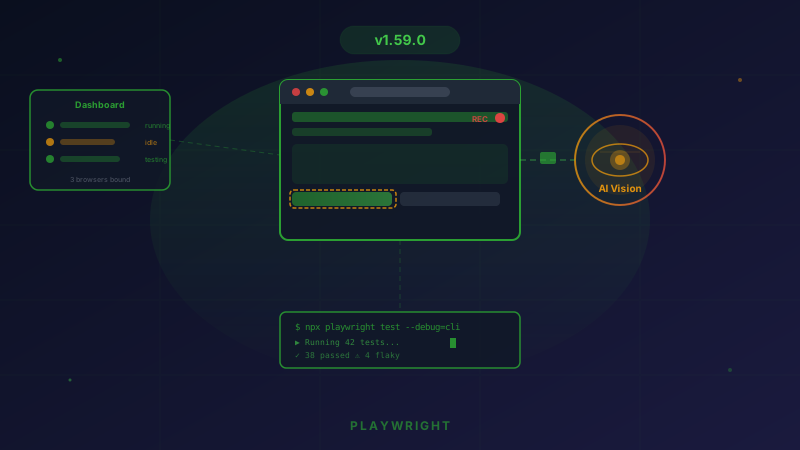
This is Playwright’s biggest release of 2026, bringing a Screencast API that fundamentally changes how tests are recorded and analyzed, a Browser Dashboard that shows the real-time status of every browser instance, and a CLI Debugger for AI Agents that makes agentic testing practical.
Let’s look at what’s new and how it could change the way your team works.
Screencast API — The Standout Feature in This Release
This is the headline feature everyone has been waiting for — a unified interface for screen recording that goes beyond simple video capture and makes it possible to truly “see” everything happening on the page.
What the Screencast API Can Do
Video recording with precise control
Instead of recording the entire test and reviewing it afterward, the Screencast API lets you start and stop exactly where you need. You can capture only the important moments, without wasting time scrubbing through a five-minute video to find a three-second bug.
Action annotations — highlight the element being interacted with
When a test clicks a button or types text, the Screencast can highlight that element in the video, making it obvious what the test did, where it happened, and when. No more guessing which exact step caused the failure.
Visual overlays — add context directly into the video
You can add chapter titles, descriptions, and custom HTML to the video. This is especially useful for test documentation that other people can watch and understand immediately.
Real-time JPEG frame streaming — built for AI vision
This is the most exciting part: the Screencast API can stream JPEG frames in real time through a callback, allowing an AI agent to “see” the screen and make decisions in real time.
Imagine this: an AI agent is performing an automated task on a website. It is not just reading the DOM — it can see the screen the way a person does and react to visual changes that the DOM may not fully capture.
Agentic video receipts
AI agents can record videos as proof of completed work — with evidence that the action was actually completed correctly. Instead of simply reporting “success,” the agent can produce a video receipt to verify it.
Browser Dashboard — Real-Time Visibility into Every Browser Instance
This is a new feature that could change how DevOps teams operate and monitor testing systems.
browser.bind() API
Previously, a browser launched by Playwright could only be used by the process that created it. Now, browser.bind() allows a single browser to accept connections from multiple clients at the same time — whether that is playwright-cli, @playwright/mcp, or other tools.
Dashboard UI
Open the Dashboard and you will see a list of all active browsers along with their status — which tests they are running, how many resources they are consuming, and which clients are connected.
For teams running tests in CI/CD pipelines, this adds the observability layer that has been missing for a long time.
CLI Debugger for AI Agents
Playwright v1.59 clearly recognizes that the future of testing is agentic — AI agents that can run tests, debug failures, and potentially fix issues on their own.
debug=cli Mode
Instead of opening the traditional GUI debugger, you can now debug through the CLI — ideal for AI agents running in terminal environments with no display.
playwright-cli attach
You can attach directly to an active debug session immediately, without rerunning the test.
Trace Analysis via CLI
The new npx playwright trace command set allows you to analyze traces right from the terminal — filter actions, inspect snapshots, and investigate failures without opening the Trace Viewer UI.
More Than 20 New APIs — Quick Summary
Beyond the Screencast API, this release also includes a large set of new APIs.
Snapshot & Locator
- page.ariaSnapshot() — capture an ARIA snapshot of the entire page
- locator.ariaSnapshot() — capture an ARIA snapshot of a specific element with depth options
- locator.normalize() — automatically convert a locator to follow best practices
- page.pickLocator() — pick a locator interactively
Storage & Console
- browserContext.setStorageState() — set storage state during a test
- page.clearConsoleMessages() — clear console messages
- page.clearPageErrors() — clear page errors
- consoleMessage.timestamp() — get the timestamp for each message
Network & Response
- request.existingResponse() — inspect an existing response without waiting
- response.httpVersion() — check the HTTP version in use (HTTP/1.1 vs HTTP/2)
Tracing
- New trace mode: retain-on-failure-and-retries — keep traces from both passing and failing runs for comparison
Async Disposable
- Support for await using syntax — automatic resource cleanup without needing try/finally
UI Mode & HTML Reporter — Major Improvements
UI Mode
- Filter tests affected by source changes — change one line of code and UI Mode will tell you which tests need to run again
- Action filtering — search for specific actions within a test run
HTML Reporter
- Show test runs from the same worker — get a clearer picture of how tests running on a shared worker behaved
- Filter test steps — search for specific steps in the report
- Timeline visualization — view the timeline of every test in a merged report and identify bottlenecks immediately (this feature started in v1.58)
Breaking Changes — What to Check Before Upgrading
Every major release comes with some breaking changes, and v1.59 has two key ones to watch:
- Dropped support for macOS 14 on WebKit — if your team still uses macOS 14 for Safari testing, you will need to upgrade the OS first
- Removed @playwright/experimental-ct-svelte — if you use component testing for Svelte through this package, you will need to find an alternative
Known Issue
There is a known issue where navigator.platform emulation may cause incorrect Ctrl/Meta key dispatch behavior. You can work around it by setting the environment variable PLAYWRIGHT_NO_UA_PLATFORM='1'.
Tested Browser Versions
| Browser |
Version |
| Chromium |
147.0.7727.15 |
| Firefox |
148.0.2 |
| WebKit |
26.4 |
| Google Chrome |
146 |
| Microsoft Edge |
146 |
Looking Back at v1.58 — The Foundation for This Release
v1.59 did not appear out of nowhere — v1.58 (January 23, 2026) laid important groundwork with:
- Playwright CLI — a token-efficient CLI mode for coding agents
- Timeline in HTML Report — visualization for finding bottlenecks
- UI Mode following OS theme — automatic dark/light mode
- Removal of legacy selectors —
_react, _vue, and :light were removed to push teams toward the newer locator model
What This Release Tells Us About the Future of Testing
Playwright v1.59 sends three very clear signals:
1. Testing is entering the agentic era
Screencast API, CLI Debugger, and Browser Dashboard — all of these are built to let AI agents run testing workflows themselves. Playwright is no longer just a tool for humans; it is becoming infrastructure for AI-driven work.
2. Observability is becoming first-class
The addition of a Dashboard, enhanced tracing, and timeline visualization shows that Playwright is no longer focused only on “running tests.” It is evolving into a testing platform with deep visibility across the entire workflow.
3. Video and visual input are becoming the interface for AI
Real-time JPEG streaming in the Screencast API is not primarily for people — it is built for AI vision models that can “watch” the screen and make decisions. This is a major step toward AI that can perform QA the way a human does.
Should You Upgrade Now or Wait?
Yes, upgrading is recommended — but do it in staging first.
Things to verify:
- If you use WebKit testing on macOS 14 → upgrade the OS first
- If you use
@playwright/experimental-ct-svelte → identify an alternative first
- Run your full test suite in staging to catch any breaking changes
For teams working on agentic testing or building an AI-powered QA workflow, v1.59 is a must-upgrade release because the Screencast API opens up entirely new possibilities.
Is Your Team Ready for Agentic Testing?
Playwright v1.59 opens the door to a new era of automated testing — but having the right tools does not automatically mean you will get the full value from them. You still need the right strategy, pipeline design, and team understanding to apply AI effectively in testing.
If you want to discuss how your team can adopt agentic testing, or if you need help designing an E2E testing system that can scale, the Enersys team is ready to help.
Talk to the Enersys team
References
- Playwright Official Release Notes — v1.59
- Playwright v1.59.0 GitHub Release
- Playwright Screencast API Documentation
- Playwright v1.58.0 GitHub Release
- Playwright npm Package