"The legacy system was like a ticking time bomb — every day we delayed migration, we were putting the business at risk. But every day we migrated incorrectly was a day the business could stop running."
That was the first thing the client’s CTO said to us in the kickoff meeting.
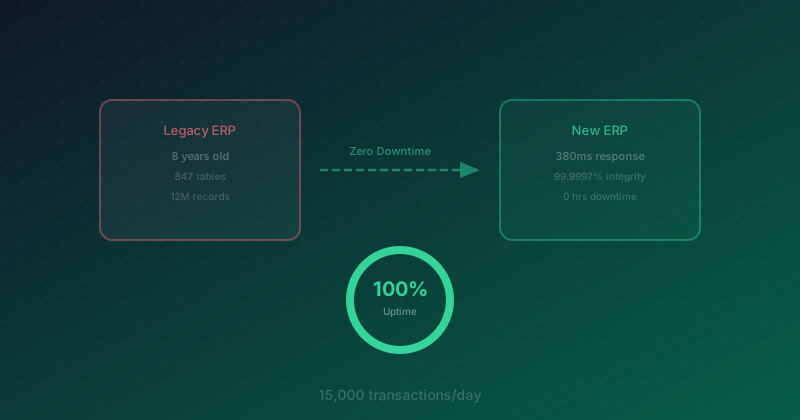
If you have ever been in a situation where you had to migrate an ERP system that is "live every day" — a system used by 350 people, running 24/7, processing 15,000 transactions per day — and then been told "you cannot take the system down for even a second," you know this is not just a technical challenge. It is a zero-failure game.
This is a real story from 2025.
The Problem: A System Close to Failure, But Impossible to Shut Down
The client was a mid-to-large manufacturing company that had been using the same ERP system for 8 years — and frankly, it was a miracle the system had survived that long.
What We Found
- Average response time of 4.2 seconds — every click an employee made required a 4-second wait. Multiply that by 15,000 transactions a day and the lost time becomes obvious.
- Average monthly downtime of 12 hours caused by bugs that were "fixed, then came back again" — in a factory running 3 shifts, 24/7, 12 hours of downtime per month translates into millions in lost revenue.
- 200+ accumulated customizations built over 8 years — with incomplete documentation, and in some cases, the original developers had already left.
- Annual maintenance cost of THB 3.5 million — and rising every year because specialists who could support the legacy system were becoming harder to find.
- Two previous upgrade attempts over the prior 3 years — both failed due to compatibility issues with years of accumulated customizations.
What made this project especially difficult: the factory operated 24/7, with 350 employees using the system continuously across production, warehouse, procurement, and finance — there was no maintenance window at all.
The Challenge: What the Client Needed
| Goal |
Details |
Difficulty Level |
| Zero Downtime |
No system downtime allowed during migration, not even a second |
Very High |
| 100% Data Integrity |
12 million records across 8 years had to be migrated with nothing missing |
Very High |
| Continuous Access for 350 Users |
No work stoppage, no "please wait a moment" messages |
High |
| Migrate 200+ Customizations |
Assess which customizations were still necessary and which could be retired |
Medium-High |
| Reduce Maintenance Cost |
Cut annual cost from THB 3.5 million to below THB 1.5 million |
Medium |
| 22-Week Timeline |
The client only had budget approval for 6 months |
High |
Given these requirements, the first option we ruled out was a Big Bang Migration — shutting down the old system on Friday night and going live with the new one on Monday morning. Textbooks may call it the "simplest" approach, but in the real world, it is often the one most likely to fail.
According to Gartner, 55–75% of ERP projects fail to deliver on expectations, and the Big Bang approach is one of the major reasons.
The Approach: 3 Core Strategies
1. Strangler Fig Pattern — Replace Gradually, Not All at Once
This pattern gets its name from the strangler fig tree, which slowly grows around an existing tree until it effectively becomes the new tree — while the old one disappears almost unnoticed.
We applied the same idea: migrate one module at a time, not the entire system at once. As each new module became ready, we gradually shifted traffic to it until the legacy system slowly lost its role.
The key advantage: if any module had a problem, we could roll it back immediately without affecting the others.
2. Dual-write Pattern — Write to Both Systems Simultaneously
During the transition period, every transaction was written to both the legacy system and the new system at the same time, ensuring 100% data consistency at all times.
If the new system encountered an issue, all data still existed completely in the old system — we only needed to switch traffic back.
3. Shadow Traffic — Test with Real Traffic, Not Test Data
This was what gave us confidence before cutover: we sent 100% of real traffic to the new system for processing, but continued returning results from the old system to users. Meanwhile, we automatically compared the outputs of both systems for every transaction.
If results did not match → immediate alert → the team investigated.
The 4-Phase Process
Phase 1: Data Assessment & Mapping (Weeks 1–4)
What we discovered when assessing the legacy system:
- 847 tables in the database (we had expected around 500)
- 23 tables with serious data quality issues, such as duplicate data, null values where nulls should not exist, and inconsistent date formats
- 67 tables that were no longer used but still consumed storage
- 12 million records that needed to be migrated
- Of the 200+ customizations, only 127 were actually still necessary; the rest were workarounds for old bugs that were no longer needed in the new system
This phase alone took a full 4 weeks, but it was the most critical phase of the project. If data mapping is wrong from the beginning, everything that follows will also be wrong.
Phase 2: Module-by-Module Migration (Weeks 5–16)
We migrated modules in this order:
| Order |
Module |
Record Count |
Weeks |
Reason for Sequence |
| 1 |
Inventory |
3.2M records |
Weeks 5–8 |
Few dependencies; good for validating the pattern |
| 2 |
Purchasing |
2.1M records |
Weeks 7–10 |
Directly connected to Inventory |
| 3 |
Sales |
4.3M records |
Weeks 10–13 |
Largest module; needed strong confidence before migration |
| 4 |
Finance |
2.4M records |
Weeks 13–16 |
Most critical; migrated last to reduce risk |
Notice that the timeline overlaps — we did not wait for one module to be 100% complete before starting the next. We began the next module once the previous one had passed defined milestones.
Phase 3: Shadow Testing (Weeks 17–20)
For 4 weeks, the new system ran alongside the old one while receiving 100% of real traffic:
- Week 17: Found a 0.3% discrepancy in the Sales module — caused by different rounding logic
- Week 18: Fixed the rounding issue, reducing discrepancy to 0.008%
- Week 19: All modules had discrepancies below 0.001%
- Week 20: Zero discrepancy for 7 consecutive days — we were ready for cutover
Phase 4: Cutover (Weeks 21–22)
This is the part we are most proud of: not a single user knew the cutover had happened.
We gradually shifted traffic from the old system to the new one:
- Day 1: 10% of traffic → new system
- Day 3: 25% of traffic
- Day 5: 50% of traffic
- Day 7: 75% of traffic
- Day 10: 100% of traffic → fully on the new system
At any point, if the error rate exceeded 0.1%, traffic would automatically roll back to the legacy system immediately — but throughout the 10-day cutover, we never had to roll back even once.
The Failed Round 1: A THB 4.7 Million Lesson
We will not pretend everything went smoothly from the start, because it did not.
Week 8 — the Purchasing module failed
When we started dual-write for the Purchasing module, everything looked fine for the first 3 days. But on day 4, the Finance team reported that some PO values "looked strange."
When we investigated further, we found:
- 2.3% of all POs had mismatched item prices between the two systems
- Root cause: the currency conversion logic in the old system calculated values one way, while the new system used a different method — the difference was small per transaction, but in total it amounted to THB 4.7 million
- The most concerning part was that without the Dual-write Pattern comparing both systems continuously, we might not have discovered the issue until financial close
What We Did
- Immediately paused migration of the Purchasing module — the Inventory module that had already been migrated continued operating normally in the new system
- Spent 2 weeks analyzing every currency conversion rule in the legacy system (which had no documentation at all)
- Built a reconciliation layer to automatically verify every PO amount before it was saved
- Ran regression tests on 2 years of historical data to ensure the logic matched 100%
The result: the timeline slipped by 2 weeks (from 22 to 24 weeks), but we did not lose a single record. Most importantly, the legacy system continued operating normally throughout, with no impact on users.
This is exactly why we chose Strangler Fig instead of Big Bang — if this had happened during a Big Bang go-live weekend, it would have meant the entire factory coming to a halt.
Results: Before vs After
| Metric |
Before Migration |
After Migration |
Change |
| Average Response Time |
4.2 seconds |
380 milliseconds |
11x faster |
| Monthly Downtime |
12 hours |
0 hours (first 6 months) |
-100% |
| Data Integrity |
Never validated |
12M records verified, 99.9997% match |
— |
| User Satisfaction |
3.2/10 |
8.7/10 |
+172% |
| Annual Maintenance Cost |
THB 3.5 million |
THB 1.2 million |
Saved THB 2.3M/year |
| Time to Generate Report |
45 minutes |
3 minutes |
15x faster |
| Bug Tickets/Month |
23 tickets |
4 tickets |
-83% |
One especially interesting figure is the 99.9997% data match rate — out of 12 million records, there were only 36 records with minor discrepancies (fractional rounding differences), which the Finance team confirmed were "acceptable and far better than expected."
Cost Analysis: How Much It Cost and When It Pays Back
| Item |
Amount |
| Total Migration Project Cost |
THB 8.5 million |
| Previous Annual Maintenance Cost |
THB 3.5 million |
| New Annual Maintenance Cost |
THB 1.2 million |
| Annual Savings |
THB 2.3 million |
| Annual Value of Avoided Downtime |
~THB 1.8 million (estimated from lost production output) |
| Total Annual Savings |
THB 4.1 million |
| ROI Break-even |
~25 months |
If you look only at the number, 25 months may feel long. But it is important to remember that the old system also carried substantial hidden costs — time employees lost waiting 4 seconds per click, reports that took 45 minutes to generate instead of 3 minutes, and missed business opportunities because the system could no longer support growth.
5 Lessons from the Field
1. Strangler Fig Beats Big Bang Every Time
No matter how urgent the timeline is, no matter how much pressure stakeholders apply, do not do a Big Bang Migration on a live production system. The risk is simply too high, and the cost of failure is always greater than the cost of moving more slowly.
2. Data Assessment Always Takes Longer Than Expected
We planned for 2 weeks and it took 4. We found 847 tables where we expected 500, and 23 data quality issues no one knew about. If we had not invested the time here, we would have faced those problems in production — where they would have been far harder to fix.
3. Dual-write Is an Essential Safety Net
Without dual-write, we would not have found the currency conversion bug until it was too late. The nearly lost THB 4.7 million is exactly the kind of cost the Dual-write Pattern helped us avoid.
4. Do Not Trust Legacy System Documentation
Of the 200+ customizations the client originally reported, only 127 were still actively used. The available documentation was outdated across the board. What we did instead was build understanding from the real system, not from the documents.
5. Shadow Traffic Means Testing Against Reality
Test data will never cover as much as real traffic. We found a 0.3% rounding discrepancy in the Sales module that test data had never detected, because the test dataset did not include edge cases involving product prices with multiple decimal places.
What Still Needs Improvement
We do not want to pretend everything is perfect. There are still areas we are actively improving:
Multi-region Failover
The new system currently still runs in a single region. If that region has an issue, downtime is still possible. We are currently planning a multi-region setup to ensure the zero-downtime capability we achieved can be sustained over the long term.
Legacy API Deprecation Timeline
There are still 3 external systems connected to the legacy system’s APIs. We need to migrate these API consumers within 6 months before the legacy system can be retired permanently.
AI-powered Anomaly Detection
During migration, we built a rules-based manual comparison system for validating data between the two platforms, and it worked well. But in the long term, we want to use AI/ML to detect data anomalies automatically so issues can be identified faster and more comprehensively than with rule-based checks alone.
Conclusion
Zero Downtime ERP Migration is not easy, but it is not impossible. What made this project successful was not the technology itself, but the thinking and process behind it — choosing Strangler Fig over Big Bang, using dual-write as a safety net, and validating with real shadow traffic before cutover.
If your organization is facing a legacy system migration, do not be afraid — but do have a plan. A good plan is one with a fallback at every stage, not one that simply assumes "nothing will go wrong."
If you would like to discuss ERP migration planning or digital transformation for your organization, the Enersys team would be glad to hear your requirements — Talk to us
Sources