"The deploy is done" — but users see an error page
At 2:00 AM on a Monday, the DevOps team deployed a new version of the website. Everything passed through the CI/CD pipeline successfully — the image was built, pushed to the registry, and the rollout completed. The terminal displayed the message: "deployment successfully rolled out."
But during the 10 seconds before that, users actively visiting the website saw this:
502 Bad Gateway
It was not the first time, and it was not the last. Every deployment created a "gap" of around 5–15 seconds during which the website was unreachable. As a result, the team chose to deploy late at night to reduce the impact.
But the real question was — why did a system designed for zero-downtime still experience downtime every time we deployed?
Root Cause: 2 Issues That Broke Zero-Downtime
Once we opened the deployment configuration, the problem was immediately clear — 2 small details had been overlooked.
Issue 1: The system was allowed to "kill" the old service before the new one was ready
The configuration effectively said, "during deployment, it is acceptable for up to 1 service instance to be unavailable." Since we only had a single service instance, that meant the system would shut down the old service immediately before the new one was ready.
Here is what happened:
- The system starts deploying the new version
- A new service instance is created (but not yet ready to receive traffic)
- The old service instance is shut down immediately
- No service is available to receive traffic → 502
- The new service becomes ready → normal operation resumes
The period between steps 3 and 5 was the "gap" where users saw the error.
Issue 2: There was no health check
Even if Issue 1 had been fixed, without a health check the system would assume the new service was "ready" as soon as it started running — regardless of whether the application inside had fully finished loading.
That is why even systems with otherwise correct deployment settings can still experience short-lived errors.
The Fix: 3 Changes in Fewer Than 10 Lines
We fixed the problem with 3 changes:
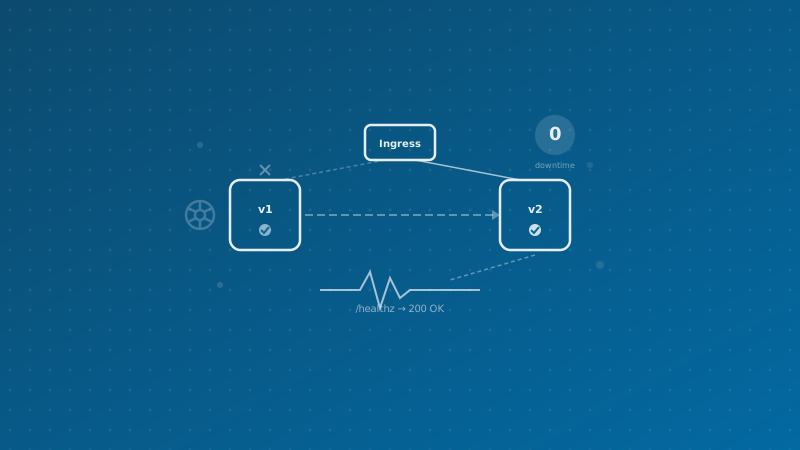
1. Add a health check endpoint — a lightweight endpoint that responds immediately when the service is truly ready to receive traffic. No page loading, no rendering — just a simple "ready" response.
2. Add a readiness check — the system checks the health endpoint every 5 seconds. If the new service does not respond, traffic is not sent to it. If it fails 3 consecutive times, traffic is stopped immediately.
3. Do not shut down the old service until the new service is ready — during deployment, 2 service instances run temporarily in parallel. The old one is only terminated after the new one passes the health check.
The Result: Deployment Timeline After the Fix
t=0s    Create new service (v2) ← old service (v1) is still receiving traffic
t=3s    Start checking v2 health endpoint
t=8s    v2 responds successfully → marked as Ready
t=8s    Start sending traffic to v2
t=9s    Send shutdown signal to v1 (graceful shutdown)
t=9s+   All traffic goes to v2 — not even a single second of gap
Deploy any time, even in the middle of the day — with no downtime anymore.
Comparing Deployment Strategies
Once you understand the issue, it helps to look at the broader range of deployment strategies used across the industry:
Recreate Strategy
Shut down all services → recreate everything. It is the simplest approach, but it always causes downtime. It is suitable for systems that require breaking changes, such as database schema migrations.
Rolling Update (What We Used)
Gradually replace old service instances with new ones one at a time. When configured correctly, this delivers zero-downtime with only a small temporary increase in resource usage. It is well suited for stateless web applications.
Blue-Green Deployment
Maintain 2 complete environments (Blue = production, Green = staging). Once Green is ready, all traffic is switched over immediately. The advantage is very easy rollback; the downside is that it consumes 2x resources at all times.
Canary Deployment
Route only 5–10% of traffic to the new version first. If no issues appear, gradually increase to 25%, 50%, and 100%. This is ideal for high-risk new features, but it requires strong observability to be effective.
Comparison Summary
| Strategy |
Downtime |
Additional Resources |
Rollback |
Complexity |
| Recreate |
Yes |
None |
Slow (redeploy) |
Low |
| Rolling Update |
No* |
Small, temporary |
Moderate |
Low-Medium |
| Blue-Green |
No |
2x at all times |
Immediate (switch back) |
Medium |
| Canary |
No |
Small |
Immediate (stop canary) |
High |
* When configured correctly
Conclusion
A 502 error during deployment is not a technology limitation — it is usually the result of incomplete configuration. Changing just 2 things — adding a health check and telling the system not to shut down the old service before the new one is ready — immediately turned a deployment process that always caused downtime into a true zero-downtime deployment.
What we learned from this: in infrastructure, the biggest problems often come from the smallest details — not from flawed architecture, not from bad technology, but from just 2 overlooked lines of configuration.
Does your organization still experience downtime during deployments?
Many organizations we work with face the same problem — deploying late at night out of fear of downtime, users encountering random errors that are hard to reproduce, or relying on maintenance windows that are longer than necessary.
At Enersys, we believe that technical excellence is not just about choosing the best technology, but about understanding it deeply enough to know what will break, when it will break — and preventing it before it happens.
If your team still has to deploy late at night because of downtime concerns — let us help