Case Studies

Even a Little Slowness Is Unacceptable — If Our Own Website Is Not Fast, Why Would Clients Trust Us?

If a software company cannot make its own website fast, why would clients trust it to build theirs? This case study documents how we tackled build warnings and reduced page data and shared JavaScript across the entire site — without breaking SEO.

5 Apr 202610 min
Web PerformanceNext.jsBundle OptimizationPage DataSEODeveloper Experience

We build websites for a living. Ours had better be fast.

Let's be honest — if a software company's own website is slow, bloated, and shipping unnecessary data, that says something. It's like a mechanic whose own car won't start. Nobody is going to hire that person.

This work didn't start because someone complained the site felt slow. It started because the build output showed two clear signals:

  • a large-page-data warning
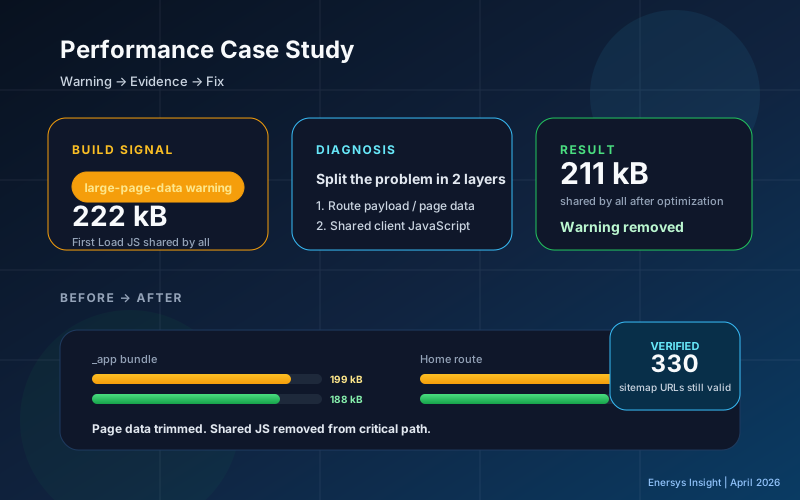
  • First Load JS shared by all sitting at 222 kB

Those two lines meant we were pushing more data and JavaScript to the browser than we needed to, before the user even got to interact with anything.

In a Next.js Pages Router app, these are two separate problems:

  • Large page data means the browser has to receive and parse more serialized data before hydration
  • Large shared JS means every route carries the same dependency bundle, even when some pages don't use any of it

If you try to fix both at once without separating them first, you'll likely optimize the wrong thing. So the first step was simple: open the build output, look at the numbers, and treat them as the source of truth.


Two questions, not one

Before touching any code, we split the investigation:

Which routes are carrying more data than they actually use? That's the page-data problem.

Which dependencies got promoted into the shared bundle for every route? That's the shared JS problem.

Without this split you just see one big number and guess. With it, you know whether to go after data scope, code-loading boundaries, or both.


Phase one — shrink the page data

Tracing the large-page-data warning back to its source, the pattern was familiar: some routes were receiving a much broader data payload than they needed to render.

This happens a lot in multilingual marketing sites:

  • content from different contexts gets lumped into one wide namespace
  • a route that only needs part of it still gets the whole thing
  • locale fallback can duplicate data across languages

The system still worked fine. It just shipped more than it needed to. So the fix wasn't random trimming. It was reshaping data boundaries so each route only gets what it actually uses.

What that looked like in practice:

  • split broad content groupings into route-appropriate scopes
  • load only the content each page needs
  • cut cross-locale duplication that added weight without user value
  • make the content catalog more locale-aware

Results:

Metric Before After
large-page-data warning Present Gone
Home page-data (TH) Much higher 87,194 bytes
Home page-data (EN) Much higher 42,936 bytes
Terms page-data (TH) Much higher 125,482 bytes
Terms page-data (EN) Much higher 59,720 bytes

The warning was gone, but the real point was that routes stopped carrying content they didn't need.


With page data smaller, the next bottleneck got obvious

Once the page-data problem was handled, the shared bundle stood out more clearly. First Load JS shared by all was still 222 kB. _app was still 199 kB.

This is where a lot of teams stop. The warning is gone, feels like the job is done. But unless you actually inspect the chunks again, you don't know if the heavy stuff has really left the critical path.

We started with a reasonable guess: if some globally rendered UI is pulling in heavy client-side dependencies, those dependencies end up shared across every route.

So the first round focused on reducing weight in the shared UI path.

But here's the thing — after that first round, we checked the chunk again. The heavy dependency was still sitting in the _app bundle.

Meaning: the first round helped, but the root cause hadn't actually moved out. The fix looked good on paper but the artifact told a different story.

If you haven't checked the artifact after the fix, you don't know if the problem is solved.

Phase two — move route-specific logic out of the shared path

Once we saw the bundle hadn't really dropped, we reframed the question. Not "what's in the layout?" but "what's being promoted into shared client code even though it only belongs to a few routes?"

What we did:

  • route-specific functionality now loads only where it's needed
  • heavy form and interaction logic no longer gets promoted into the shared path
  • appropriate loading states preserve UX instead of making every route pay the cost upfront

The principle is simple: if a feature isn't used on every page, it shouldn't be loaded on every page.

Results:

Metric Before After
First Load JS shared by all 222 kB 211 kB
_app 199 kB 188 kB
Home route 200 kB 189 kB
Contact route 199 kB 188 kB
Job detail routes 205 kB 190 kB

More importantly, when we inspected the final _app chunk, the heavy dependency that had been stuck there was gone. The cost was actually removed from the shared critical path, not just reshuffled.


What we learned

Build warnings are free instrumentation. Easy to ignore because the build still passes. But they're the framework telling you where hidden cost is piling up.

Most web performance problems aren't about algorithms. On content-heavy sites, the issues usually come from data scope and code-loading scope being wider than necessary.

Shared path = critical path. Anything in a global layout or shared bundle has system-wide cost. Put a heavy dependency there and every route pays for it.

Hypotheses have to be allowed to fail. We started with one assumption, tested it, and changed direction when the artifact didn't back it up. Good performance work means letting evidence overrule an attractive theory.

Optimization shouldn't create new regressions. We didn't just check that the numbers went down. We also verified: build passes, sitemap still generates, important routes still render, original warning doesn't come back.


Why this matters beyond the code

If you're about to hire a software company to build your website, and their own site is slow, heavy, and shipping unnecessary JS — how much confidence does that give you?

We think about that too. That's why we don't let even a single warning slide. Every unnecessary byte affects:

  • How quickly users see meaningful content — people judge a site in the first 3 seconds
  • How long they wait before a page becomes interactive — past 5 seconds, conversions drop
  • How well pages behave on mobile — over 70% of Thai users browse on phones
  • How public-facing pages perform for SEO — Google uses Core Web Vitals as a ranking factor

A fast website isn't a bonus. It's evidence that the team behind it pays attention to details.

Lighthouse Scores After Optimization

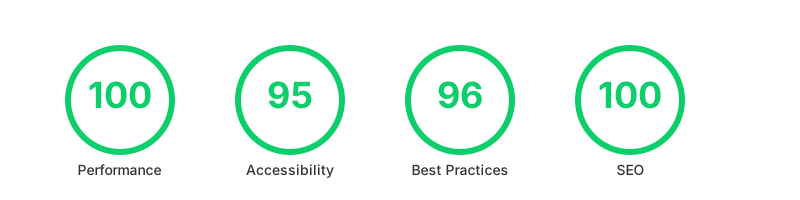
Lighthouse Scores — Performance 100, Accessibility 95, Best Practices 96, SEO 100

These are the actual Lighthouse scores for our Insights page after this round of work — Performance 100, Accessibility 95, Best Practices 96, SEO 100.


Wrapping up

This started with a small build warning that most teams would ignore. We chose not to, because if we can still do better, there's no reason to stop.

  1. Reduced page data so each route only receives what it needs
  2. Reduced shared JS so route-specific code stops riding the critical path for every page

The result wasn't just nicer numbers. It was a site that carries less hidden cost, scales more cleanly, and serves as proof that we hold ourselves to the same standard we promise our clients.

If your team is seeing similar warnings, or your build output is starting to look off as the site grows — talk to us. We fix performance from the root cause, not just the scorecard.


References

"Empowering Innovation,
Transforming Futures."

ติดต่อเราเพื่อทำให้โปรเจกต์ของคุณเป็นจริง