What Happened?
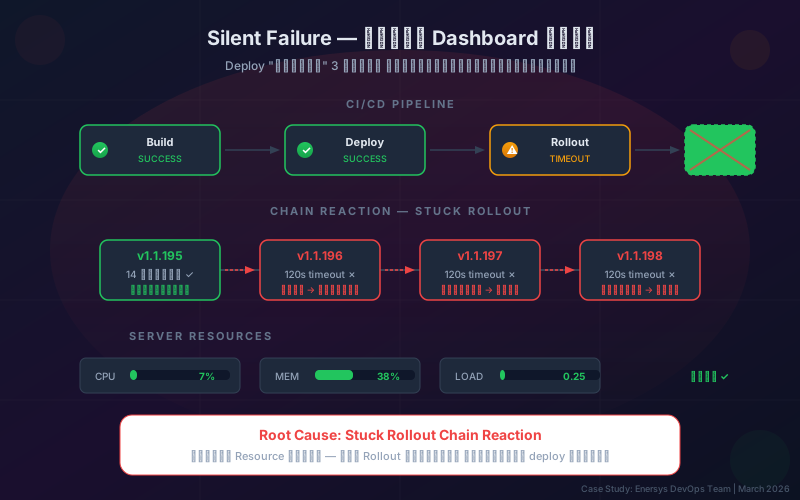
One day, we published a new article to the website. The CI/CD pipeline built successfully ✅, deployed successfully ✅, and the dashboard was green across the board — but when we opened the site, it was still showing content from 3 days ago. The new article was nowhere to be found.
And it didn’t happen just once. Looking back, we found that 3 deployments in a row had all been reported as "successful" — yet none of them had actually updated the site.
This is a record of how we traced the issue, from what we saw → what we assumed → what we eventually discovered.
Step 1 — Was It Really "Successful"?
The first thing we did was inspect every stage of the pipeline:
- Build — the image was built and pushed to the registry ✅
- Deploy — the configuration was applied to the cluster successfully ✅
- Rollout — stuck! timed out after 2 minutes, but handled with a fallback message instead of an error ❌
The key detail: the system reported "success" because the timeout was treated as a warning, not an error — so the pipeline passed even though the final stage had failed.
First lesson: "No error" does not mean "success" — silent failures are always more dangerous than loud ones.
Step 2 — Check the Most Obvious Hypotheses First
Once we knew the rollout was stuck, the next question was: "Why?" We started with the most common explanations.
Hypothesis A: Not enough resources?
We opened the monitoring dashboard and saw CPU usage at only 7%, memory at 38%, and a very low load average.
❌ Ruled out — there was plenty of capacity.
Hypothesis B: Health checks were failing?
We reviewed the configuration. The health check endpoint was set correctly and had worked in the previous version.
❌ Ruled out — no config changes there.
Hypothesis C: The image couldn’t be pulled?
We checked the registry — the image had been pushed successfully and could be pulled normally.
❌ Ruled out — not an image issue.
Step 3 — Go Back in Time to Find Where It Broke
Once the early hypotheses were eliminated, we changed our approach — go back to the last deployment that actually worked and compare from there:
| Version |
Result |
Time Taken |
| v1.1.195 |
✅ Success |
~14 seconds |
| v1.1.196 |
❌ Timeout |
>120 seconds |
| v1.1.197 |
❌ Timeout |
>120 seconds |
| v1.1.198 |
❌ Timeout |
>120 seconds |
The pattern was clear: v1.1.195 completed normally. Starting with v1.1.196, every rollout got stuck.
We checked what changed between those two versions — and found nothing had changed in the infrastructure. The only update was new content on the site.
Step 4 — Root Cause: A Domino Effect
After digging deeper, the real picture started to emerge.
How Rolling Updates Work
The container orchestration system used a rolling update strategy for zero-downtime deployment:
- Create new containers first (surge)
- Wait until the new ones are ready (readiness check passes)
- Then shut down the old ones (terminate)
With the setting that prevents reducing available capacity, the old containers can only be terminated once the new containers are fully ready.
The Problem: Chain Reaction
- v1.1.196 timed out — the rollout didn’t finish within the expected time, so the system left it in an "in-progress" state
- v1.1.197 was deployed on top of it — but the system was still processing the previous rollout, so the new one got stuck too
- v1.1.198 came next — stacking another layer on top, like falling dominoes
Second lesson: A timed-out rollout doesn’t disappear — it stays there until someone explicitly fixes it.
Step 5 — Why Didn’t the Pipeline Alert Anyone?
This was the most painful part: the pipeline completed every time because the timeout was handled as only a warning.
The logic worked like this:
- If the rollout succeeds → show "success"
- If the rollout times out → show "⚠️ timeout" but still treat the pipeline as passed
The result: a green dashboard ✅ every time, while no one realized the site had been stuck on an old version for 3 full days.
Third lesson: Every ignored warning is a future error — a timeout should be a failure, not a warning.
The Fix — 3 Levels
Level 1: Immediate Recovery
Force a restart so the system clears the stuck rollout and starts a clean deployment from scratch.
Level 2: Prevent It from Happening Again
- Change the pipeline so rollout timeout = failure, not warning
- Add a step to clear any previous stuck rollout before starting a new deploy
- Deploy one service at a time — don’t deploy the web app and API together
Level 3: Monitoring & Alerting
- Set an alert when the deployed version ≠ the version actually being served
- Check the response header after deployment to confirm it matches the latest version
- Run a smoke test after deploy — if the content doesn’t match, automatically roll back
5 Lessons for Every Team
1. Don’t Trust a Green Dashboard
"Build succeeded" ≠ "Deploy succeeded" ≠ "The system is actually working" — always verify the final outcome.
2. Silent Failures Are More Dangerous Than Loud Failures
A noisy failure gets fixed immediately. A quiet one accumulates until it turns into a crisis.
3. Go Back in Time Before Guessing
Instead of guessing "it’s probably this," find the last known good state and compare from there. It’s the fastest way to eliminate bad assumptions.
4. Every Warning Needs an Escalation Path
A warning that happens 3 times in a row is no longer just a warning — it’s an incident.
5. Design Pipelines to "Fail Fast, Fail Loud"
A good system should make noise when something goes wrong, not hide the problem behind a green status indicator.
Key Takeaways
This issue wasn’t caused by broken code, a server outage, or insufficient resources — it came from the gap between a successful build and a real deployment, a gap nobody was monitoring.
In DevOps, what you don’t measure is what you don’t know. And what you don’t know is exactly what comes back to hurt you when you least expect it.
If your organization is dealing with a similar problem — deployments that look successful but don’t actually update the system, pipelines that are too quiet, or infrastructure that needs to be more resilient — talk to the Enersys team. We help design and fix DevOps systems so they work in the real world.
References