Why Performance Testing Is an Urgent Enterprise Priority
Imagine your e-commerce system going down on Flash Sale day — tens of thousands of customers cannot access the site, sales disappear instantly, and your brand takes a hit.
Real industry figures:
- 98% of organizations report that one hour of downtime costs more than USD 100,000
- 81% say the cost exceeds USD 300,000 per hour
- Amazon once lost approximately USD 220,000 per minute during peak hours
- A website that is slower by just 100 milliseconds can reduce sales by 1%
Performance testing is no longer just “a QA team concern” — it is a business strategy that directly affects revenue, reputation, and organizational resilience.
And Apache JMeter is the open-source tool most widely trusted by organizations around the world for this mission.
What Is JMeter — and Why It Is an Industry Standard
Apache JMeter is a 100% Java open-source application designed for performance testing and system measurement — whether for web applications, REST APIs, databases, or messaging systems.
What makes JMeter stand out:
- No licensing fees — dramatically reduces testing tool costs
- Supports multiple protocols — not limited to HTTP
- Extensible through plugins — a large ecosystem
- Works with CI/CD — fits into DevOps pipelines
- Supports distributed testing — scales as needed
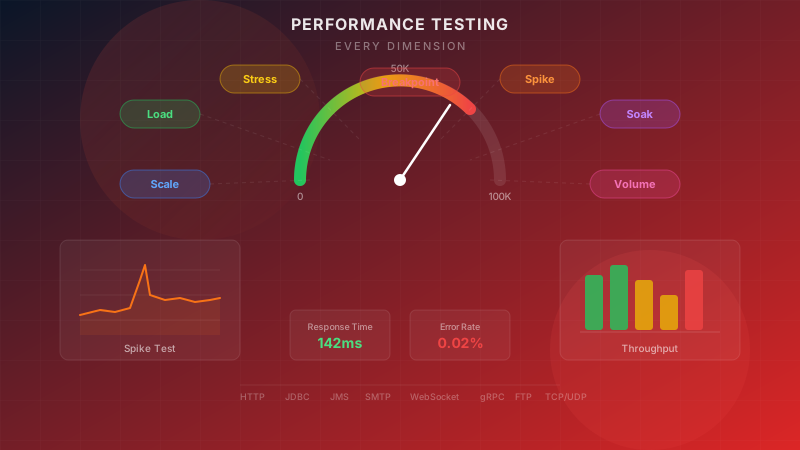
7 Dimensions of Performance Testing That JMeter Covers
1. Load Testing — Testing Under Normal Load
Goal: Confirm that the system performs as expected under normal user volume.
Business context: Suppose your ERP system has 500 employees using it simultaneously on Monday morning — a load test confirms that response times remain within acceptable limits, no transactions fail, and server resources are sufficient.
What it measures:
- Average Response Time
- Throughput (requests/second)
- Error Rate
- Resource Utilization (CPU, Memory, Disk I/O)
When to do it: Before every go-live, after every major release, and as a baseline for future comparison.
2. Stress Testing — Finding the System’s Limits
Goal: Push the load beyond the designed limit to see whether the system degrades gracefully or fails catastrophically.
Business context: A bank designs a system to handle 10,000 transactions per minute. A stress test gradually increases that to 15,000… 20,000… 30,000 to observe how the system responds — will customers see error pages, or will the system queue requests cleanly?
Questions a stress test answers:
- What is the maximum number of concurrent users the system can handle?
- How does the system fail once the limit is exceeded?
- How quickly does the system recover after load decreases?
- Where are the bottlenecks?
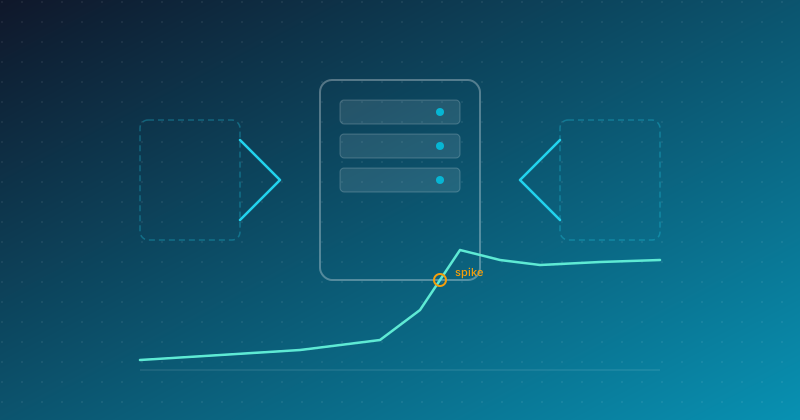
3. Spike Testing — Handling Sudden Traffic Surges
Goal: Simulate scenarios where traffic spikes abruptly — flash sales, viral news, or registration openings.
Business context: An e-commerce platform launches a flash sale at 9:00 PM — within the first 30 seconds, users surge from 1,000 to 50,000. A spike test reveals whether auto-scaling responds in time, whether CDN caching can absorb the traffic, and whether the database connection pool will be exhausted.
How it differs from stress testing: Stress testing increases load gradually, while spike testing jumps immediately — which often reflects real user behavior more accurately.
Real-world scenarios that should be tested:
- Flash Sales / Limited Drops
- Breaking news or viral content
- Registration launches (universities, concerts, vaccines)
- Tax filing deadlines
4. Endurance Testing (Soak Testing) — Hunting for Memory Leaks
Goal: Run the system continuously under load for 24–72 hours to uncover issues that remain hidden.
Business context: A core banking system that must run 24/7 may appear healthy in a one-hour load test. But after 48 hours, memory usage gradually climbs until full capacity is reached — that is a memory leak that could take down the system over a long holiday weekend when no one is watching.
Issues soak testing can uncover:
- Memory leaks that accumulate over time
- Database connections that are not released
- Log files that grow until disks are full
- Thread pools that gradually become exhausted
- Progressive performance degradation
Recommended duration:
- General systems: 24 hours
- Mission-critical systems: 48–72 hours
- Systems with prior memory issues: run until the pattern is clearly visible
5. Scalability Testing — Verifying Scale
Goal: Validate that the system actually scales as the architecture was designed to.
Business context: A SaaS company designs its system to scale horizontally with Kubernetes — but being designed to scale does not mean it actually will. Scalability testing increases load step by step while adding pods/instances and measuring whether throughput rises linearly or shows diminishing returns.
What it measures:
- Whether throughput increases linearly as resources are added
- Whether there are bottlenecks preventing scale (for example, a database as a single point)
- Whether auto-scaling works correctly
- How cost per transaction changes
6. Volume Testing — Massive Data Volumes
Goal: Test the system when the database contains very large amounts of data.
Business context: A CRM system with 100,000 customer records may perform normally, but when it grows to 10 million records, a search that once took 200ms may take 15 seconds, and a report that once generated in 3 minutes may take 2 hours.
What JMeter helps test:
- Query performance as data grows by 10x, 100x
- Index effectiveness under real data volumes
- Report generation time with large datasets
- Data migration performance
7. Breakpoint Testing — Finding the Exact Failure Point
Goal: Identify the system’s exact breaking point.
Business context: Unlike stress testing, which asks whether the system can “cope,” breakpoint testing seeks a precise number such as “the system fails at 12,847 concurrent users.” This is critical for capacity planning and investment decisions.
What it delivers:
- The exact maximum number of concurrent users
- Which resource becomes the first bottleneck (CPU, Memory, Network, Disk)
- The safety margin that should be reserved
- Data for capacity planning 6–12 months ahead
Protocols Supported by JMeter — Not Just HTTP
One of JMeter’s most important strengths is the breadth of protocols it supports, allowing testing across the full technology stack.
HTTP/HTTPS — Web Applications & REST APIs
The core protocol used to test websites, REST APIs, GraphQL endpoints, and even single-page applications that use AJAX to call backend services.
JDBC — Database Performance
Test query performance directly against the database — without passing through the application layer — making it easier to determine whether the issue is in the database or the application.
JMS — Message Queues
For organizations using message queues such as ActiveMQ, RabbitMQ, or Kafka, JMeter can test both producers and consumers, including message throughput.
SMTP/POP3 — Email Systems
Test email systems under load — especially important for organizations that send high volumes of email, such as marketing campaigns or notification systems.
WebSocket — Real-Time Communication
Test real-time systems such as chat, live dashboards, and collaboration tools that use WebSocket for bi-directional communication.
gRPC — Microservices Communication
Supports the increasingly popular gRPC protocol in microservices architectures — enabling service-to-service communication testing under load.
FTP — File Transfer
Test large file transfer systems — important for environments with batch processing or data exchange workflows.
TCP/UDP — Low-Level Protocols
For systems using custom low-level protocols, JMeter supports raw TCP/UDP, enabling testing even for non-standard protocols.
What this means for enterprises: Enterprise systems are not just websites — they include databases, message queues, microservices, file transfer, and much more. JMeter is a single tool that can test the entire stack.
Core JMeter Components — An Executive-Level View
Thread Groups — Simulating Users
Thread Groups are the heart of testing — they define how many users to simulate, how quickly they ramp up, and how long the test runs. JMeter offers several Thread Group types to support different usage patterns:
- Regular Thread Group — ideal for basic load testing
- Stepping Thread Group — increases users step by step, suitable for scalability testing
- Ultimate Thread Group — allows flexible pattern design, ideal for simulating real traffic behavior
Samplers — Sending Requests to the System
A Sampler is the component that sends actual requests to the target system — whether an HTTP request, a database query, or a message queue operation.
Timers — Simulating Real Behavior
Real users do not click continuously without pause. Timers simulate think time between actions, making test results closer to reality.
Assertions — Validating Correctness
It is not enough for “the system to respond” — it must “respond correctly.” Assertions verify whether the response is correct, whether by status code, content, or response time.
Listeners & Reporting — Presenting Results
These convert raw data into understandable reports — graphs, tables, and summary statistics that help teams make decisions.
Pre/Post Processors — Automating Data Handling
Extract values from previous responses (such as tokens or session IDs) for use in the next request — essential for testing complex flows.
Logic Controllers — Controlling Flow
Define sequence and conditions, such as routing 70% of users to the home page and 30% to search in order to simulate realistic traffic patterns.
Config Elements — Centralized Configuration
Define shared values such as server URLs, default headers, and CSV data, making test plans easier to manage.
Advanced Capabilities — What Makes JMeter More Powerful Than Typical Tools
Distributed Testing — Spreading Load Across Multiple Machines
For tests that need to simulate tens of thousands to hundreds of thousands of users, a single machine is not enough. JMeter supports a distributed architecture that spreads load across multiple machines, with a master node collecting the results.
Benefits:
- Simulate anywhere from hundreds to hundreds of thousands of users
- Distribute load geographically
- Eliminate bottlenecks on the test runner machine
- Consolidate results into a single report
Real Browser Testing — Testing with Actual Browsers
JMeter is not limited to the protocol level — with WebDriver integration, it can test using real browsers, covering JavaScript rendering, CSS loading, and user interaction.
Best suited for:
- Single Page Applications (React, Angular, Vue)
- Systems with complex client-side logic
- Measuring real user experience
Correlation & Parameterization — Testing with Diverse Data
Real systems do not have one user repeating the same action over and over. JMeter supports:
- Parameterization — using different data in each iteration (usernames, products, addresses)
- Correlation — extracting values from previous responses (tokens, sessions) for reuse
- CSV Data Set — reading test data from external files
Plugin Ecosystem — Unlimited Extensibility
JMeter has a plugin ecosystem that expands its capabilities:
- Custom Samplers for specialized protocols
- Thread Group Patterns for complex load models
- Visualization Plugins for clearer reporting
- Integration Plugins for connecting with other tools
Real-Time Monitoring — Grafana + InfluxDB
The best performance testing is not just “run and review the results later” — it requires real-time monitoring.
JMeter can send results to a time-series database such as InfluxDB and visualize them in Grafana dashboards, enabling teams to:
- See problems immediately during the test instead of waiting until it ends
- Correlate performance data with server metrics (CPU, Memory, Network)
- Build dashboards visible to the whole team, not just testers
- Store historical data to compare performance across releases
From our experience: Integrating JMeter with a solid monitoring stack reduces root-cause analysis time by more than 70% compared with relying on log files alone.
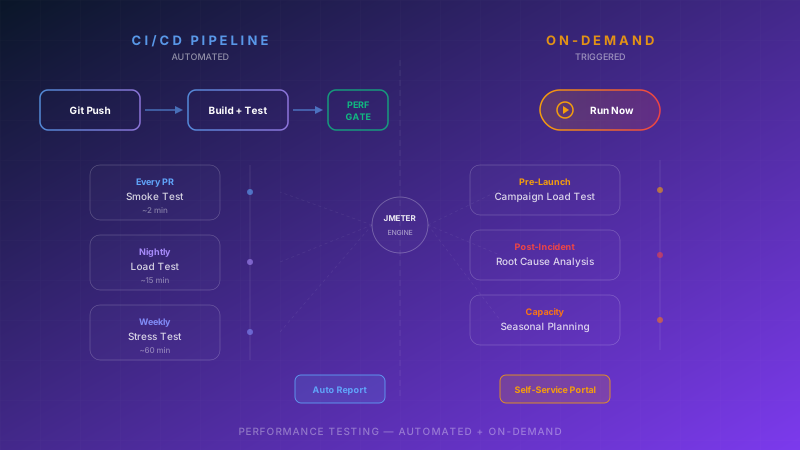
CI/CD Integration — Automated Performance Testing
In the DevOps era, performance testing must be automated and built into the pipeline.
JMeter supports Non-GUI mode, which enables teams to:
- Run automatically in the CI/CD pipeline on every release
- Set performance gates — fail the build if response times exceed thresholds
- Compare baselines — alert when performance declines versus the previous version
- Generate reports automatically — send results to the team immediately
Why this matters: No organization wants to discover a slow system after users complain — performance gates in CI/CD catch issues before code reaches production.
Performance Testing Strategy — Planning It the Right Way
Effective performance testing is not just “open JMeter and click Run” — it requires a clear strategy.
Step 1: Define Performance Requirements
- SLAs agreed with customers (response time, uptime)
- Current expected load and projected load over the next 6–12 months
- Critical business transactions that must receive the highest priority
Step 2: Choose the Right Test Types
You do not need to run all 7 types every time — choose based on context:
| Scenario |
Recommended approach |
| Before go-live |
Load + Stress + Breakpoint |
| Flash Sale / Campaign |
Spike + Scalability |
| 24/7 systems (Banking, Healthcare) |
Soak + Load + Stress |
| After data migration |
Volume + Load |
| Every sprint/release |
Load (Automated) |
Step 3: Build Realistic Test Scenarios
- Use production traffic patterns as the model
- Simulate diverse user journeys, not just a single page
- Include background processes (batch jobs, scheduled tasks) in the test
Step 4: Analyze and Improve
- Clearly identify bottlenecks (Application, Database, Network, Infrastructure)
- Prioritize fixes by business impact
- Retest after remediation to confirm the issue is fully resolved
The ROI of Performance Testing — Numbers Executives Need to Know
The Cost of “Not Testing”
- Downtime Cost: Average of $300,000+ per hour
- Reputation: 79% of users dissatisfied with performance will not return
- SEO: Google uses page speed as a ranking factor — slower systems mean lower rankings
- Conversion: Every additional 1 second of delay reduces conversion by approximately 7%
The Return on Testing
- Prevents downtime worth hundreds of thousands to millions of dollars
- Reduces infrastructure costs through right-sizing based on capacity planning
- Improves conversion with faster systems
- Cuts troubleshooting time with a clear performance baseline
A real-world example: The global software testing market was valued at approximately USD 48.17 billion in 2025 and is projected to grow to USD 93.94 billion by 2030 — reflecting the steady rise in the importance organizations place on testing worldwide.
Conclusion — JMeter Covers Every Dimension of Enterprise Performance Testing
JMeter is not just a load testing tool — it is the most comprehensive performance testing platform for enterprises:
- 7 test types from Load to Breakpoint
- 8+ protocols covering the full technology stack
- Distributed architecture for large-scale testing
- Real-time monitoring with Grafana + InfluxDB
- CI/CD integration for DevOps pipelines
- Plugin ecosystem with virtually unlimited extensibility
- Open source with no licensing fees
But no matter how capable the tool is, it means little without the right strategy and a team that understands both business context and technical depth.
Let Enersys Help You Plan Performance Testing
At Enersys, we have experience designing and executing performance testing for many Thai enterprises — from e-commerce platforms handling flash sales to banking systems that must operate 24/7.
We do not just “run JMeter” — we help you:
- Build a strategy for performance testing aligned with your business
- Design test scenarios based on real production traffic patterns
- Analyze results and identify bottlenecks with recommended remedies
- Create monitoring dashboards your team can continue using
- Integrate with CI/CD for automated performance testing
Consult the Enersys team about Performance Testing
Sources