The Problem Every Team Runs Into: AI Writes Fast, Shipping Still Takes Forever
By 2026, a lot of software teams are living through the same strange contradiction:
AI helps you write code much faster, but getting that code into production still takes days or even weeks.
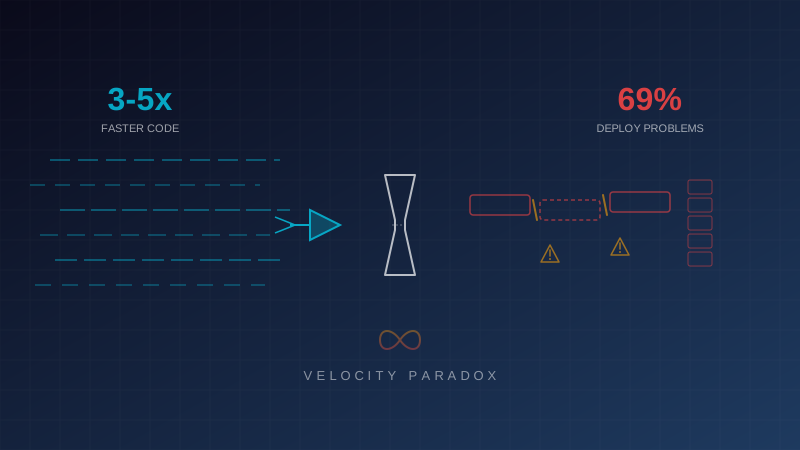
The Harness State of DevOps 2026 report puts numbers behind that feeling. 69% of teams using AI heavily in coding said deployment problems were happening more often, and their average incident resolution time climbed to 7.6 hours, compared with 6.3 hours for teams using less AI.
So the problem is not simply that AI writes bad code.
The real problem is this: most teams are still trying to push a much faster stream of code through the same old delivery system.
It is like upgrading the factory machine so it can produce 10 times more output, while the quality-control belt and shipping line stay exactly the same. Work piles up. Nothing moves faster where it actually matters.
This article walks through how Enersys built the foundation infrastructure that lets AI-assisted code go through every important check and reach production in minutes instead of days.
The Core Idea: Trust, But Verify at Machine Speed
Once AI starts helping your team write code, the amount of code produced each day goes up fast. That raises one simple question:
How do you know the code still works?
The answer is not "have humans review every line." People cannot review code as fast as AI can generate it.
The answer is to build layered, automated verification that checks the code from different angles before it is allowed anywhere near production:
- Type Safety: Does the code match the language and shared contract structure?
- Lint Rules: Does it follow the team’s standards?
- Unit Tests: Does each piece behave correctly on its own?
- Integration Tests: Do the pieces work together?
- E2E Tests: Does the system work from a real user’s point of view?
- Performance Audit: Is the experience still fast enough?
- Build Verification: Can the final artifact actually be built?
If everything passes, it ships automatically.
If one gate fails, the pipeline stops right there and tells the team exactly what broke.
That is the model: let AI move fast, but make the verification system even harder to fool.
What We Built: A Parallel Pipeline for a Monorepo
Our setup is a monorepo with three main applications living in one repository:
| App |
Role |
| API |
Backend services, business logic, and data access |
| Web |
The customer-facing website and web experience |
| Mobile |
The mobile application |
| Shared |
Reusable types, utilities, constants, and cross-app contracts |
Why a Monorepo?
When you work with AI coding tools, a monorepo gives the model much better context.
It can see which API endpoint is called by the web layer, which shared types are reused across apps, and where changes might ripple through the system. If each app lives in a separate repo, the model often sees only one slice of the picture. That makes it more likely to suggest code that looks right locally but breaks somewhere else.
The downside is obvious: if you test everything in sequence, the pipeline drags. You end up waiting for API checks, then web checks, then mobile checks, even when those steps do not actually depend on one another.
So the real job was not just "add CI/CD." The real job was design a pipeline that keeps the full-system context of a monorepo without paying the full sequential cost every time someone pushes code.
What Happens on Every Push
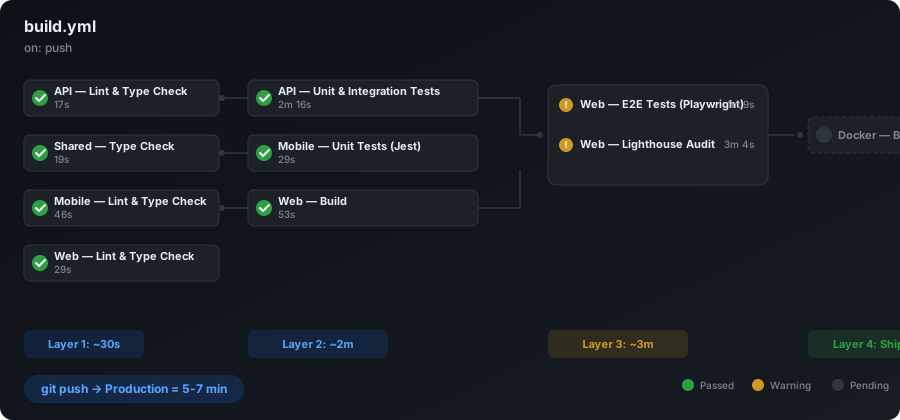
Every time someone runs git push, the pipeline starts automatically and runs the required verification jobs based on a dependency graph.
Layer 1: Fast Feedback in Under a Minute
The first layer is all about speed. The goal is simple: tell the developer as quickly as possible if the push is obviously broken.
| Job |
Time |
What it checks |
| API — Lint & Type Check |
~17s |
Backend structure, types, and code standards |
| Shared — Type Check |
~19s |
Contracts and shared code used by every app |
| Web — Lint & Type Check |
~29s |
Frontend structure, types, and standards |
| Mobile — Lint & Type Check |
~46s |
Mobile code structure and type health |
These four jobs run at the same time.
That matters because if a type breaks or lint fails, the team hears about it in under a minute. There is no reason to spend extra compute time running deeper tests on code that already failed the first sanity check.
This first layer is especially important with AI coding. AI often creates code that looks fine inside one file but does not line up with what the rest of the system expects. Type checks catch that kind of mismatch before a reviewer wastes time reading the PR.
Layer 2: Deeper Verification
Once the fast checks pass, the pipeline moves to deeper verification:
| Job |
Time |
What it checks |
Dependencies |
| API — Unit & Integration Tests |
~2m 16s |
Business logic, endpoints, and database behavior |
Waits for API lint/type to pass |
| Mobile — Unit Tests (Jest) |
~29s |
Components and app logic on mobile |
Waits for Shared type check |
| Web — Build |
~53s |
Production compilation for the web app |
Waits for mobile lint/type in this pipeline design |
One important detail here: the API test layer includes real integration tests against a real database, not just mocks.
That choice matters because some of the worst failures do not show up inside isolated code. They show up at the seam between the code, the database, and the service contract.
Layer 3: User Experience Verification
The last layer before shipping checks the product the way a user would experience it:
| Job |
Time |
What it checks |
| Web — E2E Tests (Playwright) |
~1m 9s |
Real browser flows, clicks, forms, and page behavior |
| Web — Lighthouse Audit |
~3m 4s |
Performance, accessibility, SEO, and best practices |
Playwright E2E tests do not just confirm that a page renders. They walk through the product like a person would: opening a page, clicking through a flow, filling a form, and checking the result.
Lighthouse protects the performance side. AI can easily introduce a component or dependency that "works" but quietly slows the page down. This step catches that before the slowdown reaches production.
Layer 4: Ship It
| Job |
What it does |
| Docker — Build Images |
Builds the deployable container image for production |
Once the earlier layers pass, the image is built and the system is ready to ship.
In practice, the full path from git push to production takes around 5 to 7 minutes.
Why Parallel Execution Matters
If you ran every check one after another, the timeline would look more like this:
17s + 19s + 29s + 46s + 2m16s + 29s + 53s + 1m9s + 3m4s = about 9m 42s
With parallel execution based on real dependencies, the path becomes:
Layer 1 (~46s) → Layer 2 (~2m16s) → Layer 3 (~3m4s) → Layer 4 = about 6-7 minutes
That saves roughly 30% per push.
On paper, that may not sound dramatic. In a team that pushes 20 or 30 times a day, it adds up to hours saved every single day.
And the bigger win is not just wall-clock time. It is faster feedback.
If type checking fails at second 17, the developer knows at second 17. They do not have to wait 10 minutes to discover a mistake the first layer could have caught almost immediately.
What Changed in the Way We Work
Before This Infrastructure
- Developers finished code, opened a PR, and waited 1 to 2 days for review.
- After merge, deployment was manual.
- QA often happened afterward, which added another 1 to 2 days.
- Time to production was usually 3 to 5 working days.
- Production bugs slipped through several times each week.
- Friday deployments felt risky.
After This Infrastructure
- Developers finish code and push.
- The pipeline runs automatically.
- If every gate passes, the change goes live.
- Time to production drops to 5 to 7 minutes.
- Production regressions dropped by 80%+ because the system now checks the basics every single time.
- Deployments are no longer tied to a "safe day."
What Changes When AI Enters the Loop
Once developers start using AI heavily, the number of commits each day goes up fast. But every commit still has to pass the same pipeline.
That changes the work rhythm:
- AI helps write code faster, so developers push more often.
- The pipeline responds in seconds, so broken changes are fixed quickly.
- Every push goes through the same automated gates, so teams do not have to rely on gut feel.
- If AI generates a bad change, the pipeline stops it right away.
That turns the cycle of think → build → test → ship into something measured in minutes.
Five Design Principles That Made This Work
1. Fast Feedback Comes First
The quickest checks need to run first.
If type checking fails in 17 seconds, there is no good reason to spend another 3 minutes on E2E tests. This saves both developer time and compute cost.
2. Fail Fast, Fail Loud
When a step fails, the pipeline stops immediately.
The team should see something like "API Type Check failed at line 42", not a vague message that says only "Pipeline failed."
3. Parallel by Default, Sequential Only When Necessary
Jobs should run in parallel unless there is a clear dependency.
If one step does not need to wait for another, it should not. Sequential execution is a cost you should justify, not a default you inherit.
4. Test in Real Environments
Integration tests should hit real infrastructure where it matters. E2E tests should use a real browser where it matters.
The nastiest bugs usually hide at system boundaries, not inside neat little isolated functions.
5. Performance Is Part of the Product
Lighthouse is not a nice extra. It is part of the shipping gate.
If a change makes the product slower, that is still a production problem, even if the feature technically works.
What AI Coding Actually Needs from Infrastructure
After working with AI coding tools day to day, a few requirements stand out.
A Strict Type System
AI writes quickly, but it does not truly "understand the whole system" the way an experienced engineer does.
A strong type system becomes the safety net that catches bad assumptions across boundaries.
Broad Test Coverage
The more AI helps write code, the more tests matter.
That is not because AI is uniquely dangerous. It is because the volume of change goes up, and humans cannot realistically inspect every line at that speed.
Tests become the reviewer that never gets tired.
A Pipeline That Is Actually Fast
If the pipeline takes 30 minutes, developers batch large changes together. That makes debugging harder.
If the pipeline takes 5 minutes, developers are willing to push smaller changes more often. That makes debugging easier.
Pipeline speed shapes team behavior.
Shared Contracts in One Place
When AI can see the API, the web app, the mobile app, and the shared types together, it makes better suggestions.
When those pieces are split apart, it starts guessing. And cross-system guessing is where a lot of bad changes begin.
Is It Worth the Investment?
What It Costs
- Pipeline design time: about 2 to 3 weeks for the first version
- CI/CD compute cost: roughly 5 to 7 minutes of compute per push
- Ongoing maintenance: updates as dependencies, tests, and architecture evolve
What It Gives Back
- Time to production drops from days to minutes
- Production bugs go down sharply
- Developer confidence goes up, which means smaller and more frequent releases
- AI becomes more useful because speed is now matched by verification
- Code review becomes higher value because people can focus on logic and design instead of catching preventable mistakes
A Practical ROI View
Imagine a five-person team pushing around 20 times per day.
Before this setup, releases happen a few times a week. Features sit around. Feedback is slow.
After this setup, releases can happen continuously. Feedback arrives faster. Iteration tightens. Teams correct mistakes earlier and learn faster.
The biggest return is not just time saved.
It is confidence. Teams push more often because they trust the safety net underneath them.
What This Pipeline Still Will Not Solve
It Will Not Catch Every Bug
Pipelines are good at catching syntax issues, type mismatches, regressions, and performance drops.
They are not magic. A complicated business rule can still be wrong if the test suite never checks it. Human review still matters.
Tests Still Need Maintenance
Old tests can create false confidence.
If the product changes and the tests stop reflecting reality, the pipeline may still look healthy while checking the wrong thing.
A Slow Pipeline Trains the Wrong Habits
If the pipeline becomes slow, teams start batching large changes again. That leads to harder debugging, bigger merges, and more painful releases.
So one of the long-term jobs is simple: keep the pipeline fast.
The Bottom Line
AI does not replace infrastructure. It amplifies whatever is already there.
- If your infrastructure is strong, AI makes the team much faster.
- If your infrastructure is weak, AI makes the existing delivery problems show up faster and more often.
What Enersys learned from building this foundation is straightforward:
Spend a few weeks building the pipeline properly, and it pays you back every day after that.
If your team is starting to rely on AI for coding but still does not have a strong verification pipeline, start there first.
Because fast AI plus strict verification is what turns "we wrote the code" into "we shipped the product."
Want This Kind of Foundation Infrastructure for Your Team?
Whether you run a monorepo or multi-repo setup, whether your team has 3 people or 30, and whether you ship Web + API + Mobile or a larger microservices stack, the same principles apply.
Enersys has hands-on experience designing CI/CD pipelines and DevOps infrastructure for Thai organizations, from startups to enterprise teams.
Book a free consultation
Talk to the Enersys team