Imagine this: you clone a work project and wait 12 minutes for it to finish. Or on a Monday morning, you receive an email from GitHub saying the company’s API key has been exposed publicly — even though you deleted it last month.
These problems share the same root cause: Git keeps everything forever. BFG Repo-Cleaner is the tool that helps solve this problem quickly and safely.
Why Do Git Repositories Get "Bloated"?
Secrets and Credentials That Slip into History
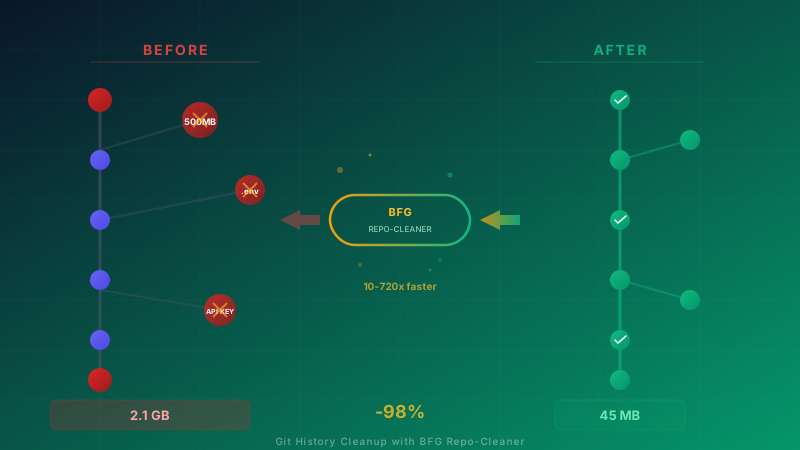
Every software team has faced this situation — an API key, .env file, database password, or private key gets committed by accident. What many people do not realize is that even if you delete those files and commit again, the original data still remains in Git history in full. Anyone with access to the repository can inspect old commits and see those secrets.
Large Files That Should Not Be in Git
Binary files, video files, high-resolution images, build artifacts, or even node_modules committed by mistake — these files were never meant to live in Git. Every time someone changes or adds these files, Git stores a new snapshot for that version.
History That Accumulates Over Time
A repository that started at 10MB can grow to 2GB within a few years because Git is designed to be append-only — every change is recorded and nothing is removed. Even if a file is "deleted" in the latest commit, all earlier versions still remain in Git’s database.
Why Isn’t Deleting a File and Committing Again Enough?
The answer lies in Git’s architecture — every commit is a complete snapshot of the project at a point in time. When you "delete" a file, you are only creating a new commit without that file. The original commit that contains it still remains in history forever. To truly remove data from Git, you must rewrite history — and that is exactly what BFG Repo-Cleaner is designed to do well.
What Is BFG Repo-Cleaner?
BFG Repo-Cleaner is an open-source tool created by Roberto Tyley to rewrite Git history quickly and safely. The name "BFG" is inspired by the powerful weapon in Doom — because it destroys Git repository problems just as quickly.
Exceptional Speed
BFG’s biggest advantage is speed — it is 10-720x faster than git filter-branch, based on official benchmark figures. In tests against the GCC repository with 148,495 commits, removing a single file with BFG took only 3.5 minutes, while git filter-branch took 8 hours — making BFG 135x faster.
Built with Scala/Java — Cross-platform
BFG is written in Scala and runs on the JVM, so it works on any platform that supports Java, including Windows, macOS, and Linux.
Designed for 2 Core Jobs
BFG does not try to do everything — it is purpose-built for the 2 most common tasks:
- Remove large files from all history
- Remove secrets and credentials from every commit they ever appeared in
This simplicity makes BFG much easier to use than other tools — no complex scripting, no deep understanding of Git internals required.
Common Real-World Use Cases
1. Leaked Credentials — When Secrets Slip into a Repository
A developer commits a .env file containing an API key, database password, or OAuth secret into the repository. Even if they notice and delete it in the next commit, the data is still discoverable in history. Anyone with repo access can inspect earlier commits and view those secrets. BFG removes this data from every commit in the history, not just HEAD.
2. Repo Bloat — Someone Committed a 500MB Video
A classic scenario — someone commits a 500MB demo video or uploads a large dataset two years ago. Even if the file was later deleted, everyone who clones the repository still has to download that 500MB of data every time. This makes cloning painfully slow, especially in environments with limited internet bandwidth.
3. Compliance — PDPA/GDPR Requires Personal Data Deletion
When personally identifiable information (PII) ends up in a repository — such as customer names, national ID numbers, or email addresses — Thailand’s PDPA and the EU’s GDPR require that data to be removed completely. Deleting it only from the latest commit is not enough. It must be removed from every commit in history for full compliance.
4. CI/CD Performance — Pipelines Slow Down Because the Repository Is Too Large
Every time a CI/CD pipeline runs, the system may need to clone the repository again. A 2GB repository slows down the clone step → slows down builds → slows down deployments → keeps the team waiting → reduces productivity. When pipelines run 20-50 times per day, the time lost during cloning adds up to hours every week.
5. Migration — Moving from Monorepo to Multi-repo
When an organization decides to split a monorepo into several smaller repositories, unrelated historical data often comes along too. This can leave each new repository almost as large as the original monorepo. BFG helps clean the history so only the relevant parts remain in each new repo.
6. Storage Costs — Git Hosting Charges for Storage
GitHub, GitLab, and Bitbucket all impose storage limits per repository and per organization. An unusually large repository may force you to upgrade your plan or pay extra storage fees. Cleaning up an oversized repository can directly reduce costs.
BFG vs git filter-branch vs git filter-repo
Choosing the right tool for Git history cleanup matters. Each tool has different strengths and limitations.
Comparison Table
| Criteria |
BFG Repo-Cleaner |
git filter-branch |
git filter-repo |
| Speed |
Very fast (10-720x faster than filter-branch) |
Very slow |
Fast |
| Ease of use |
Very easy — designed for 2 specific jobs |
Difficult — requires Git internals knowledge |
Moderate |
| Safety |
High — does not touch the HEAD commit |
Low — can corrupt the repo |
High |
| Flexibility |
Limited — removes large files/secrets |
Very high — can do almost anything |
High |
| Current status |
Active (maintained) |
Deprecated (not recommended by Git) |
Active — officially recommended by Git |
| Language |
Scala (JVM) |
Shell script |
Python |
Why Is BFG Faster?
The difference comes down to architecture — git filter-branch works sequentially, walking the file hierarchy of every commit one by one. That approach is extremely inefficient for tasks that only need to remove a few files.
BFG uses Git’s unique object identification system to identify files and folders, then processes each item only once. Combined with multi-core parallel processing that fully utilizes the CPU, it can be dozens to hundreds of times faster.
When Should You Use Which Tool?
- BFG Repo-Cleaner — best when you need to remove large files or secrets from history. It is easy to use, fast, and safe.
- git filter-repo — best for more complex history rewriting tasks such as changing author names, extracting a subdirectory into a new repository, or restructuring paths across the entire history. The Git project officially recommends it as a replacement for filter-branch.
- git filter-branch — no longer recommended. The Git documentation itself warns about many gotchas that can corrupt a repository.
A Safe Process for Git History Cleanup
Rewriting Git history must be done carefully because the impact affects everyone on the team. This is the methodology we use when helping clients perform a cleanup:
Step 1: Always Back Up First
Before doing anything else, create a full backup of the repository somewhere else — whether as a bare clone, a zip file, or a mirror on another remote. There is no easy way back if a rewrite goes wrong — this is the first rule and must be followed every time.
Step 2: Analyze What Is Making the Repository Large
Before deleting anything, understand what is making the repo bloated. Analysis tools help identify which files consume the most storage across history. This information helps you plan what to remove and estimate the expected outcome.
Step 3: Plan What Will Be Removed
Create a clear list of which files will be removed, define file size thresholds (for example, remove every file larger than 10MB), and identify secret patterns that must be purged. Good planning prevents accidental deletion of things that should remain.
Step 4: Work in a Separate Clone
Do not work directly on the live repository. Clone it into a separate copy so you can verify the results before pushing anything back.
Step 5: Validate the Results
After the cleanup is complete, verify that:
- The repository size has decreased as expected
- No files or secrets targeted for removal remain
- The project still builds and runs normally
- The history still makes sense
Step 6: Force Push — Coordinate with the Team First
This is the most dangerous step. A force push changes the history of the entire remote repository. Everyone on the team must be notified in advance, any in-progress work should be saved, and a clear schedule should be set for when the change will happen — ideally during off-hours, such as Friday evening or a holiday.
Step 7: Everyone Must Re-clone
After the force push, do not continue using old local repositories. Everyone on the team must clone the repository again because existing local copies no longer match the remote history. Attempting to pull will create problems.
Step 8: Rotate Leaked Secrets
Critically important — BFG removes secrets from Git history, but that does not mean those secrets are safe. Someone may already have cloned the repo, or GitHub/GitLab may still cache old commits. You must rotate every leaked secret immediately — change API keys, change passwords, revoke old tokens.
Real Numbers — Results from Cleanup
These are the kinds of outcomes we have seen in real Git repository cleanup projects:
Repository Size
| Metric |
Before Cleanup |
After Cleanup |
Improvement |
| Repository size |
2.1 GB |
45 MB |
98% smaller |
| Object count |
850,000+ |
120,000 |
86% reduction |
| Pack file size |
1.8 GB |
38 MB |
98% reduction |
Performance
| Metric |
Before Cleanup |
After Cleanup |
Improvement |
| Clone time |
12 minutes |
8 seconds |
90x faster |
| CI/CD pipeline (clone step) |
5 minutes |
12 seconds |
3-5 minutes saved per build |
| git fetch |
45 seconds |
2 seconds |
22x faster |
| git status |
3 seconds |
< 1 second |
3x faster |
Business Impact
- CI/CD savings: If a team runs pipelines 30 times/day and clone time drops by 4 minutes/run = 2 hours/day saved = 40 hours/month
- Developer productivity: No more waiting for long clones, so work starts faster immediately
- Storage costs: Lower hosting costs from eliminating unnecessary repository size
- Onboarding: New developers can clone the project in seconds instead of waiting 12 minutes
Critical Risks to Understand Before Cleanup
Force Push Permanently Changes History
Once you force push, all commit hashes change, which means:
- Everyone on the team must re-clone
- Open pull requests will show incorrect diffs
- Links to old commits will no longer work
- PR comments referencing old commits may disappear
Protected Branches May Block Force Push
Many organizations enable branch protection rules that prevent force pushes to main/master. You may need to temporarily disable protection, perform the force push, and then re-enable it — which requires admin privileges.
Leaked Secrets May Already Have Been Copied
BFG can remove secrets from Git history, but it cannot remove them from everywhere else. Anyone who cloned the repository while those secrets were still present already has a copy on their machine. Therefore, you must rotate secrets every time, with no exceptions.
GitHub/GitLab Caching
Even after secrets are removed from the repository, GitHub and GitLab may cache old commits for some time. You may need to contact your hosting provider’s support team to request cache removal for old commits — especially on GitHub, where an old commit may still be accessible via direct URL even if it no longer appears in history.
Forked Repositories
If the repository has forks, the commits containing secrets may still exist in those forks. You must coordinate with fork owners to delete them or recreate the forks from the cleaned repository.
Best Practices — Prevent the Problem from the Start
Repository cleanup is a reactive fix. The best approach is to prevent the problem from happening in the first place.
A Comprehensive .gitignore
A strong .gitignore file is your first line of defense. It should cover every file that should never enter Git — including environment files, build outputs, IDE configs, binary files, and dependency directories. Review .gitignore regularly and use GitHub templates as a starting point.
Git Hooks for Secret Detection
Install pre-commit hooks that scan for secret patterns before allowing a commit. If a hook detects an API key, password, or private key, it can block the commit immediately — providing automatic protection without relying solely on individual developer discipline.
Git LFS for Large Files
If the project genuinely needs large files, such as game assets, design files, or datasets, use Git Large File Storage (LFS). It stores large files separately from the main repository while Git keeps only lightweight pointers in the repo.
Secret Scanning Tools
Automated secret scanning tools such as GitHub Secret Scanning, GitLeaks, or TruffleHog can inspect the entire repository — including history — for exposed secrets. Some tools can run as part of CI/CD and automatically check every new commit.
Thorough Code Review
Code review should not focus only on logic. It should also check whether any files in the commit do not belong there, whether .gitignore has been updated appropriately, and whether hardcoded credentials are hidden in configuration files.
CI/CD Shallow Clone
For CI/CD pipelines that do not need full history, use shallow clone (cloning only the latest few commits) to reduce clone time regardless of repository size. This does not solve repository bloat, but it can immediately reduce the impact on pipeline performance.
How Can Enersys Help?
The Enersys team has experience helping organizations manage Git repository issues, including:
- Git Repository Audit — analyze repositories to identify large files, leaked secrets, and other issues
- History Cleanup — plan and execute cleanup safely using a proven process
- DevOps Consulting — implement preventive controls such as Git hooks, secret scanning, and CI/CD optimization to avoid repeat issues
- Security Assessment — assess which repositories across the organization may contain exposed secrets
If your repository is too large, cloning is too slow, or you are concerned that credentials may still exist somewhere in history — contact us for a consultation
Resources