AI & Technology

Claude Design Is Here — Anthropic's Prompt-to-Prototype Tool That Lets Non-Designers Ship, and Tanked Figma Stock the Same Day

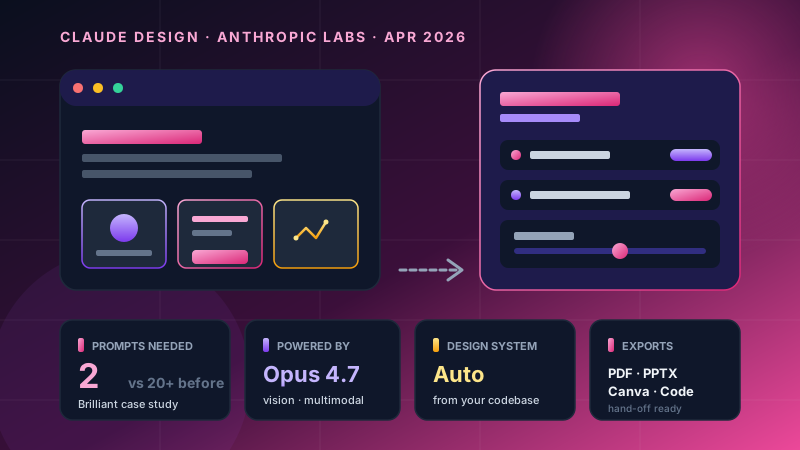
On April 17, 2026, Anthropic launched Claude Design, powered by Opus 4.7. It reads your codebase to auto-build a design system, turns prompts into working prototypes, and hands off to Claude Code for production. Real numbers from Brilliant: complex pages dropped from 20+ prompts to just 2. This is a practical guide to what works, what doesn't, and who should use it.

20 Apr 202613 min
Claude DesignAnthropicDesign ToolsPrototypingAI DesignFigma AlternativeProduct Design

Quick summary first

On April 17, 2026, Anthropic launched Claude Design under a new brand called Anthropic Labs.

The core idea: type a prompt → get a working prototype, slide deck, landing page, or one-pager — not just an image.

Why the design tool market is shaking:

  • Powered by Claude Opus 4.7 (a new model with vision capabilities)
  • Reads your own codebase and auto-builds a design system — colors, typography, components
  • Refines work with AI-generated custom sliders instead of re-prompting every time
  • Has a web capture tool that pulls real elements from live sites so prototypes feel real
  • Exports a hand-off bundle that Claude Code can implement directly
  • A real user from Brilliant said: complex pages that used to take "20+ prompts in other tools" → done in just 2 prompts

And on the same day Anthropic announced — Figma stock dropped. The market read this as a serious new competitor.

This isn't hype writing. It's a practical guide to a new tool for people who need to decide: use it, try it, or wait and see.


The day Figma stock dropped and the design tool market shifted

One day before launch, TechCrunch reported that Anthropic's CPO had left Figma's board following reports that Anthropic was about to ship a competing product.

The next day — April 17 — Anthropic announced Claude Design.

Market reaction:

  • Figma stock dropped the same day
  • VentureBeat headline literally said "challenges Figma"
  • 9to5Mac, Engadget, TechCrunch all ran it as headline news

Anthropic itself tried to position the product as "complementary to Canva, not a competitor" — but analysts saw Claude Design as a Figma alternative for prototyping and presentation work.

The bigger signal isn't the stock dip: it's that the design tool market is being rewritten with AI at the core — not as a feature bolted onto existing tools, but as a new generation of tools where AI is the foundation.

For broader context — around the same window, Anthropic was being valued at $800B+, signaling the market believes Anthropic is becoming much more than "the AI chat company."


What is Claude Design — short version

Three lines:

  1. Prompt-to-prototype — type what you want, get a working artifact
  2. Codebase-aware — reads your own design system and reuses it across projects
  3. End-to-end workflow — design in Claude Design → hand off to Claude Code → production

Current status: Research Preview. Available to Claude Pro, Max, Team, and Enterprise subscribers.

Note for Enterprise: disabled by default — admins must activate it (good news for governance).

What you can build:

  • Static designs and slide decks
  • Interactive prototypes you can actually click through
  • One-pagers, marketing collateral, landing pages
  • Code-powered prototypes with voice, video, shaders, 3D, and built-in AI

Inputs supported:

  • Text prompt
  • Image upload
  • Documents: DOCX, PPTX, XLSX
  • Codebase reference
  • Web capture (this one matters — explained below)

Why it's different from Figma or Canva

Let me draw clean lines:

Figma = mature design tool — precision controls, layer management, a huge plugin ecosystem. Requires real design skill to use well. Built for designers.

Canva = template-based — built so non-designers can produce things. But no codebase awareness, no engineer hand-off.

Claude Design = AI native — designed from day one with AI as the core. Reads your design system, produces on-brand work immediately, hands off to Claude Code.

The real difference isn't "it has AI" — Figma already has Figma Make and Canva has Magic Studio.

The real difference is codebase awareness and end-to-end workflow. Claude Design doesn't think of itself as "a design tool with AI" — it thinks of itself as "an AI assistant that can do design."

That framing changes the whole UX. Instead of opening a blank canvas and dragging components, you describe what you want and the system handles the rest.


5 most interesting capabilities

1. Auto-built design system from your codebase

Normally when you start a new project in Figma or Canva, you set up:

  • Brand color palette
  • Typography scale
  • Component library
  • Spacing tokens

Claude Design does this at first onboarding — you connect your codebase and upload old design files, and the system reads them and generates your design system automatically.

Every project after that — output is on-brand without you having to repeat yourself.

You can also maintain multiple design systems in parallel — useful if you handle multiple brands or work for multiple clients.

This is something Figma can do but requires manual setup, and Canva can't really do at all.

2. AI-generated custom sliders

The smartest feature in my view:

After generating a design, the AI analyzes the elements and creates sliders specifically for that work, like:

  • A slider to adjust "logo size"
  • A slider for "card spacing"
  • A slider for "accent color brightness"

Drag them around → see the change live. No need to write a new prompt every time.

This solves the classic AI design tool pain — it usually takes ten prompts to land on something you actually like. Claude Design fixes this with direct manipulation on the elements the AI itself chose to expose.

3. Web capture — pull in the real thing

A great feature for prototypes that need to be shown to clients or used as demos:

Capture elements from real websites into your design — a client's header, a table from an old dashboard, a component from an inspiration site.

The result is a prototype that looks like the real product, not a dry mockup. When you present to stakeholders, it feels much closer to the final outcome than a wireframe ever would.

4. Hand-off to Claude Code

This is where the workflow really differs:

Finish a design in Claude Design → export a hand-off bundle → throw it at Claude Code → get production-ready code.

No more designer-to-engineer hand-off documents. No more sitting around documenting specs component by component.

For teams already on Claude Code, this connects both ends of the workflow — design and code live in the same ecosystem.

5. Multi-format export

Destinations you can choose:

  • PDF — for client delivery or archives
  • Public URL — share instantly
  • PPTX — for the PowerPoint crowd
  • Canva — keep editing collaboratively in Canva
  • Standalone HTML — host it yourself
  • Hand-off bundle — feed to Claude Code

Worth noting: the Canva integration is what Anthropic means by "complementary, not competitor" — design fast in Claude Design, then hand off to your marketing team to refine in Canva.


The real number: 20 prompts → 2 prompts

The number Anthropic highlighted at launch came from Brilliant (the well-known learning app):

Complex pages that used to take "20+ prompts in other tools" → done in Claude Design with just 2 prompts.

Why this fast? Three reasons I can extract:

  1. Opus 4.7 vision — understands image context and component layout much better than previous versions
  2. Design system context — you don't need to repeat "use this font, this color, this spacing" — the system already knows
  3. Custom sliders + inline edit — you refine after the first prompt without prompting again

This isn't a synthetic benchmark — it's a real user case study. And that's the threshold that says this tool has crossed from "interesting toy" into "actually usable for work."

Who uses it how — practical guide

Based on Anthropic's positioning plus observed use cases:

Founder/CEO

  • Pitch deck in 30 minutes (instead of 3 days) — feed in an outline, get full slides on-brand
  • Investor one-pager from meeting notes
  • Wireframe of a new feature to share with the team for early input
  • Less dependency on designers for internal presentations

Product Manager

  • Feature flow from PRD → hand off to engineering immediately
  • Stakeholder presentations that look professional without bothering the design team
  • A/B test variant designs — multiple versions in minutes
  • User journey maps with mockups attached

Designer

This is the honest part: Claude Design isn't a "replacement" for designers — it's an "accelerator"

  • Static mockup → interactive prototype the client can actually click
  • Explore design directions 5-10x faster than by hand
  • Focus on design strategy and system-level work — let AI handle execution detail
  • Use it for early ideation that you'd normally throw away anyway

Designers who adapt get stronger. Designers stuck on "pixel pushing" will struggle.

Marketer

  • Landing page mockups for new campaigns
  • Campaign visuals with multiple variants for testing
  • Social media templates that follow brand guidelines automatically
  • Hand off to Canva for the team to use

Software House (like Enersys)

Speaking from our own seat:

  • Custom-per-client sales presentations — every client gets a deck specific to their needs, not a template with the name swapped
  • Quick prototypes for proposals — show a mockup before signing the contract
  • Internal tool UI without hiring a designer
  • Hand off to Claude Code → production code in the same sprint

For Odoo customization work — generate UI mockups of new forms/views before development to reduce friction in client approval.


What it isn't great at yet (being honest)

To be credible, I need to talk about limits, not just features:

  1. Pixel-perfect production design — Figma still wins on precision and the wider plugin ecosystem. For enterprise design system work that demands pixel accuracy, this isn't it yet.
  2. Complex animation/motion — Motion design is limited. If you need keyframe-level control, After Effects or Rive is better.
  3. Deep brand identity — Logo design, brand books, brand voice — still humans only.
  4. Multi-page complex apps — For product design with 50+ tightly consistent screens, Figma + a designer still manages it more systematically.
  5. Offline work — Always online. Doesn't work on a plane or in low-signal areas.
  6. Research preview — Features may change, breaking changes possible before GA.

The right framing: a great tool for exploration, prototyping, presentation — not a replacement for Figma in pixel-perfect production work.


How to start

For people who want to try:

  1. Subscribe to Claude Pro or Max ($20-100/month) or use your company's Team/Enterprise plan
  2. Go to claude.ai and enter Claude Design mode
  3. Onboarding: connect your codebase + upload design files to build your design system
  4. First prompt — start small. Something like "make a landing page for X"
  5. Use sliders/inline edit to refine — don't re-prompt every time
  6. Export to Canva or hand off to Claude Code

Tips from hands-on time:

  • Start with a simple project — a landing page or slide deck — not a multi-screen app
  • During onboarding, upload your real old design files so the design system is complete
  • Use web capture with client sites or inspiration you like — results feel closer to real than text prompts alone
  • Save prompts that work well — the patterns repeat across projects

Impact on the design industry

Broken down by stakeholder:

Figma

Has to accelerate AI features. Figma Make exists but doesn't go as deep on codebase integration as Claude Design. Figma's strengths are still the ecosystem, plugins, and large enterprise base — but the moat is being challenged.

Canva

The template market gets pressure from generative tools because users now create from prompts instead of editing templates. But Canva's collaboration and brand kits are strong. Anthropic choosing to partner with Canva (export to Canva) suggests the positioning will be co-existence, not direct competition.

Mid-level designers

Need to upskill toward strategy and system design. Pixel-pushing loses value. Understanding business problems, user research, and design system thinking gains value.

Junior designers

Some work is gone — throwaway mockups, slide design, simple landing pages — the kind of starter tasks juniors used to handle are becoming AI work. The path forward is learning AI orchestration quickly and focusing on design judgment, user research, and accessibility — areas AI still doesn't handle well.

Non-designer founders/PMs

Get a new superpower — they can build at a level that previously required waiting on the design team. Removes a major bottleneck in early-stage validation.


For the Enersys team

Speaking as a software house focused on Odoo, Enterprise AI, and data privacy:

What changes for us:

  • Faster prototyping = faster client validation = better fit during proposal and scoping
  • Combined with Claude Code: design → code → deploy in one workflow, dramatically shortening time-to-demo
  • For Odoo customizations: rapid UI mockups for client approval before development starts — fewer rework cycles
  • Sales materials: per-client decks ready in minutes instead of recycling one template across all prospects

What doesn't change:

  • We don't "replace" designers — we work with them differently
  • Understanding the client's business problem is still where AI doesn't substitute for humans
  • Designing the system architecture for an Odoo customization still needs people who understand both business and tech stack

The thing to watch out for: clients who see fast mockups may expect dev to be just as fast — the conversation about expectations needs to be clear that prototype ≠ production.


Wrap up

Claude Design isn't just "another AI design tool" — it's the signal that a new generation of design tools is being built with AI at the foundation.

What's most interesting:

  1. Codebase-aware design system — solves a pain point other design tools haven't
  2. Custom sliders + inline edit — fixes the "20 prompts to get it right" problem with direct manipulation
  3. Hand-off to Claude Code — design-to-code workflow lives in one ecosystem
  4. 2 prompts vs 20+ — the Brilliant number is a tangible productivity gain

Who should try it: anyone who does design, prototyping, or presentation work often — even non-designers.

Who can wait: teams doing pixel-perfect production design or teams whose workflow is deeply tied to Figma plugins.

The bigger picture: AI isn't just adding features to old tools — it's redefining what tools should look like. Claude Design is a live case study of that shift.

At Enersys we believe teams that adopt AI-native workflows will gain serious leverage in the next 12-18 months — and trying new tools while they're still in research preview is the best way to understand how they reshape your work.

If your team is thinking about AI integration in your design/dev workflow or wants to talk through Enterprise AI adoption strategy — let's chat.


Sources

"Empowering Innovation,
Transforming Futures."

ติดต่อเราเพื่อทำให้โปรเจกต์ของคุณเป็นจริง